🏆 Challenge of the Week
This week, your challenge is to share an example that shows how accordion interactions can be used to present frequently asked questions in e-learning courses.

What are accordion interactions?
Accordions are kind of like tabs, in that both are great for breaking up big chunks of content into bite-sized pieces your learners can click through. But, as you’ll see, there are a few important ways they’re different.
With tabs, you’ve got your buttons (the tabs) sitting in one spot on the slide, nice and predictable. Accordions, on the other hand, use panels that expand and collapse, so you can tuck content away until you’re ready to show it off.
Tabs are usually a bit easier to build, since the buttons and content stay put no matter which one you click. Accordions are a little more advanced—they take a bit more planning, since the panels move around and you have to think about where everything goes.
Are these interactions difficult to build in Storyline 360?
Just like with most things in Storyline, there’s more than one way to build an accordion. If you’re just starting out, you can stick with the basics (states, layers, and triggers) to make a simple click-and-reveal accordion. If you’re feeling a bit more adventurous, you can work with variables and motion paths to design animated accordions.
To give you a feel for the some common ways to build accordions, check out the examples below:
Alison Sollars
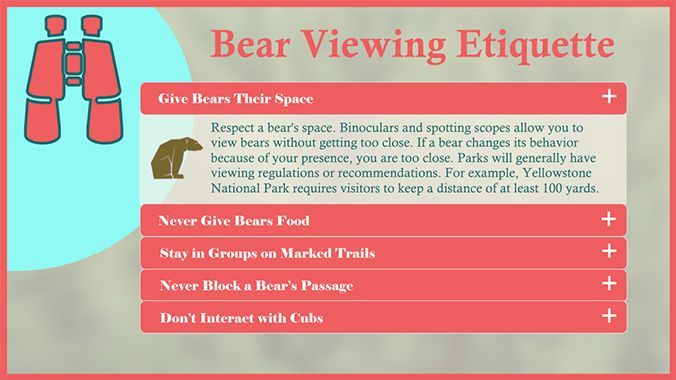
Example | Alison Sollars | Website
Karin Lorbeck

Example | Download | Karin Lorbeck
Larry van wave
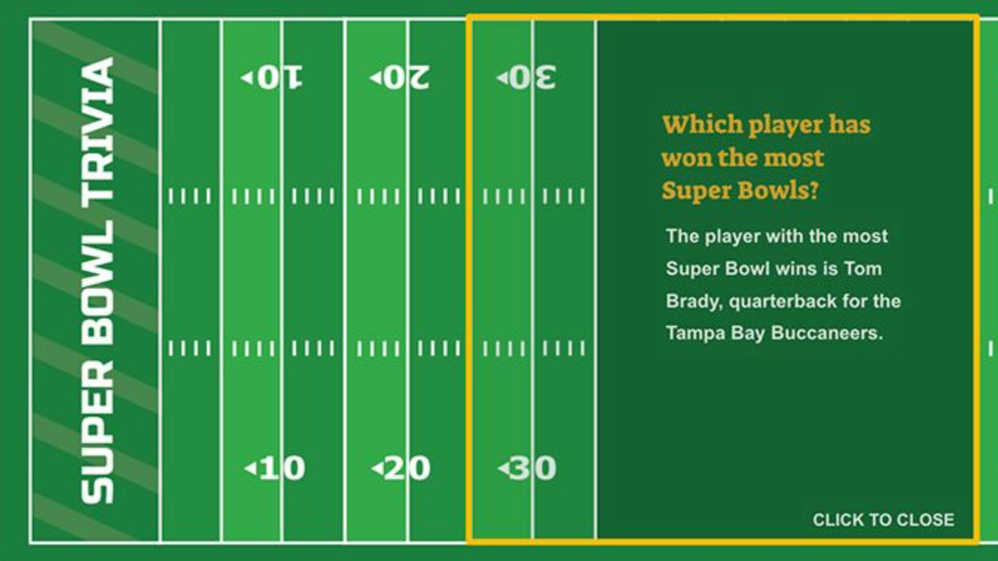
Example | Larry van wave | Website
🙌 Share Your E-Learning Work
You put in the effort, now make sure your work gets seen:
- Personal blog: If you have a blog, please write about your example from this week’s challenge and share the link with your submission.
- Social media: Please share your examples on LinkedIn and mention both David & Articulate using the #ElearningChallenge tags so we can help promote your work.
- Support your peers: With the new submission format, you can comment directly on each example. Try leaving helpful feedback on at least three projects this week.
- Community forums: Feel free to cross-post in the forums to give your work even more visibility.
🙌 Last Week’s Challenge:
Before you get started on this week's accordion challenge, check out the interactive meet-the-team examples your fellow challengeres shared over the past week:

Team Member Introductions in E-Learning #543: Challenge | Recap
👋 New to the E-Learning Challenges?
The weekly e-learning challenges are ongoing opportunities to learn, share, and build your e-learning portfolios. You can jump into any or all of the previous challenges anytime you want. I’ll update the recap posts to include your demos.
Learn more about the challenges in this Q&A post and why and how to participate in this helpful article.
