Forum Discussion

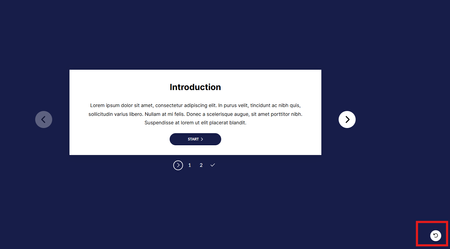
Remove Rise microlearning restart button
- 8 months ago
Nisha, I think you found a bug! Note this only happens under this criteria:
- Microlearning course
- Use only one block
- Hide cover page during publish/export
Here's the CSS I came up with, and as shown in the screen recording I added this directly to index.html
<style>
/* hide 'next buttons' including restart button for a single-block microlearning course */

#app .lesson-one-page-slides__next-btns {
  display: none;
}
</style>
Screen recording:

Nisha, I think you found a bug! Note this only happens under this criteria:
- Microlearning course
- Use only one block
- Hide cover page during publish/export
Here's the CSS I came up with, and as shown in the screen recording I added this directly to index.html
<style>
/* hide 'next buttons' including restart button for a single-block microlearning course */

#app .lesson-one-page-slides__next-btns {
  display: none;
}
</style>
Screen recording:

Hello NishaAtkins and PhilFoss,
I want to confirm that this is expected behavior in a Rise 360 Microlearning, even when you remove the Cover Page and include only one block. I understand that the ability to toggle this restart button on or off would be helpful in these instances where content doesn't need to be refreshed. We've shared your insight with the product team. We'll be sure to share any future updates in this thread so everyone stays in the loop.
Thanks for helping make Rise 360 even better!
- PhilMayor8 months agoLegend
I would say that was a bug, if you add a single text box there would be nothing to reset.
- PhilFoss8 months agoCommunity Member
I agree, based on the pagination dots are smart enough to hide themselves when there is nothing to click to, the restart button should also hide itself when there is nothing to click to. To a user this button appears to be broken.
- NishaAtkins7 months agoCommunity Member
LucianaPiazza Thank you for passing on the feedback.
- randykepple1 hour agoCommunity Member
This has been an issue for me as well recently with a batch of compliance courses. There are formative "Check Your Understanding" quizzes as you progress through the course and they are set to not allow the learner to advance unless they are answered correctly and are set to allow multiple attempts. The "replay" button at the end has caused issues for a number of people. There should be a way to toggle this button on/off without having to resort to custom coding in my opinion. :)
Thanks!


Related Content
- 1 month ago