Forum Discussion

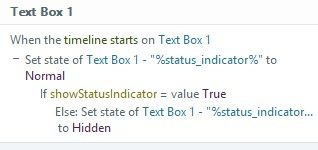
Storyline 360 when timeline starts on object
- 5 months ago
If you change to timeline start of the slide rather tahn the object that it will work as you intended.


I have a distant memory of maybe noticing this changeover, I'm not sure, though I also recall finding the way it is now to be more intuitive. The reason is because while the timeline may technically reach the entry point of an asset on the timeline, I'm of the mind (and this explains the changeover) that if the object is hidden, then it doesn't have a practical entry point from which to invoke the "When the timeline starts on Text Box 1" trigger.
I can see it both ways so I'm not disagreeing with you, and there's no reason in the physical universe the program cannot be made to still trigger even if the object is hidden, but I'm very certain this isn't a bug so much as a correction, though I can't speak from the perspective of the development team.
I think the easiest solution is to set the initial state of the textbox to Normal and simply invert the trigger: to hide Text Box 1 when the timeline starts on Text Box 1 if the showIndicator = False. The hiding is instant, avoiding any "blip" of a Normal object momentarily rendering before being hidden by the trigger, so the effect is the same as what you desire, but it seems the Hidden initial state is not compatible with the trigger that checks when the object enters the scene.
Related Content
- 27 days ago