Forum Discussion

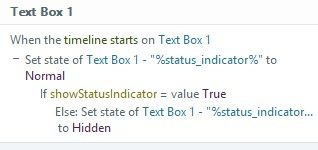
Storyline 360 when timeline starts on object
- 5 months ago
If you change to timeline start of the slide rather tahn the object that it will work as you intended.


Ah yes, I see. This is the expected behaviour. As the element is hidden, it's timeline does not start. You would have to have the default state as Normal for this behaviour to work.
Hidden = Object timeline does not run.
Normal = Object timeline runs.
It is safe to use the method of having the object's state as Normal. You will not see a flash of the object. The only thing you will need to look out for is if you use the property "Resume saved state" on the slide. If the saved state is Hidden, the trigger will no longer act on the object, and so you would either "Reset to initial" or add a trigger to always reset the object to Normal start at the start of the slide so that you know the trigger will always run.
- PhilMayor5 months agoLegend
Agree with Sam, object is hidden so its timeline has not started yet
Related Content
- 27 days ago