3d-visualization
2 TopicsPop Out by Using Grow Animation
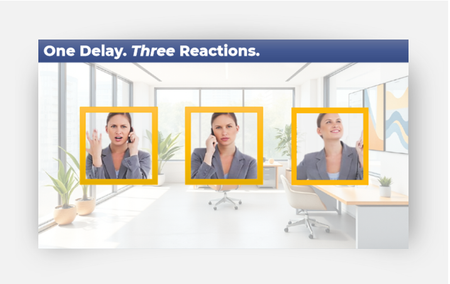
Thanks for this interesting challenge! It made me pause for a second — maybe this is more than just a fun visual idea. When a character steps out of their frame, it shifts how we look at the whole scene. And maybe that shift helps us think differently, too. There’s a study by Parong & Mayer (2018) that showed we learn better when things are presented in 3D or spatial formats. Our brains seem to respond well when something feels more physical or “in the room” with us. It actually reminds me a bit of how VR works — creating the feeling that you're in the content rather than just looking at it. Of course, this is much simpler — no goggles needed — but maybe it taps into the same effect. Here is my attempt to break out of the frame: One Delay. Three Reactions. Download3D MacBook Pro Short Product Tour
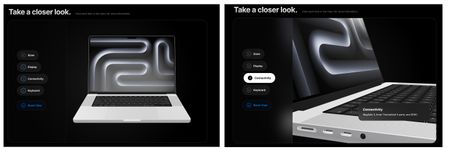
MacBook Pro Short Product Tour Review Link --- Inspiration Apple’s design philosophy has always been a major inspiration for me. Their ability to balance minimalism with high-performance functionality is something I wanted to capture in this short interactive product tour. I wanted to create a digital experience that felt as premium as the hardware itself. This is my first time I have done a 3D model like this using code. --- Tools Building this required a blend of 3D assets and prompting: AI: I used Gemini and developed a prompt to architect the logic, refine the UI, and tackle complex CSS challenges. 3D Modeling: I used a high-fidelity 3D model of the MacBook Pro that I downloaded from https://sketchfab.com/. Infrastructure: To ensure fast loading and reliable delivery, I hosted the .glb 3D file on AWS (Amazon Web Services). --- Key Lessons Learned The biggest takeaway from this project was the "Desktop vs. Mobile" reality check. A layout that looks breathtaking on a large monitor can completely break on a handheld device. I learned that: Spatial Awareness Matters: On mobile, you have to fight for every pixel. I had to implement a custom "slow-scroll" script to ensure the model stayed in view when users interacted with the menu. Contextual UI: I had to write (and rewrite a lot 🙃) the prompt so that there was logic to move text overlays (like the Connectivity box) so they wouldn't block the very features (the ports) they were trying to describe. Iteration is Key: Design isn't "one and done." It’s a constant loop of tweaking, testing on different screens, and refining the code until it feels right everywhere. --- The HTML zip file is below.299Views5likes2Comments