graphic design
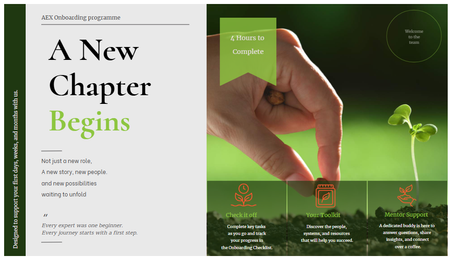
4 TopicsMagazine-inspired design for Onboarding course cover slide
Hi, this week challenge is so timing and inspiring to me, especially when it comes to renovating my onboarding programme. So I thought Why not give it a try! It was my first time to explore Custom Blocks, especially trying different Typo, shapes, lines and everything else. P/s: With this design I hope the onboarding experience to feel more like opening a digital editorial publication than a typical corporate training course. Would love to hear any room for development.Stop Designing Courses. Start Designing Performance. (Yes, I Made a Whole Magazine About It.)
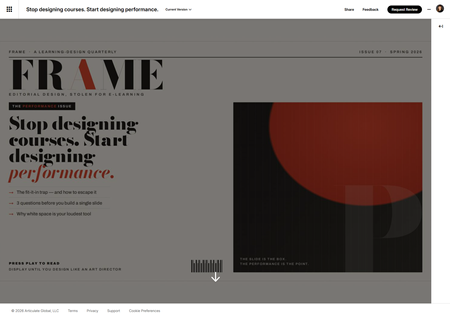
This week's challenge asked us to build a magazine-inspired layout for an e-learning course. A reasonable person reaches for a nice hero image, a pull quote, and calls it a day. I, apparently incapable of restraint, invented an entire fictional learning-design magazine — masthead, barcode, snooty cover price, the works — and then nearly lost a fistfight with my own cover image. Reader, meet FRAME. One magazine. One issue. Big opinions. FRAME has exactly one issue so far: The Performance Issue. And the cover story is, fittingly, "Stop designing courses. Start designing performance." Here's why that's not just a cute headline. The challenge quietly nails something I think about constantly: editorial design and performance design are the same move. The fit-it-in designer asks, "How do I cram all this onto the slide?" The art director asks, "What does the reader actually need to feel — and what's the one thing that matters most?" Swap "reader" for "learner" and that is the whole philosophy. So instead of slapping a magazine layout onto random content, I made the content about the thing the layout is demonstrating. The article practices what it preaches. Very normal, very healthy behavior on my part. The build (a.k.a. drop caps in an e-learning course) It's all running in a Rise Code Block — custom HTML, CSS, and JavaScript — with a real editorial type system doing the heavy lifting: Bodoni Moda for the dramatic, fashion-magazine masthead and headline Newsreader for the body copy (because magazines use serifs and we should be allowed to have nice things) Archivo for the kickers, labels, and page furniture Paper-and-vermilion palette. A proper drop cap. A pull quote sitting on a solid ink slab. A sidebar with "Three questions to ask before you build a single slide." A "By the Numbers" strip. I put a drop cap in an e-learning course, friends. We are officially through the looking glass. The cover that fought back The artwork was done. All I needed was the right size. Simple. Here is the complete, humbling timeline: Me, with total confidence: "It's 16:9." I did not look this up. I simply declared it. Claude — agreeable to a fault — went "sounds right!" and built it. Two professionals, vibing, zero sources between us. Beautiful, really. Then I actually Googled it. Google, with equal confidence, told me 1000 × 3000 — a portrait strip the proportions of a CVS receipt. (Reader, I had it backwards.) "Okay, 3000 × 1000 — a wide banner." We rebuilt the entire cover sideways to fit. It looked great. I felt productive and correct. Plot twist. At this point Claude finally checked Articulate's own docs, which calmly state that cover photos want… 16:9. My original, evidence-free guess. The one we abandoned to go chase a number Google was suspiciously sure about. We had traveled in a complete circle and ended up exactly where I started, just with more files. And Rise cropped it anyway. Because Rise dynamically crops covers, so no "correct" dimension was ever going to stop my masthead from quietly walking off-screen. The thing that actually won? I dropped the image onto a rectangle in PowerPoint, shrank it, centered it, exported a PNG. Fixed instantly. I have a whole interactive-design toolkit, and the hero of this story is a PowerPoint rectangle. I solved it like it's 2009. No notes. (I did later bake the padding in properly, so Future Me never has to do the PowerPoint Shuffle again — but the Shuffle is what got me to the deadline.) Did I use AI? Loudly, yes. I co-built this with Claude — the HTML/CSS/JS, the editorial copy, and yes, even the fake barcode. Credit where credit is due. It's a genuinely great way to go from "I have a weird idea about a fake magazine" to "the fake magazine is real and has a barcode" in an afternoon. The takeaway The information never changes. The packaging — and who you design it for — changes everything. FRAME, Issue 07. The Performance Issue. Newsstand price: press play. Display until you design like an art director. If you published a learning-design magazine, what's the cover story? 🏆 Stop Designing Courses. Start Designing Performance.Design Like an Art Director
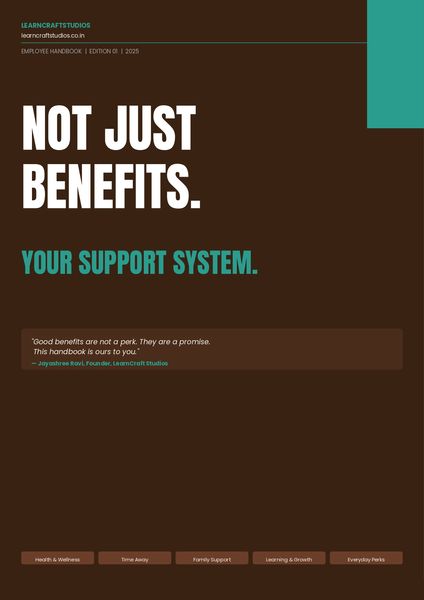
This week's challenge got me thinking about the contrast David set up so well, the fit-it-in mindset versus the editorial designer mindset. So I built both. Review here. The PDF is the fit-it-in version, a fully designed benefits employee handbook. Clean, structured, readable. This is available on the resources tab of the published file. A few Screenshots below. The art director's version takes the exact same content and reimagines it as a cinematic experience, where every frame carries one idea, typography does the heavy lifting, and nothing ever looks like a list. Would love to hear which approach you think lands harder.Visual Hierarchy
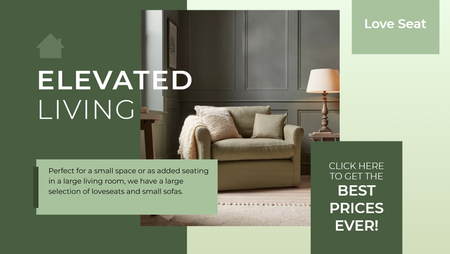
In this Storyline 360 example, I demonstrated the importance of by organizing content to guide learners' attention toward the most critical information first. Rather than presenting multiple concepts on a single slide, I broke the content into a series of focused slides, allowing learners to process information in manageable chunks. This approach reduces cognitive overload, improves clarity, and creates a more engaging learning experience by ensuring each element has a clear purpose and place within the overall design. View Below is an image of mailers that I receive and get lost in all the noise of too many items to look at.