Web object not showing
May 07, 2012

Hello everyone,
..I have tried to insert a web object into storyline and it does not work.
The web object is flash and bundled in a folder structure. To start it I have an index.html file and it works fine in my browser.
When I test the link the web object opens normally, however I have to tell my browser to start this potentially dangerous content.
When I than publish and start the WBT the page is empty and the web object not displayed.
Does this have to do with the security settings or is there anything I have to check?
Ah and by the way, when I than go into the source files of the course, I find the web object and can play it from there.
Any ideas or help?
Best regards,
Max
PS.: Storyline is awesome and I am really excited about the coming month of work because of it 
11 Replies
Hi Max & welcome to Heroes,
First, make sure that you're viewing your content in the environment in which it'll be used. Typically, this means upload your content & testing it there. This allows your browser to work as expected instead of with the restrictions of loading local content.
If you continue to have problems, see the link below for other solutions:
http://www.articulate.com/support/kb_article.php?product=st1&id=bdgxltu7pofp
Hi Brian,
thanks for the advice and the warm welcome. You were perfectly right It all runns on the LMS.
Thanks a lot!
I'm now having this same problem with web objects in Storyline but it doesn't appear to be any of the problems described in the article at Brian's link.
It seems that web objects magically stopped working for me in Storyline. Thanks in advance for your help.
Hey Joe,
I published your course to the Web. When I tried to open it in Chrome I got crickets. HOWEVER, when I opened it in IE, I got this below. I then added a slide with a different URL...try opening this file.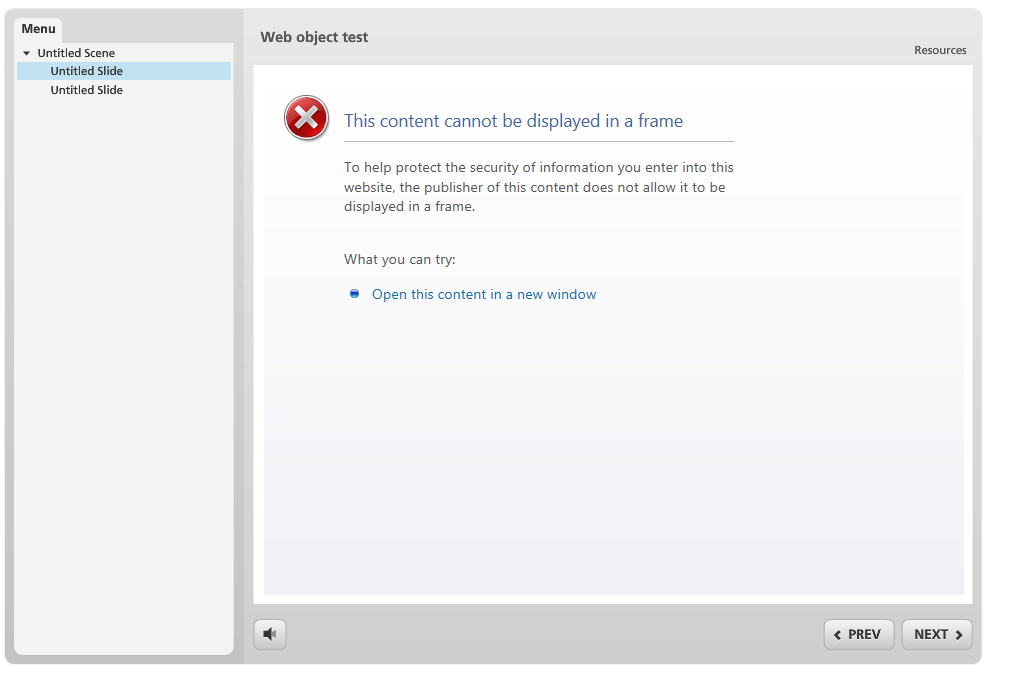
Tricia nailed it. Many websites like Google don't want their content in a frame. So, they change the "x-frame-options" tag to DENY to prevent that:
https://developer.mozilla.org/en-US/docs/The_X-FRAME-OPTIONS_response_header
Some browsers like Chrome will just display a blank page. Other browsers will actually give the end-user a reasonable error message.
Wow...I just got a "nailed it" from Brian! My day is complete and Elvis has left the building!
Thanks for the help guys. I think I've got it all figured out now. It was a combination of problems getting me. The first problem was that Google wasn't working in my tests. The next problem turned out to be caused by publishing to a network drive instead of locally on my computer. When I published locally, sites other than Google worked. Strange thing is with Presenter I'm able to publish to a network drive and web objects still work but not with Storyline.
HI Brian,
Was there a fix for the iframe/xframe issue? Is there a way to edit so x-frame work inside IE (default browser)
Web objects show up fine when outputted in CD-ROM format. The problem is Govt machines are locked down - so users can't run "exe"
Web objects don't show up in the presentation if outputted HTML5.
Which leaves me stuck regarding Web objects.
Thnx
Garry
Hi Garry,
As Brian mentioned it's an issue associated with the browser (such as Chrome) or the website, as you'll see in this Support article. In regards to the web object not loading in HTML5, you'll want to follow the steps here to fix it.
Hi Ash,
Thank you for this and the other responses
Cheers
Garry
Glad I could help Garry and please let us know if there is anything else you need.
This post was removed by the author
This discussion is closed. You can start a new discussion or contact Articulate Support.