Forum Discussion

New in Labs: Responsive Custom Blocks
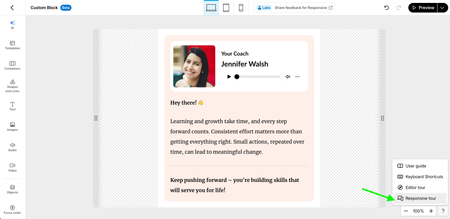

Hello Michelle_Eire,
Happy to help! Enabling Responsive Custom Blocks in Labs won’t convert any existing custom blocks to the new responsive format, so you won’t see the Containers option when editing one of those existing blocks.
Could you try creating a new custom block after enabling the experiment? Select Custom Block, then choose Blank or one of the responsive templates. That should open the responsive editor, where you’ll see Containers in the left sidebar.
If you’re already creating a brand-new responsive custom block and still don’t see Containers, let us know and we can take a closer look!

Hi LucianaPiazza I can confirm I was trying to add a new block. Screenshot attached.
- LucianaPiazza1 month agoStaff
Hi Michelle_Eire,
Thanks for confirming and for sharing the screenshot! It looks like you’re in the right place. From here, try these steps:
- Expand the Custom Block menu and click + Blank.
- A placeholder block will be added to your course. Click Create a Custom Block inside that placeholder.
- This will open the Custom Block editor.
- In the editor, click Containers in the left-hand menu.
You should then see the responsive container options available to add to your new custom block.
Let me know if you still don’t see Containers after following those steps!- Michelle_Eire1 month agoCommunity Member
Ah, thank you LucianaPiazza , I see now. Much appreciated.
- LucianaPiazza1 month agoStaff
You're very welcome, Michelle_Eire! Glad that helped.
Once you've had a chance to explore Responsive Custom Blocks, we'd love to hear what you think. Feel free to share your experience and feedback through our feedback form.