Forum Discussion
Cropping - Shadow
- 1 year ago
Hi Malvika,
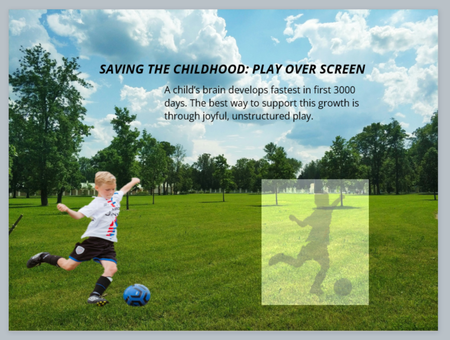
Is the boy with the ball is a separate image (.png) sitting on top of the background image?
Does PNG has a completely transparent background? I would probably edit it Photoshop first (or another graphic software) or just ask AI assistant (remove background / make a transparent background and insert it like this, and then, in Articulate itself, do the shadow settings. You can play with "distance" and "angle" (under "shadow options") to adjust it and make look natural.


For a quick and dirty approach, just select your image (boy with ball), copy it (CTRL-C), and duplicate it (SHIFT-CTRL-D). This will paste it directly on top of the original. While selected, go to Format, Adjust, Brightness, Picture Correction Options and drop the brightness to 0 (black). Now, set transparency to something like 77%. Resize the image with the side handles, shrinking the height by about half and the width slightly. Rotate it a little clockwise and shift it to the right a bit. Move the "shadow" image below the original in your timeline. Fine tune as needed.
More realistic adjustments like skewing, perspective resizing, and blurring could be added if done with an external tool like Photoshop or Krita, but you can get pretty close with just Storyline and it's more convenient to do basic adjustments in the application.
Related Content
- 1 year ago
- 10 years ago
- 2 years ago