Forum Discussion

Storyline Theme Builder
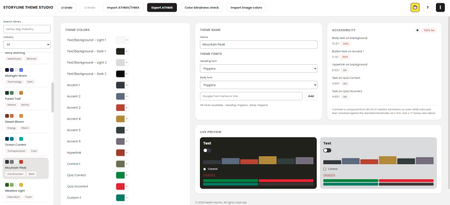

Love all the community inspiration and building blocks that led to you creating this Nedim! Thanks so much for sharing with the community! I can see this being a huge time-saver for teams that need to stay on-brand across multiple courses.
Have you used this with a real project yet? Would love to know how much time is saved you!
This application was originally developed in early 2025. At the time, it was much simpler than it is today. It didn't include the extensive feature set, design improvements, or workflow enhancements that exist now.
The original goal was to provide Instructional Designers with a lightweight local tool for creating Storyline themes, especially for those who didn't need to use Storyline as part of their day-to-day work. Rather than installing and opening Storyline just to create a theme for developers, they could generate the theme locally and export it as an .athmx file for developers to import directly into Storyline.
As I continued using the tool myself, it gradually evolved beyond that original purpose. I started creating Brand Kits and theme libraries for different clients, projects, and visual styles, organizing them by client name or design tone and saving them for future use. Before long, I had built a reusable library of themes that could be shared across individuals or entire teams.
That is when I realized the real value of the application. When you're working with multiple clients or creating several branded courses in a short period, recreating Storyline themes from scratch becomes repetitive and time-consuming. Instead of rebuilding each theme every time, you simply select an existing Brand Kit, generate a new theme, and export it. The tool essentially becomes a centralized theme management system rather than just a theme generator.
To summarize the key benefits:
- No manual selection of 16 theme colors — Generate a complete Storyline color palette from a single brand color or logo. The application automatically creates a balanced, accessibility-aware theme instead of manually choosing every swatch.
- No rebuilding brand assets for every project — Brand Kits store a client's colors, typography, and branding information once, allowing new Storyline themes to be generated instantly for future projects.
- No accessibility guesswork — Built-in contrast and color accessibility validation removes the need for separate manual accessibility checks.
- No importing into Storyline just to preview — Live previews display the theme applied to a realistic course interface before exporting, making it easy to validate the design without opening Storyline.
- No file conversion or manual editing — Export directly to ATHMX (and PowerPoint theme formats where needed), eliminating manual file preparation or modification.
The overall result is a significant productivity improvement. A process that typically takes 30–60 minutes or more: selecting colors, validating accessibility, creating the theme, and preparing the export, can be completed in just a few minutes. More importantly, once Brand Kits are established, that efficiency scales across an entire library of themes, making it especially valuable for freelancers, agencies, and teams managing multiple brands.
Related Content
- 1 year ago
- 3 months ago
- 10 years ago