accordion
14 TopicsChallenge #544: Brand Storytelling Accordion (Powered by AI & JS!) 🚀
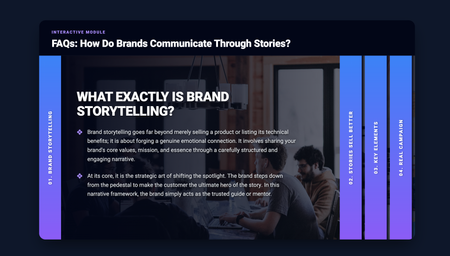
Hi everyone! 👋 Here is my entry for this week's Accordion Interactions challenge. For the content, I decided to focus on Brand Storytelling and how brands communicate through stories rather than just hard data. I thought it would be a valuable mini-lesson for anyone interested in marketing or instructional design. But the most exciting part for me was the behind-the-scenes creation process! Yesterday (March 24th), I had the opportunity to attend the "10 AI Assistant Capabilities You’re Missing & 10 Tips to Master them" event by David Anderson, which discussed the implementation of the AI Assistant in Articulate. Around the same time, I watched an excellent video tutorial by Learning Dojo titled "Building a Sliding Accordion with New Learning Prompts Tool". I felt so inspired that I decided to test out the prompts from prompts.learningdojo.app mentioned in the video, implementing them directly into the Articulate Storyline AI Assistant. To my surprise, it worked wonderfully! 🤯 The AI generated the structure for a fully functional HTML/CSS/JS accordion. I simply placed it inside an "Execute JavaScript" trigger when the timeline starts on a blank slide. Then, from my side as an instructional designer, I only had to tweak the CSS styles (giving it a clean design with a deep blue/purple gradient) and make a few minor adjustments to the code to structure the content into two levels and ensure the text fit perfectly. I think this is a fantastic tool and workflow for adding interactive and custom UI elements to our courses. AI keeps surprising me every day! You can check out my interaction here: Brand Storytelling Accordion Hope you like it! I'd love to read your feedback.Accordion FAQs
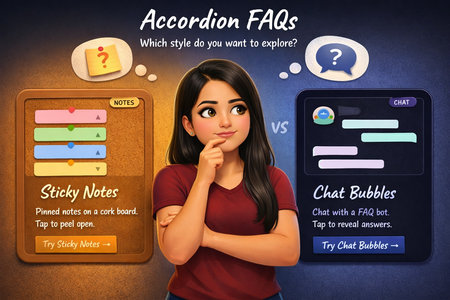
What if an accordion FAQ didn't have to look like one? For this week's challenge, I built two completely different takes. One is styled as sticky notes pinned on a corkboard, where each note peels open on click, and one is a chat conversation where tapping a question triggers a typing animation before the bot replies. Both in Storyline 360 on a 9:16 canvas, with a selection screen so you can pick which style to explore. Check it out here! Would love to connect on LinkedIn and exchange ideas!The South Africa Big 5
Hello! I'm currently sitting in Joburg Airport, waiting for my flight back to the UK after a terrific week in South Africa with New Leaf Technologies. After the Learning Indaba, I was very fortunate to spend some time with the team at Kwalata Game Lodge in Dinokeng Game Reserve. Inspired by that experience, here's my demo for this week's Accordion Challenge. This demo uses JavaScript to 'shuffle' the five parts of the accordion, reordering their z-index positions, so that the selected part always appears beneath the other four. var player = GetPlayer(); var animalValue = player.GetVar("ANIMAL"); var ids = { GrassFgd: "6HxcFGzoBsU", ELEPHANT: "6YFFSsUIcdG", RHINO: "6f62e0IMC4F", LION: "5ohBXuBxrO4", BUFFALO: "6moj2Qru7Il", LEOPARD: "6DwuJlPK3xT", GrassBgd: "64KgCoIDN33" }; // Priority order: index 0 = highest z-index (frontmost) var animalOrder = ["ELEPHANT", "RHINO", "LION", "BUFFALO", "LEOPARD"]; function getEl(id) { return document.querySelector('[data-model-id="' + id + '"]'); } function getZ(id) { var el = getEl(id); if (!el) return 0; return parseInt(window.getComputedStyle(el).zIndex) || 0; } function setZ(id, z) { var el = getEl(id); if (el) el.style.zIndex = z; } var zBgd = getZ(ids.GrassBgd); var zFgd = getZ(ids.GrassFgd); var zBase = zBgd + 1; // zBase+0 = selected (back), zBase+1..4 = others low to high // So Elephant (highest priority) gets zBase+4 when not selected, etc. if (!animalValue || animalValue.trim() === "") { // Reset: Elephant highest, Leopard lowest in the group for (var i = 0; i < animalOrder.length; i++) { // i=0 (Elephant) gets highest: zBase+4, i=4 (Leopard) gets zBase+0 setZ(ids[animalOrder[i]], zBase + (animalOrder.length - 1 - i)); } } else { var selected = animalValue.trim().toUpperCase(); // Selected goes to the very back of the group setZ(ids[selected], zBase); // Remaining animals keep their relative order, stacked above var zCounter = zBase + 1; // Walk from lowest priority to highest (Leopard up to Elephant) // so that Elephant ends up with the highest z-index for (var i = animalOrder.length - 1; i >= 0; i--) { if (animalOrder[i] !== selected) { setZ(ids[animalOrder[i]], zCounter); zCounter++; } } } // Re-pin grass layers setZ(ids.GrassBgd, zBgd); setZ(ids.GrassFgd, zFgd); Each section of the accordion is also made using an SVG image, as the transparent areas of a PNG image would have blocked users from clicking any sections beneath it. Right! I have a flight to catch! Visit the Game Reserve here: https://bit.ly/elhc544
Code Block Accordion w/ Video Player
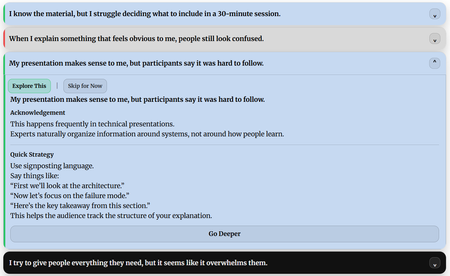
I opted to go full custom code block for this one. My accordion consists of 14 statements that might resonate with a subject matter expert who has been asked to develop and deliver training. Clicking each statement operates like a typical accordion by expanding and showing more content. In this case, the content includes several buttons that let the user explore a quick solution, or mark the scenario as not applicable to them. Additionally, they can even go deeper on the content and load a short video on the topic. The full accordion sits inside a single custom code block. Enjoy! Link to Course DemoAI in Business: Key Concepts
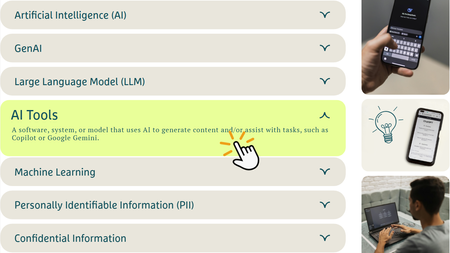
Took a stab at recreating this nifty accordion interaction my company utilizes on our company website (scroll down a bit to see it): Advisory Services | Osaic With a dedicated trigger in place that marks the course complete when all tabs have been visited, the intent is to have this SL block serve as a "checkpoint" before learners move down the page to the next section of a Rise course. Here's an example of how it can be incorporated: https://360.articulate.com/review/content/cfd8ed8f-1974-48a2-ae4a-bce13925788d/review I've attached the SL file if anyone would like to use/modify it for their own purposes.Using Accordion Interactions in eLearning
We created a custom eLearning sample on Cybersecurity Compliance to demonstrate how accordion interactions can make learning activities more engaging and learner-friendly. Check out the sample: https://www.swiftelearningservices.com/accordion-interactions-in-custom-elearning/