articulate ai
20 TopicsI Was Wholly Unprepared for NOVA’s Translation and Localization Power!
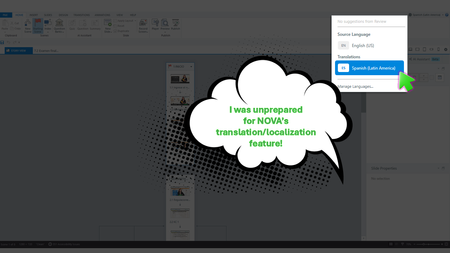
Yup, We Need This Course Updated by Next Week During the week of Articuland Orlando, my business partners dropped an “immediate need” eLearning build in my lap. At first, I didn’t think it would be a huge lift. Then I realized I had to fine-tune the English version of an existing course and create a Spanish version. Typically, translating a course from English into Latin American Spanish can take us two to four weeks. After I use Copilot to translate the course's script, an internal expert validates the translation. I then make the necessary changes, and the expert confirms that the revisions are correct. The challenge is that my internal expert has a full-time role with the company, so reviewing eLearning translations naturally falls lower on their priority list. When Articulate announced during the keynote that NOVA’s translation and localization feature had been activated for Articulate360 subscribers, I was literally in the middle of translating my course (MANUALLY). What Can It Hurt - Take NOVA for a Spin I said, “What the heck. Even if Storyline is able to only translate the base layer’s onscreen text, that’s a win.” Mind blown, when NOVA translated nearly everything!🤯🤯🤯 It translated: Onscreen text (base layer) Onscreen text (layers) Onscreen text (Master slides*) Changed the language the player was set up in AI Voiceover audio Lessons learned Written Spanish, typically, runs longer than written English. Resizing your text boxes etc. takes time, even with the tool that spotlights exactly where the issues are. *Some Master Slide (layouts) were translated, some were not. I was not working on a highly complex course, so fixing the lingering untranslated Master Slide (layouts) was not a big deal. As mentioned in Articulates Help documentation, when you have hardcoded text onto an image, that will not be translated. I can’t share a full demo, but I captured a few screenshots for your perusal (see below). My Key Takeaway Bottom line, the time NOVA saved us is remarkable. I was so excited, I nearly called my manager to rave about it (even though she was on vacation 🤣🤣).6Views1like0CommentsHow to Create a Step-by-Step Guide in Articulate 360 AI
This week's tip comes from elizabeth (that's me!) at our certified training partner, Yukon Learning. By now you've probably seen the buzz around some of the new types of content you can create in Articulate 360. One of the new features is the ability to create a guide, which contains step by step instructions to completing a task. All you need is a video, and Articulate 360 does the rest. You can even record your screen right inside the tool! In this video I'll show you how to create a step-by-step guide using a screen recording. You'll learn how to: Upload an existing screen recording Review and edit guide steps Update the automated thumbnails Annotate your images Resources: Yukon Learning YouTube Channel Need Articulate 360 Training? Sign up.98Views2likes0CommentsAccelerate Course Creation with AI Assistant
Create courses in minutes instead of days with AI Assistant, a powerful AI information and automation tool. Seamlessly integrated into Articulate 360 apps, AI Assistant is designed to supercharge your course development process. As your new partner in course creation, AI Assistant unlocks creativity and boosts productivity. You remain in control throughout the process—from outlining and drafting to iterating and refining—while creating high-quality content faster than ever. Explore the articles below to learn how to use AI Assistant, find answers to frequently asked questions, and discover tips and best practices to unlock this tool’s full potential. Rise 360 User Guides Rise 360: Get Started with AI Assistant Rise 360: Create Content with AI Assistant AI Assistant in Rise 360: AI-Generated Text-to-Speech AI Assistant in Rise 360: AI Course Drafts AI Assistant in Rise 360: AI-Generated Captions AI Assistant in Rise 360: Importing Questions to Create a Quiz AI Assistant in Rise 360: Creating Lessons From Imported Documents Storyline 360 User Guides Storyline 360: Get Started with AI Assistant Storyline 360: Create Content with AI Assistant AI Assistant in Storyline 360: Voice Library AI Assistant in Storyline 360: AI-Generated Alt Text Suggestion AI Assistant in Storyline 360: AI-Generated Captions AI Assistant in Storyline 360: AI JavaScript Entrance Animations AI Assistant in Storyline 360: AI-Generated Built-in Animations AI Assistant in Storyline 360: Generate Theme Colors AI Assistant in Storyline 360: Creating JavaScript Interactions AI Assistant in Storyline 360: Syncing Slide Elements With Audio AI Assistant in Storyline 360: Modifying Question-level Settings Tips and Best Practices AI Assistant: Essential Tips to Unlock its Full Potential Content Library 360 and AI Assistant: Boost Visual Interest with Stock or AI-Generated Images Storyline 360: Enrich Audio Narrations with Classic or AI-Generated Text-to-Speech FAQs Articulate 360 FAQs: AI Assistant30KViews7likes0CommentsWhy AI Could Turbocharge L&D Professionals
Amid all the excitement surrounding artificial intelligence (AI), there’s one glaring fear: “Is AI going to replace me?” It’s a reasonable concern. After all, generative AI can work a whole lot faster than we mere mortals. But here’s the deal: AI is a tool. And a tool is only as good as the person who wields it. At Articulate, we think of AI as an accelerator of human capability, not a replacer of human ingenuity. Let’s unpack why AI can’t do everything alone and how—when used effectively—it doesn’t take away potential but unlocks it. AI Has Limitations On the surface, AI-generated content truly feels like it could’ve been written by a human. But mimicking a human isn’t the same as being a human, and that makes all the difference. Courses built solely with AI are prone to the following hurdles: Inaccuracies. AI is a people-pleaser. If it can’t give you a correct answer, it will still produce a reasonable “something”—but that something might be riddled with half-truths or outright “hallucinations.” Without a human validating output, AI might deliver wholly fabricated content. Biases. Generative AI was trained on the internet, making it highly susceptible to biases. Take away ethical human input and guidance, and AI may reinforce stereotypes, spread misinformation, and deliver inequitable training with unapologetic conviction. Ineffectiveness. AI can’t independently create complex, engaging learning experiences like the L&D pros. It can work quickly, but only a human course creator knows the nuance that goes into helping learners wrap their heads around tough topics, develop complex skills, and work through real-world practice scenarios. AI Requires Guidance AI’s limitations remind us that it can’t work alone. The sidekick is only as good as the hero. And AI is only as good as the e-learning heroes who use it. High-quality training requires humans in the driver’s seat. If you don’t have professionals consulting with stakeholders, discerning learning needs, setting directions, iterating with AI, and validating outputs, you end up with training that misses the mark. What Can AI Do? So, if AI isn’t replacing L&D professionals, what is it doing? If you’re a course creator, think of AI as another tool in your kit—and a mighty valuable one at that. Use AI mindfully, and you can: Collate information quickly. Have several dense documents to sift through? Consider using AI to pull and synthesize the information—kick-starting your course-creation process. Get a first draft. Debating how to start a lesson or course? AI solves the notorious “blank page” problem by giving you a first draft. Then all you have to do is fine-tune it. Brainstorm. Need to toss some ideas around? Your AI helper is an excellent creative thought partner. For example, you might use AI to think through course outlines, come up with industry-relevant examples, and surface themes within your work. Modify and personalize your work. Want to change direction or adapt your training for a different audience? No problem! AI can switch up your tone or writing style in a flash. Accelerate monotonous tasks. Have a lot on your plate? You might free up your day by using AI to speed through time-consuming, repetitive work. For example, you could ask AI to generate a summary, knowledge check, or full-course quiz based on your content. Well-Guided AI Unlocks L&D Superpowers Ultimately, with course creators at the wheel, an AI sidekick helps course creators do more, work smarter, and achieve their goals faster. The result? Instead of replacing L&D pros, AI gives them superpowers. Learning teams who leverage AI have more time, freedom, and mental space to use their specialized expertise, dig deeper, innovate, and home in on the creative side of course creation and design. Wrap Up The scary robot takeover isn’t happening anytime soon. AI is an invaluable asset. But it only works if we keep humans at the center. For more information about AI, check out these helpful resources: Build Compelling Courses Up to 9x Faster with Articulate’s AI Assistant 4 AI Basics Every E-Learning Creator Needs to Know in 2024 3 Ways AI Transforms Workforce Skill-Building Is Your Organization Ready for AI? How Articulate AI Safeguards Your Data You can stay in the loop by subscribing to our newsletter and finding us on LinkedIn and X (formerly Twitter). Want to try out our apps but don’t have an Articulate 360 subscription? Start a free trial today.1.2KViews1like4CommentsHow E-Learning Experts Are Shaping Articulate AI
What makes Articulate AI unique? It all started with a singular focus: Develop a tool, not a toy. Sure, AI is entertaining. But we recognize that what you really need as e-learning pros is functionality—something that inspires, elevates, and enables human creators to get things done. So, how do we get there? Our developers called in the experts, partnering with e-learning pros every step of the way. We’re working on a suite of features built with course creators like you, for you. Let’s pull back that creation curtain and unveil how the scene is unfolding. Consulting L&D Pros at Every Stage Articulate’s talented engineers, product developers, and designers aren’t working in a vacuum. From planning through creation, testing, modifying, and scaling, we’re developing Articulate AI iteratively with ongoing input and feedback from people who live and breathe e-learning. It started with consulting experts both inside and outside Articulate. As production began, the collaborative efforts only skyrocketed. Business as usual for us means regular brainstorming sessions, routine updates, rapid-fire discussions, shared docs, testing, working meetings, and feedback, feedback, feedback. Shaping the AI Features and Interface Thanks to this collaboration, e-learning experts are helping define what features Articulate is prioritizing and how the AI interface will work. More specifically, the L&D pros are: Molding the workflow. They share their typical workstreams and outputs with developers—ensuring that Articulate AI will work for you, not against you. Influencing features. L&D pros brainstorm AI’s limitations and values and present their findings, pitching ideas and rating features by the potential impact on Rise 360 work. Refining outputs. They help shape ideal AI outputs, influencing decisions around what questions AI should ask and when, how many outputs AI should generate, and how frequently you should touch base with AI before getting your final results. Shaping the user interface. E-learning creators are further helping our product designers customize how AI shows up to bring you a seamless and easy-to-understand authoring experience. Setting the Benchmark Articulate’s e-learning experts are working tirelessly throughout testing to help ensure you get the best possible AI outputs. Here’s how these subject matter experts are making a difference: Improving back-end prompt instructions. Leveraging e-learning best practices, they’re helping craft and test back-end prompt instructions to improve output quality. Developing the standard. Our e-learning experts are also developing weighted criteria for judging the AI outputs against instructional design frameworks—setting the benchmark for what “good” looks like. Testing the features. Who better to judge AI than those who use Articulate’s tools every day? With each update, the pros test the features, assessing what works and what doesn’t, and share their findings with developers. Our Goal? Tailored AI That Delivers Results We truly believe our deep collaborative efforts will pay off. When we release Articulate AI it’ll be specialized to meet your needs as an e-learning creator. Rather than offering a one-click magic button with subpar results, Articulate AI will complement your workflow. The built-in processes will keep humans at the center, incorporating instructional design best practices and enabling you to iterate every step of the way. Wrap-Up Thanks to direct, ongoing input from e-learning experts, Articulate AI will empower you to do more. Magic happens when great minds come together—and a whole lot of minds are melding to create Articulate AI. We can’t wait to share that magic with you! Ready for more? For more details about these upcoming features, check out the following resources: Build Compelling Courses Up to 9x Faster with Articulate’s AI Assistant 4 AI Basics Every E-Learning Creator Needs to Know in 2024 How Articulate AI Safeguards Your Data Why AI Could Turbocharge L&D Professionals Before you take off, remember to subscribe to our newsletter to get the latest product updates, e-learning examples, and expert advice directly in your inbox. You can also find us on LinkedIn and X (formerly Twitter). Want to try out our apps but don’t have an Articulate 360 subscription? Start a free trial today. And if you have any questions, please share them in the comments.1.6KViews0likes0CommentsHow Articulate AI Safeguards Your Data
Artificial intelligence (AI) is gaining a lot of hype, and for good reason! This technology has the potential to streamline work and inspire human creativity. But new advancements also bring new hesitations. And in AI’s case, data privacy is chief among them—with 63% of consumers fearing how AI could misuse their data and more than 1 in 4 organizations banning generative AI over security concerns. At the same time, AI is a critical asset in a creator’s tool belt. Companies waiting to adopt AI risk lagging behind. So, what’s the solution? At Articulate, we’re committed to giving you the innovative AI features you need with security safeguards you can trust. Let’s dive into how we’re making that happen. Compliance Standards We’re excited about our AI-powered product enhancements—and that includes how we’re keeping customer information safe and confidential. For starters, this means complying with relevant laws and industry standards. Here are a few highlights: Articulate complies with international data protection protocols, including CCPA, GDPR, SOC 2, ISO 27001, and ISO 27701. Committed to upholding these standards, we’re updating our SOC2 and ISO reports this year to include AI and monitoring the evolving laws applicable to Articulate AI. Articulate 360 is FedRAMP® authorized—and that’s not changing with AI. We’re including AI in our 2024 FedRAMP® Audit. If you’re unfamiliar with FedRAMP® authorization, it means that Articulate apps are among the select few to meet strict cloud security requirements determined by the U.S. federal government. As regulations evolve, so will we! We’re deeply committed to our security and privacy standards and will continually review and update our practices to align with the changing landscape. Robust Transmission and Encryption Protocols As we integrate AI into our platform, we’ll continue protecting customer security with the most advanced encryption technology publicly available. How do we do that? We encrypt your data via secured connections with Transport Layer Security (TLS) 1.2 or 1.3 encryption. Carefully Vetted AI Partners We’ve carefully selected our AI partners, including ElevenLabs and OpenAI. What’s more, we have contractual obligations with these partners to uphold our collective commitment to your privacy and security. Zero Data Retention Policy If you’re like 80% of consumers, you might be concerned about how your online data is being used. With Articulate AI, rest assured: After Articulate AI generates your content, any data used in the process is immediately deleted from the servers of our AI subprocessors. To make sure you don’t lose your work, Articulate still retains your data as long as your subscription is active, but we never use your information to train our AI models. We Give You Control You can control AI access on your account at the admin level. This allows you to enable access for everyone, limit it to specific user groups, or turn it off entirely. Wrap-Up Technology evolves, but Articulate’s commitment to privacy and security remains the same. We understand how important data protection is to you, and we’re committed to maintaining your trust. Our AI-enhanced offerings are safe and secure—allowing you to stay on the ball with AI innovations while prioritizing the protection of your data. Interested in learning more about our approach to security and data protection? You can reach us at [email protected] for general security-related questions and [email protected] for privacy notice and data management questions. Also, be sure to check out these resources for extra intel: Read how to Build Compelling Courses Up to 9x Faster with Articulate’s AI Assistant Dive into AI Security and Privacy at Articulate Review our Articulate 360 Security Policy Learn more about Global Data Security and Privacy at Articulate Explore our Privacy Notice Visit our Trust Center Check out Articulate’s Terms of Service Review Articulate’s Data Processing Agreement You can stay in the loop by subscribing to our newsletter and finding us on LinkedIn and X (formerly Twitter). Want to try out our apps but don’t have an Articulate 360 subscription? Start a free trial today.4.8KViews0likes0CommentsAI Assistant: Essential Tips to Unlock its Full Potential
Generative AI’s rapidly advancing capabilities are transforming the way we work. In e-learning, generative AI can be a valuable partner in course authoring. That’s why we designed AI Assistant—a powerful ally in your course creation journey, seamlessly integrated into the Articulate 360 apps you already use. Whether you’re a newbie eager to kickstart your course creation journey or a seasoned instructional designer looking to leverage AI for more efficient authoring, you’ll be ready to unlock the full potential of AI Assistant with the essential tips contained in the articles linked below. AI Assistant: Setting the Stage for AI Magic AI Assistant: Creating, Refining, and Converting Blocks AI Assistant: Using Magic Text Import to Transform Existing Content AI Assistant: Writing and Editing Inline Content AI Assistant: Creating Images Using Prompts AI Assistant: Building Effective Quizzes and Knowledge Checks AI Assistant: Summarizing Swiftly with Summary Generation AI Assistant: Producing Highly Realistic Audio AI Assistant: Using AI Prompts to Create JavaScript Entrance Animations51KViews14likes0CommentsArticulate AI.....When?
So I have been reviewing numerous posts in relation to Articulate AI launching. No unless I missed something, I just can not seem to find any 'definite' launch date information. September seems to be the month now being talked about. Do we have any official word on this, any actual date? We have a couple of new projects we are keen to trial with the use of Articulate AI.Solved3KViews5likes36CommentsEverything You Need to Get Started with Articulate 360 AI
Welcome! This series of articles will show you how to get up and running with Articulate 360 AI, fast. You’ll learn how to access all the apps in your subscription, get started with your first project, and make the most of all the powerful tools in Articulate 360. Click on “Get Oriented to Articulate 360” to get started. Get Oriented to Articulate 360 Pro Tips for Choosing Between Storyline 360 and Rise 360 Build Responsive Courses with Rise 360 Create Interactive Courses with Storyline 360 Get Started with Assets from Content Library 360 Accelerate Course Creation with AI Assistant Everything You Need to Know About Articulate 360 Teams Speed Collaboration with Review 360 Boost Your Skills with Articulate 360 Training307Views0likes0Comments