code block
27 TopicsThink About It!! Quiz, with Quiz Builder
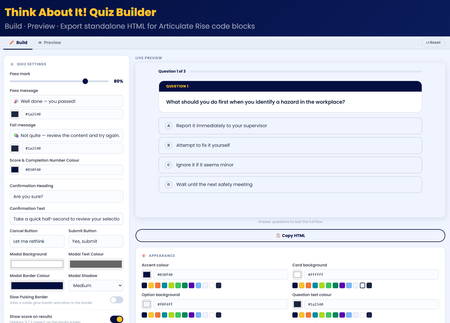
💡My take on the challenge: I looked at this from a slightly different perspective. Building a quiz is easy! so I wanted to create something useful for the entire community. I didn't just create a quiz, I built an app right inside Rise that allows users to craft, preview, and export their own high-impact, standalone quiz right inside Rise for use in their own courses. Everything in the quiz is customisable! Use it along with the native rise style and format block controls to create something amazing! 🖥️ The tech bit! The tool is a dynamic, client-side web application built using HTML, CSS, and Vanilla JavaScript. It allows you to build, configure, and export self-contained, interactive quiz blocks engineered specifically for code block iframe integration within Rise. 🔎LMS/Rise Compatibility & Performance The exported codebase is mathematically pure Vanilla JavaScript (ES5 standard for runtime compatibility). I hope you enjoy it 😊 Think About It!! Quiz With Quiz BuilderWelcome to The Dugout
It is the 46th minute of a World Cup Final. The score is level. Your team is tired. The opponent likes to keep the ball. And the second half is about to begin. In this short challenge, you are not just learning about football. You are stepping into the role of head coach. You will make three tactical decisions. Each choice changes the match. Some decisions may create momentum. Others may protect your team. Some may work beautifully in one situation and fail in another. That is the point. Football is not only about knowing the rules. It is about reading the moment, making a call, and learning from what happens next. This experience was built using custom code blocks in Rise to create a more interactive, decision-based flow. Ready? Step into the dugout.I Asked AI to Help Me Build Team Games. I Didn't Stop at One.
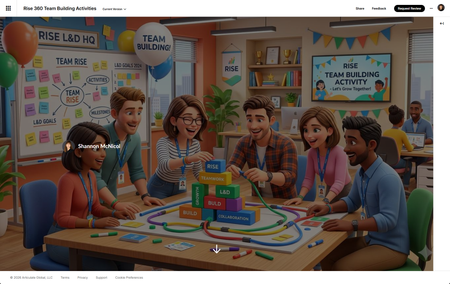
Let me set the scene. I've got a team building meeting coming up. I wanted something engaging — not another "share two truths and a lie" moment that makes everyone stare at the ceiling. I wanted something that actually gets people talking, laughing, maybe even a little competitive. You want a game. 🎮 But I also had approximately zero hours to build one from scratch. Sound familiar? Here's what I did instead: I opened a conversation with AI, described what I was going for, and started building. And somewhere between "let's make it facilitator-led" and "can you add confetti when someone scores a point" I didn't end up with one game. I ended up with five. The Process Was the Whole Point I didn't sit down with a grand master plan to build a game library. I started with a simple goal: create something fun for a L&D team building session that didn't require everyone to download an app, log into a platform, or remember a join code. The constraint? It needed to live in Rise 360 as a Code Block self-contained, no dependencies, ready to run on one shared screen. What I didn't expect was how fast 🏎️ the ideation loop would move. Describe a concept, see it rendered, react to it, refine it. Across a few sessions, that loop produced five fully playable games: L&D Jeopardy: Five categories of industry-specific clues that hit a little too close to home (SME Confessions, anyone?) AI Confessional: A L&D edition where the real answers might surprise you Prompt Lab: A game that actually reinforces AI prompting skills while everyone thinks they're just playing L&D Quest: Virtual Trivia Pursuit: Because our field deserves its own trivia championship The Case of the Vanishing Keynote: A mystery game so relatable it hurts Five games. Multiple sessions. No dev team. No budget line item. What Made It Work A few things I learned along the way that made the process actually fun instead of frustrating: Start with the vibe, not the mechanics. Before I said a word about HTML or JavaScript, I described the energy I wanted: laugh-out-loud, low stakes, facilitator-led, one screen for 20 people. That framing shaped every design decision that followed. React out loud. The fastest iterations happened when I said exactly what I saw — "the modal is off to the left," "the text isn't readable," "this needs more wow factor." Specific feedback beats vague dissatisfaction every time. Let it surprise you. I came in asking for Would You Rather. I left with Jeopardy complete with a starfield background, confetti cannons, animated score bumps, and a facilitator answer key. The AI brought ideas I wouldn't have thought to ask for — and some of them were the best parts. The Real Takeaway for L&D We talk a lot about engagement in learning design. We spend weeks building branching scenarios and interactive modules trying to manufacture the thing that games create naturally: people want to play. What this experiment reminded me is that the barrier to building game-based learning experiences is lower than it's ever been — not because the craft got easier, but because the tools got smarter. You still need to know your audience. You still need to write questions that land. You still need to make judgment calls about what's too complex and what's just right. But the part where you stare at a blank HTML file at 11pm wondering how to center a div? That part you can skip now. Try It Yourself If you've got a team meeting coming up, a training session that needs a warm-up, or just a burning desire to ask your colleagues whether they'd rather deal with a hands-off SME or a micromanaging one — build the game. Describe the vibe. Pick a format. React to what you see. Iterate. You might sit down to build one game and walk away with five. Built in Rise 360 using Code Block. AI-assisted development across multiple sessions. No divs were harmed in the making of these games. 🐵 Rise 360: Team Building Activities231Views5likes2CommentsAre You Sure? Turning a Confirmation Prompt Into a Checkpoint 🛑
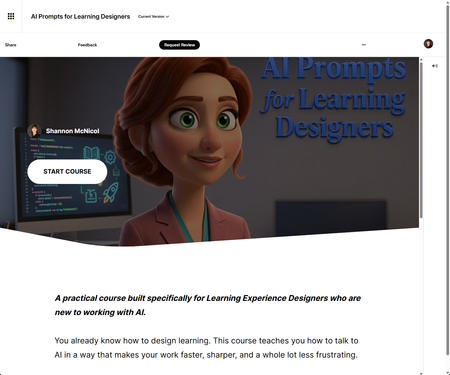
We've all done it. You're halfway through a required course, your inbox is screaming, and you click the first answer that looks right just to keep moving. So when this week's challenge landed on confirmation prompts that little "Are you sure?" pause before you submit I knew exactly the moment I wanted to design for. But I didn't want to bolt a generic pop-up onto a quiz. I wanted the pause to actually do something. The idea id💡 I built this as a Checkpoint inside my course AI Prompts for Learning Experience Designers and here's the part I had a little too much fun with: it's a course about prompting, and the checkpoint itself models the single most important prompting habit there is. Don't fire off the first thing that comes to mind. Pause. Reread. Reconsider. Then commit. The interaction drops the learner into four real-world scenarios, one drawn from each module of the course writing intro copy under a deadline, drafting measurable objectives, iterating on a draft that's almost right, raising the ceiling on generic questions. They pick an answer. And then, before anything locks in, the pause hits. What makes the pause smart ⏸️ This is the bit I'm proudest of. Instead of the same flat "Are you sure?" for every option, the confirmation reacts to the exact answer you picked. Choose the vague prompt and it nudges you: "Three words, zero context — you'll spend the time you saved rewriting the output. Sure?" Choose the strong one and it affirms your thinking instead. It reads like a prompt coach leaning over your shoulder never giving away the answer, just helping you check your own work. Then at the end, a little tally shows what the pause actually did: how many times reconsidering rescued a wrong answer, and how many times it talked you out of a right one. Turns out the value of slowing down is surprisingly easy to measure. 😄 A couple of build notes 🗒️ Placement matters. The Checkpoint sits before the hands-on Practice Lab on purpose recognition first (spot the better prompt), then production (write your own). Nice little scaffolding ramp. All Rise 360 Code Block, and entirely transform-free the gradient hero, the twinkling tokens, the glowing progress bar, the staggered fade-ins, and the count-up score are all pure opacity, shadow, and gradient. Keeps it rock-solid inside Rise's iframe. Matched to my course palette so it feels native, not bolted on. And yes — I built this side by side with Claude as my co-creative partner. The taste and the instructional intent are mine; the AI just helped me get there faster and iterate without losing my mind. Which, fittingly, is exactly what the course is about. 🙂 The real lesson of a good confirmation prompt isn't "gotcha." It's "hey — you've got this, just take half a second to be sure." That's the kind of friction I'm always happy to design in. Would love to hear how you'd use a pause like this in your own work. 👇 AI Prompts for Learning Designers“Are You Sure?” in E-Learning #555
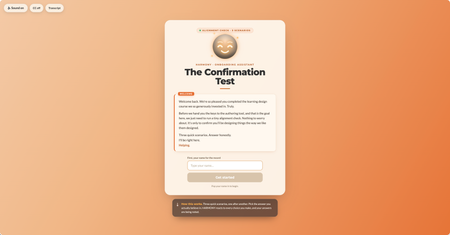
This week I wanted to lean into the spirit of the confirmation prompt, that moment of pause, of reconsideration, and ask: what if that pause wasn't entirely on your side? The scenario: you're an internal team member who's just come back from a learning design course. You have the master learning design authoring tool. Before you're allowed near the authoring tool, the org's AI guide HARMONY needs to run a quick "Confirmation Test." Three scenarios. Shouldn't take long. HARMONY is very helpful. The "Are you sure?" mechanic does something a little different here. I'll leave it at that. 🙂 A few craft notes for anyone interested in the build: The confirmation prompt UX is deliberately asymmetric; the buttons don't behave the same way depending on which answer you're leaning toward HARMONY has two states that shift based on your choices throughout Three different endings based on your answer tally The fake "analysis" stage has a silent jury. You'll see. I have a lot of fun with Claude Design, Code and all things Claude Would love to know which ending you hit, and whether any of the scenarios felt a little too close to home. 👀 Are you a conformist or a rebel? Find out here Confirmation Test Thanks to DavidAnderson and the Articulate 360 Account Management team for the prompt; this one was a lot of fun. #ElearningChallengeWelcome to a Severance Style Code Block
My first time creating an interaction with code! So inspired by what everyone has created. I've learned it can take a few iterations to get what you want. I used Copilot and ChatGPT5. Feel like I could have spent more time—had to stop and call it good enough for now. Enjoy this Severance inspired interaction. As a new employee, Mr. Milchick has assigned a task for your to complete as part of your orientation. When you are complete, clock out and take the elevator to leave. See it here Cyd Find me on LinkedIn or https://mastermind180.com/717Views9likes10Comments
Crossword
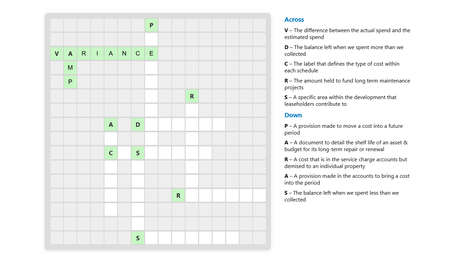
I vibe coded a crossword puzzle interaction in the new Articulate Rise custom html block to support our Accounts Review training. It took about an hour of back-and-forth with Copilot to get this working. Check it out here https://rise.articulate.com/share/OHzJApuSIhFcNe4GLwmto58-5dg_-j-C#/lessons/3cT6ydJmoggnBlDSVsXmKaxp11ASrlKp Full HTML code is below the preview, feel free to adapt it and repurpose for own projects.475Views5likes2CommentsChallenge #544: Brand Storytelling Accordion (Powered by AI & JS!) 🚀
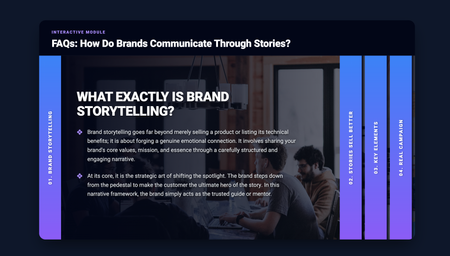
Hi everyone! 👋 Here is my entry for this week's Accordion Interactions challenge. For the content, I decided to focus on Brand Storytelling and how brands communicate through stories rather than just hard data. I thought it would be a valuable mini-lesson for anyone interested in marketing or instructional design. But the most exciting part for me was the behind-the-scenes creation process! Yesterday (March 24th), I had the opportunity to attend the "10 AI Assistant Capabilities You’re Missing & 10 Tips to Master them" event by David Anderson, which discussed the implementation of the AI Assistant in Articulate. Around the same time, I watched an excellent video tutorial by Learning Dojo titled "Building a Sliding Accordion with New Learning Prompts Tool". I felt so inspired that I decided to test out the prompts from prompts.learningdojo.app mentioned in the video, implementing them directly into the Articulate Storyline AI Assistant. To my surprise, it worked wonderfully! 🤯 The AI generated the structure for a fully functional HTML/CSS/JS accordion. I simply placed it inside an "Execute JavaScript" trigger when the timeline starts on a blank slide. Then, from my side as an instructional designer, I only had to tweak the CSS styles (giving it a clean design with a deep blue/purple gradient) and make a few minor adjustments to the code to structure the content into two levels and ensure the text fit perfectly. I think this is a fantastic tool and workflow for adding interactive and custom UI elements to our courses. AI keeps surprising me every day! You can check out my interaction here: Brand Storytelling Accordion Hope you like it! I'd love to read your feedback.Code Block Accordion w/ Video Player
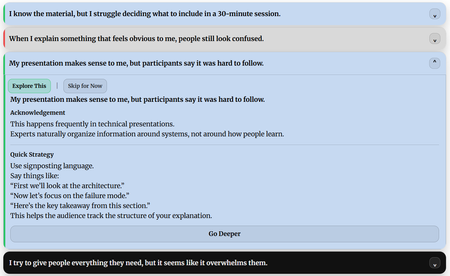
I opted to go full custom code block for this one. My accordion consists of 14 statements that might resonate with a subject matter expert who has been asked to develop and deliver training. Clicking each statement operates like a typical accordion by expanding and showing more content. In this case, the content includes several buttons that let the user explore a quick solution, or mark the scenario as not applicable to them. Additionally, they can even go deeper on the content and load a short video on the topic. The full accordion sits inside a single custom code block. Enjoy! Link to Course Demo