microlearning
17 Topics5 Mental Health Resources You Can Share With Your Learners Today
Did you know that May is Mental Health Awareness Month? Individuals aren’t the only ones impacted by mental health challenges—businesses can feel the effects, too. Polling from Gallup indicates that employees with mental health challenges miss four times more work than those who rate their mental health positively. This lost productivity costs the economy some $47.6 billion annually. As an e-learning designer, you can help employees feel supported by providing resources that raise awareness of the importance of mental health and outline helpful tips for improving it. If you’re an Articulate 360 subscriber or trialer, you can get the ball rolling quickly by using the ready-to-use mental health training materials in Rise 360—just in time for Mental Health Awareness Month. Curious what’s available? Check out some of the new releases below. You can learn how to customize these templates for your own company and training needs at the end of this article. 1. Stress Busters Microlearning Course Encourage employees to feel more relaxed with the 9 Simple Stress Busters You Can Do Today microlearning course. Moving through this quick learning exercise reveals proven strategies for relieving stress and activating feel-good endorphins. 2. Breathing Exercises Microlearning Course Anyone feeling tense can benefit from the Melt Away Stress With a 3-Minute Breathing Exercise microlearning course. With each successive swipe through a guided breathing exercise and accompanying graphics, learners will feel more peaceful and serene. 3. Feel Your Feelings Microlearning Course Reinforce the message that it’s OK not to be OK with the Feel Your Feelings microlearning course. This quick activity helps people process difficult emotions by prompting them to name and explore their feelings from a place of compassion and understanding. 4. Get Grounded Microlearning Course Support employees through worry spirals and mental fog with the Escape Anxiety With a 5-Minute Grounding Practice microlearning course. Moving through this 5-minute practice roots learners in the here and now as they engage their senses of taste, touch, smell, sight, and hearing. 5. Day-by-Day Challenge Course To offer access to a more in-depth daily challenge, check out the 5-Day Challenge To Improve Mental Health course. Each day, learners can refer to this course, explore a different facet of mental health, and follow simple exercises for putting concepts into practice. Wrap-Up Providing mental health resources as part of your business training is a win-win. Employees have access to support at work, and businesses benefit from employees who are less stressed and anxious. The examples above can help you get started, but the sky’s the limit for how you can use Articulate’s creator tools to achieve your business training objectives. Interested in sharing one of the supportive resources with your team? If you’re an Articulate 360 subscriber or trialer, you can access and edit all the examples linked throughout this post directly from your Rise 360 dashboard. Simply click Create New, choose Microlearning and select the template you want to use, as shown in the video below: Looking for even more ready-to-use, customizable mental health content? You'll find those in your Rise 360 dashboard too. Just click Create New, choose Course, and then select Mix & Match Lessons. Here are some relevant topic categories to check out: Stress Management: covers stress management fundamentals, stress and work performance, and strategies to relieve stress. Health and Wellness: includes dealing with difficult emotions and life events, exercise, forming healthy habits, mental health awareness in the workplace, positive psychology fundamentals, and positive psychology in the workplace. Resilience: features content on resilience fundamentals, building career resilience, leadership and resilience, emotional and physical resilience, and thriving through challenges. Be sure to also follow us on Twitter and LinkedIn and come back to E-Learning Heroes for more advice on everything related to e-learning. If you have any questions, please share them in the comments.1.1KViews0likes9CommentsCybersecurity Awareness - Spot the Phish
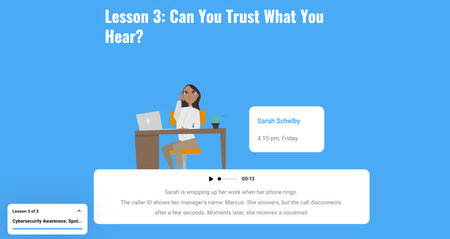
Hola....Here's an interactive cybersecurity awareness course designed to help learners recognise common cyber threats and adopt safer digital behaviours. The course uses a learner-friendly approach to introduce essential cybersecurity concepts, including phishing attacks, password security, social engineering, malware, and safe online practices. CLICK TO VIEWFrom Music History to Interactive Learning
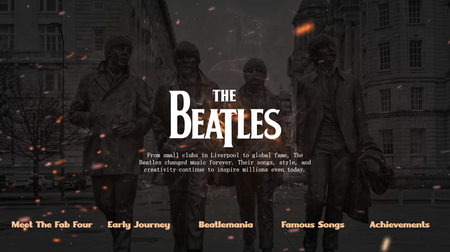
I created this interactive learning experience inspired by **The Beatles**—the band that changed music forever. From their early journey in Liverpool to the global craze of Beatlemania, this microlearning module blends storytelling with engaging interactions to bring history to life. This project reflects how microlearning can turn even classic topics into **engaging, immersive experiences**. Linkedin Article Demo Direct229Views0likes1CommentWhat If an eLearning Company Was a Rock Band?
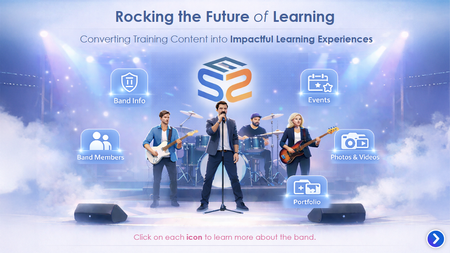
Presenting an eLearning provider as a Rock Band experience Instead of a traditional services page, we designed a fun, interactive concept: Band info → eLearning company overview Band Members → eLearning development team Events → Upcoming projects Photos & Videos → eLearning templates & videos presentation Portfolio → eLearning samples Built using Articulate Storyline 360, featuring interactive navigation and microlearning elements to enhance engagement. Click the link below to view the sample. https://www.swiftelearningservices.com/how-modern-elearning-transforms-corporate-training-in-2026/134Views1like0CommentsComics in Music Video
Corporate Rock, A Comic Book Take on Learning Through Music For this week’s Comic Book challenge, I leaned into bold visuals, panel‑based storytelling, and a little nostalgia to explore a simple idea: what if learning content worked more like Schoolhouse Rock? Corporate Rock is an experiment in using music and comic book visuals to teach workplace learning concepts. I partnered with AI throughout the process, starting with the design of a Knowledge Management course strawman, then breaking topics into short, focused scripts. One subtopic was transformed into a song using an alternating verse and hook structure, with spoken moments to reinforce key ideas. From there, AI helped generate detailed image prompts for each verse and spoken section, intentionally designed as comic book panels. Verses became three‑panel cartoon sequences, while spoken moments landed as single, punchy panels. Each image was generated with a consistent illustrated style to feel like pages pulled straight from a comic. The final step was bringing everything together into a music video, syncing the song with the comic visuals and editing it all in DaVinci Resolve. The result is a learning experience that blends instructional design, music, and comic storytelling to make content more engaging and memorable. This project was a reminder that learning does not always have to look like slides. Sometimes it can look like a comic book that rocks. https://360.articulate.com/review/content/60255320-a8d6-4676-bb6a-b112b189b074/reviewWhat happened at Bluff Creek?
Hello! This week, I used Rise's new Custom Block to add extra layers to this microlearning mystery. Can you solve the mystery of what happened at Bluff Creek? As this Beta feature is not yet fully accessible, I needed to hardcode the captions into the videos I used in the Custom Blocks. Otherwise, it was very easy to angle the videos and combine them with shapes, images, and text, to create 'interactive collages' in the Custom Block. Bonus feature I've used Fire Mods from Discover eLearning to add a custom reflection block to the course. (ChrisHodgson is a genius!) This allows you to jot down your hunch during the investigation, and then refer back to your notes before the final reveal. Just like Columbo would. The voice of 'Annie' is 'River' from Storyline 360's AI Text-to-Speech. I exported the audio files and added the tinny tape recorder effect in Audacity. The audiovisual elements were made using CCO footage from Unsplash, with a dash of Synthesia, edited in Camtasia. Then I mixed it all together in Rise and... voila! One half-baked mystery. Can you piece together the events of Tuesday, 13th July, 1976? CLICK HERE 1.7KViews15likes7Comments
New Advisor Onboarding
Our team is using Articulate to build out new advisor onboarding for our entire campus. Custom Blocks was released shortly before we launched so, naturally, I dove in head first and gave all of our training modules a makeover. I've included screenshots of some of the assets we've used below, and have a review link to one of our training modules linked at the bottom of this post. Each week in our training has a different theme color, based on our University brand colors, that gives each week a really unique feel but with consistent and familiar assets across the entire training. Important tips/suggestions now use this Core Concepts custom block with some design adjustments to match our style: Comparing and contrasting various features and processes is so much more visually appealing now than when we were using simple tables before: 1. 2. The custom blocks have really opened up a whole new world for me as I think about how we share content visually. I like to start with one of the templates from Articulate and then see where my imagination takes me. Check out the way I formatted degree requirements: One of my absolute favorite design features in custom blocks are the ombre color effects. It is visually stunning (in all of the theme colors we have utilized), adds interest to the content, and naturally leads a learner through the content. Here are a few examples from our courses: 1. 2. 3. 4. I had a great time utilizing the conversation bubbles to share some example questions and answers from advisors. I also uploaded some images and played around with sizing for this cusom block - I have to say, this one is my absolute favorite thing I have created so far: If you made it all the way here - thank you and I'm so excited to share all of this with you! For a deeper look at how this looks in our courses, check out our course for Week 4: Advising Technology & Tools611Views3likes5CommentsDiving Into My First E-Learning Challenge – A Simple Take on PASS
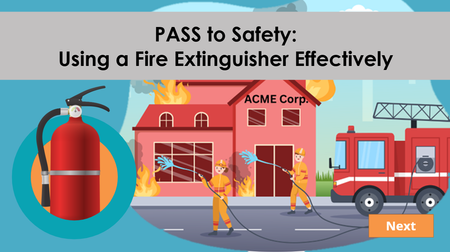
I just completed my first E-Learning Challenge from David Anderson—Challenge #508: creating a short, effective training module to teach the PASS method (Pull, Aim, Squeeze, Sweep) for fire extinguisher use. I built the course in Rise 360, leaning on the AI Assistant to help me outline the content. As a first-timer, I wanted to keep it simple and practical, focusing on what would actually help learners retain the steps. Here’s what I included: 🧯 Step-by-step blocks to break down each action clearly 🔄 A drag-and-drop activity to help reinforce the correct order 🧠 A quick quiz to check understanding I kept the module lightweight and approachable—something that could be used in onboarding or a quick safety refresher. With more time, I’d love to explore a more immersive or scenario-based version. ✨ Big takeaway: Even with simple tools, thoughtful design can make a big impact. And starting small is a great way to learn what works! 🔗 Here’s the course I created Would love any feedback or ideas for taking this further!PASS to Safety
For this challenge, I created a short, interactive eLearning module that teaches learners how to use a fire extinguisher using the PASS method: Pull, Aim, Squeeze, and Sweep. Features include: A realistic fire scenario to set the stage Interactive buttons and layers for each PASS step Drag-and-drop practice to reinforce learning Custom illustrations designed in Canva Voiceover narration A fun and lighthearted close to leave learners with a smile (and a safety reminder!) The goal was to keep it memorable while still rooted in essential fire safety training. I’d love for you to check it out and share any feedback! Here is a link: PASS to Safety