What the Project Is
The Confidence Self-Check Dashboard started with a challenge that many learning professionals will recognise: we're often very good at measuring learner perceptions at a single point in time, but much less effective at understanding the journey that got them there.
Most confidence checks, smile sheets, and end-of-module surveys provide a snapshot. They tell us how a learner feels at the end of an experience, but they rarely show how much progress has been made between the starting point and the finish line. As learning designers, trainers, and educators, we're increasingly asked to demonstrate impact and effectiveness, yet many of our evaluation tools remain focused on isolated moments rather than measurable growth.
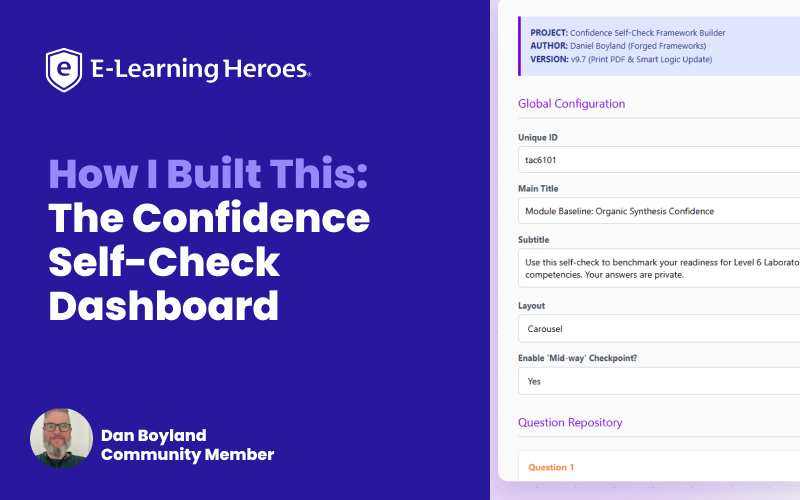
The Confidence Self-Check Dashboard is an open-source framework designed to help visualise that growth. Learners can capture baseline, midpoint, and final confidence scores, creating a richer picture of progression across a programme, module, or learning journey. The system then visualises progress through checkpoints, historical tracking, and comparative reporting, helping learners and educators see not just where confidence sits today but also how it has evolved.
What makes the project different is that the dashboard is only half of the solution.
Built directly into the framework is a configurable Designer Mode that allows instructional designers, trainers, and subject matter experts to modify questions, scoring, weighting, feedback, and visual elements without touching the underlying code. Once configured, the framework can generate deployment-ready outputs for both standalone HTML environments and Storyline projects.
For me, the project sits at the intersection of learning analytics, instructional design, and curiosity. It explores how we might move beyond static interactions and perception-based evaluation towards adaptable tools that not only support learning but help us better understand the impact of what we create.
Why I Built This
One recurring frustration I encounter as a learning designer is that many custom interactions end up as disposable solutions.
They solve a problem for a specific programme, module, or client, but the moment somebody wants to adapt them, whether that's changing questions, adjusting scoring logic, updating feedback, or tailoring the experience for a different audience, the process often becomes disproportionately difficult.
This isn't limited to Storyline. I've seen the same challenge across standalone HTML tools, JavaScript widgets, learning micro-applications, and community-shared frameworks.
The learning community produces some incredible work, and I'm regularly inspired by the creativity on display. However, many of those solutions are understandably built to solve a specific challenge at a specific moment in time. Reusing them often means digging through code, unpicking logic, or rebuilding large chunks from scratch.
At the same time, I was finding myself increasingly able to prototype ideas that previously would have stayed as scribbles in a notebook or half-finished thoughts in my head.
That led me to a different question.
Rather than repeatedly rebuilding interactions whenever requirements changed, could I create something that remained adaptable after development had finished?
I became increasingly interested in building systems rather than outputs.
Instead of creating another hardcoded interaction that would need future rebuilding, I wanted to explore whether the editing capabilities themselves could become part of the experience.
The result was Designer Mode.
Rather than expecting instructional designers, trainers, or subject matter experts to modify code, they could adjust questions, scoring, weightings, feedback, and configuration settings through a dedicated interface and generate deployment-ready outputs themselves.
Ultimately, this project became an exploration of a broader idea: perhaps the most valuable thing we can build isn't the interaction itself, but the framework that allows other people to adapt it long after we've moved on.
How I Built It
The chronology of the project was actually quite different from what people might expect.
It started with a community language-learning project where I was exploring how learners could benchmark their confidence over time using a simple Likert scale. At the time, I wasn't trying to build a framework. I was simply trying to create a better reflection point for learners.
That evolved into a benchmarking dashboard, which I later adapted for quality management systems and professional development programmes. As the number of adaptations increased, I found myself repeatedly rebuilding or modifying the same interaction.
The turning point came after sharing an earlier project with the Articulate community.
Somebody asked a simple question (thanks to the E-Learning Heroes Community):
"This is great, but how do I edit it myself?"
That question stuck with me.
The first version of Designer Mode was incredibly basic. It allowed users to configure the front and back of flip cards without touching the underlying code.
Once that worked, I started asking questions:
- Could they change images?
- Could they update URLs?
- Could they alter scoring boundaries?
- Could they swap animations?
- Could they generate the code themselves?
What started as a convenience feature gradually became the main project.
At some point, I realised I wasn't really building interactions anymore. I was building frameworks that could generate interactions. The goal stopped being to build a better confidence tracker.
The goal became building a system that could adapt itself.
Once I made that mental shift, a lot of the design decisions suddenly became much clearer.
My Development Workflow
One thing I've learned is that my best ideas rarely arrive in a neat, structured format.
They usually arrive as half-formed concepts, tangents, questions, and observations that need untangling before they become useful.
Because of my dyslexia and dyscalculia, I often find it easier to explain concepts verbally than work directly with large blocks of code. Over time, I developed a workflow that helped translate those ideas into something more structured.
- ChatGPT often acted as a critical friend and sounding board.
- Gemini became my primary coding and debugging environment.
- Claude frequently challenged learner experience decisions, instructional design choices, and pedagogical assumptions.
I also built a prompt generator that helped translate my often-discordant thought processes into something the various models could consistently understand and execute.
Rather than generating code directly, it acted as a translation layer between ideas, constraints, learning requirements, accessibility considerations, technical limitations, and deployment requirements.
One of the biggest lessons I learned was that prompting quality often mattered more than coding quality.
I also learned very quickly that dirty context windows are real. The longer the conversations became, the more assumptions accumulated, and the more unpredictable the outputs could become.
Managing context became almost as important as debugging.
After what felt like the hundredth iteration, and probably wasn't far off, I finally realised I was solving the wrong problem: The challenge wasn't building a better interaction, it was making sure I didn't have to rebuild it again six months later.
Exporting for Different Environments
One of the design goals from quite early on was that I didn't want the framework tied exclusively to a single authoring tool.
As a result, Designer Mode generates two separate deployment outputs.
The first is a standalone HTML package that can be deployed independently and used outside of Storyline altogether.
The second is a Storyline-compatible export. Rather than generating complete slides, the framework produces copy-and-paste-ready JavaScript that can be dropped directly into an Execute JavaScript trigger. The generated code sits behind a simple trigger, button, or slide event and handles the heavy lifting in the background.
Supporting both outputs inevitably created additional testing and development effort, but it felt important that the framework remained flexible rather than becoming dependent on a single platform or workflow.
Key Decisions & Trade-Offs
One of the hardest parts of the project wasn't deciding what to build, it was deciding what not to build.
There were plenty of moments where I could see an exciting next step. AI-generated learner feedback was one of them. Cloud storage was another. User accounts, enterprise integrations, reporting dashboards, and centralised administration all felt possible.
But possible and sensible aren't always the same thing.
AI-generated feedback sounds impressive until you remember that learners may act on that information. The last thing I wanted was a hallucinated recommendation confusing somebody or sending them down the wrong path.
If that level of personalisation is going to happen, I think it belongs within a controlled organisational environment rather than inside an open-source learning widget.
Cloud storage presented a similar challenge.
Whilst it would unlock richer reporting and persistence, it also introduces authentication, security, GDPR considerations, APIs, hosting, maintenance, support requirements, and handover considerations.
Very quickly, the project stops being a configurable learning tool and starts becoming a software platform. I had to keep reminding myself what problem I was actually trying to solve.
The same challenge appeared within Designer Mode itself. Every new configuration option made the framework more powerful but also increased cognitive load.
There is a point where flexibility becomes overwhelming.
If somebody needs a developer sitting next to them to understand the configuration panel, I've probably failed. Sometimes the best design decision is leaving something out.
👉 Check out this build that exemplifies more of my design choices
Why I Open-Sourced It
The project is shared as open source because I genuinely believe we all stand on the shoulders of giants. That philosophy comes partly from learning design and partly from my blacksmithing hobby.
Almost every forge project I've ever made has been inspired by somebody else's work, technique, or idea. Usually, somebody has already solved part of the problem before you arrive. The same is true in learning design: The more we share, the more we learn, the more we learn, the more we innovate.
That's why the source framework, Designer Mode, and deployment outputs are all available for others to explore, adapt, and build upon. Not because it's finished, but because I hope somebody takes it somewhere I hadn't thought of yet.
What I've Used It for Since
Although the original use case focused on confidence benchmarking, the Designer Mode approach has quietly spread into a lot of my other projects.
I've since added similar configuration layers to flip cards, quizzes, odd-one-out activities, swipe interactions, branching scenarios, media players, and other custom learning tools. Partly because it reduces build time, and partly because it reduces future maintenance. It also reduces the number of times I need to revisit the same problem.
The framework can be adapted for:
- Skills audits
- Readiness assessments
- Professional development planning
- Reflective practice activities
- Learner self-assessment
- Progress check-ins
What interests me most is that it turns what is often passive engagement into active reflection.
Instead of simply consuming content, learners are asked to pause, think, and evaluate where they are right now. They feel included.
Key Takeaways
If there's one thing I'd encourage other instructional designers to take from this project, it's not that you need to become a programmer.
You mustn't underestimate your ability to build.
The tools available to us today mean that many of the barriers between an idea and a functioning prototype are lower than they've ever been.
For me, the goal isn't to replace the work of learning design.It's to create more space for it.
- Less time wrestling with implementation.
- More time understanding learners.
- More time refining experiences.
- More time asking awkward questions.
- More time thinking.
The biggest shift isn't that technology can generate code.
The biggest shift is that instructional designers can now build tools, frameworks, and systems that previously required specialist development and teams. Use that opportunity wisely. Use it to remove the dross. Use it to reclaim time.
And then spend that time doing the bits that humans are still brilliant at: creativity, empathy, reflection, judgement, and understanding what learners actually need.
Ask Me Anything
If you'd like to know more about the project, feel free to reach out or drop a comment below.
I'm always happy to chat about generative AI in learning design, the successes, the pitfalls, and the occasional moments where everything goes wonderfully wrong.
I'm also happy to talk about instructional design, learner engagement, accessibility, healthcare, accreditation, quality management systems, blacksmithing, or pretty much anything in between.
Portfolio - Built with Claude Design and now hosted via GitHub
Outside of learning design, you'll often find me metal-bashing in the forge, experimenting with new projects, or being supervised by my two feline quality inspectors, Tenacious D and Blackjack.
Want to Share Your Build?
Do you have a project you’d love to share with the community? We’re always looking for more How I Built This stories. Whether it’s a game, interaction, or unique design, we’d love to feature your process. Drop a note in the comments or reach out to the community team if you’re interested!