Forum Discussion

Code Block Creator Tool
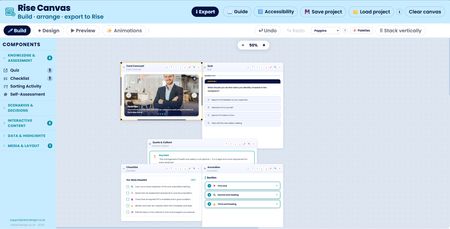

In my latest update, Rise Canvas has had a big run of improvements and new functionality. Here's everything that changed.
New completion coordinator. Previously, if you had more than one interactive component on a slide and wanted the lesson to wait for all of them before letting the learner continue, it just didn't work properly, whichever component finished first would trigger completion. That's now fixed. Every block on the canvas has a target toggle, and you can mark exactly which components are required. The lesson will only report as complete once every marked component has been finished. If you don't mark anything, it behaves as before, so nothing breaks for existing projects.
Off the back of that, completion firing is now far more consistent across the whole suite. A lot more components can now signal completion, not just quizzes and checklists. The reveal-based components, accordion, tabs, flip cards, carousel, and the expanding infographic, now fire completion once the learner has opened or viewed every item. The branching scenario completes when an outcome is reached, and the labelled graphic completes once all the hotspots have been viewed.
There's a brand-new Audio builder. It lets you add narration, music, or ambient sound to a Rise lesson with three player styles, a full player with artwork and progress bar, a slim minimal bar, and an invisible ambient mode that just shows a little animated equalizer. You get three playback modes too: autoplay when the learner reaches the block, a muted start with an unmute button, or manual play. There's a loop toggle, full colour control, optional artwork. It also warns you if an uploaded audio file is large enough to cause problems in a Rise code block.
The Labelled Graphic builder got a lot of attention. You can now control the marker size with a slider, and the markers scale properly, both the circle and the number or icon inside it grow together, with the pulse animation scaling to match. The viewed markers now fade slightly once a learner has opened them, so it's clear at a glance which hotspots are left to explore. You can also now set the modal heading and body text colours independently, which is handy for matching your brand or making text readable against different modal backgrounds. The close button on the modal was also fixed so it stays visible against any background colour, including white.
There's a new global font selector in the canvas toolbar. Pick from twelve fonts commonly used in e-learning, and your choice is applied to the exported HTML with the matching web font loaded automatically. There's a small info button next to it that explains the font change shows up in the final output rather than the in-app previews, so there's no confusion about what it does. Your font choice is remembered between sessions.
A few quality-of-life fixes round things out. The quiz answer boxes used to go semi-transparent when selected or marked correct or incorrect, which made the text hard to read if you had a background image on your Rise lesson, those are now solid, so text stays clear over any background. The cluttered hint text was taken out of the build toolbar. And a stacking bug was fixed where canvas blocks could sometimes display on top of the builder panel when you'd added a lot of components.
As always, everything still exports as standalone HTML that drops straight into a Rise 360 code block, with no external dependencies.
Related Content
- 9 months ago
- 1 month ago
- 9 months ago
- 11 months ago
- 8 months ago