Forum Discussion

Code Block Creator Tool
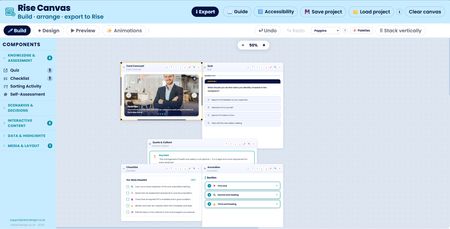

Launched another update. This one is less about one big new feature and more about a wave of refinements that make Rise Canvas noticeably nicer to build with, plus a couple of fixes to things that had been quietly annoying. Here’s what’s changed since last time.
The biggest single improvement is around layering and how your layout actually comes out the other end. You can now control the stacking order of overlapping components. Each block on the canvas has four new buttons, bring to front, forward one, backward one, and send to back, so if you want a speech bubble sitting on top of an image, or a callout layered over a card, you can set exactly which sits above which. More importantly, that layer order now carries through to the exported HTML. Previously the canvas worked out stacking purely from position, so the order you carefully set on screen didn’t necessarily survive into Rise. Now it does.
Closely related, and honestly the fix I’m most pleased with, the exported layout now faithfully matches what you arrange in Design mode. There was a subtle but maddening problem where the output didn’t look like the canvas, an image would balloon to full width, and a component layered over it would drift out of position. The export now reproduces your Design-view layout at its true proportions, sized and positioned exactly as you placed everything, and it scales down gracefully if the space it lands in is narrower than your design. What you arrange is what you get.
A lot of work went into the builders themselves becoming more pleasant to use. Across the Card Carousel, Flip Cards, Infographic Cards, Process Steps, Stats & KPI, Accordion and Expanding Infographic builders, the card-editing section has been moved up to sit directly beneath the live preview, laid out in neat rows rather than stranded in a tall column with a big empty grey area beside it. It’s a much more compact, sensible use of the space. While doing that I also fixed a genuinely irritating bug, when you typed into a card field, the editor boxes would jump and vibrate on every keystroke, because each character was triggering a full rebuild of the preview. Typing is now smooth, your text registers instantly, but the preview quietly catches up a moment after you pause, with no more jitter. Long words that used to spill out past the edge of a carousel card now wrap properly inside it, too.
There was a toggle that affected every builder. When you added a component to the canvas and then reopened it to edit, all the toggle switches showed their default positions even though the component itself was unchanged, so to flip a switch you had to click it twice, the first click just snapping it back into sync. That’s fixed everywhere now, reopen a component and every toggle shows its true state, and a single click does what you’d expect.
Some other minor changes to the UI also applied.
As always, everything you make is exported as standalone HTML that drops straight into a Rise 360 code block.
Related Content
- 9 months ago
- 1 month ago
- 9 months ago
- 11 months ago
- 8 months ago