Forum Discussion

AI audio "pop" sound at end of clip
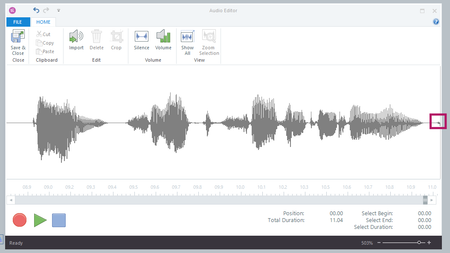

Hi LynnKurtz-992f7 & RussellEngoran,
Great to see that SamHill has been helping you.
Sorry to hear that AI Text-to-Speech in Storyline occasionally generates errant audio. Using Matilda and Brian, I haven't been able to reproduce the same behavior in Storyline's current version, or version 3.128.38292.0.
As Sam mentioned, AI models may sometimes produce an unintended sound or an abrupt transition in the recording. These artifacts can be inconsistent, and they may appear in one generation but not another. Even when the script and settings are the same.
We recently introduced Version 4 of our voice model. I can't guarantee it will prevent all artifacting, but it does offer improved voice accuracy and consistency. Please note that Versions 3 & 4 do not support SSML tagging. If the behavior becomes more consistent, I suggest trying v4 to see if that improves the issue.
Let me know how it goes!
- RussellEngoran16 days agoCommunity Member
how do I try v4?
- KellyAuner13 days agoStaff
Hi RussellEngoran,
I'm happy to help!
Here’s how to change the model to v4:
- Open the AI text-to-speech window.
- Advanced settings.
- Next to Model, select v4.
- Select Generate to preview the voice again.
Please let me know if you have any questions!
- RussellEngoran12 days agoCommunity Member
Thank you KellyAuner! I was able to switch to v4.
However, the result is much worse. I use the Brian voice, and with v4 it is noticeably flatter.
Worse than that, v3 handled acronyms beautifully, but v4 tries to pronounce them as words.
Samples of v3 and v4 attached.


Related Content
- 1 year ago