Forum Discussion
MichaelTham-e41
8 months agoCommunity Member
[Articulate RISE] How do I edit the Mouse over text for my disabled blocks ?
Hi everybody! Anybody knows how can I edit the text for the "Mouse over" texts (Indicated above) when the user clicks on the disabled blocks ? Thanks!


EricSantos
8 months agoStaff
Hi MichaelTham-e41,
Thanks for reaching out with your question!
You can edit text labels in Rise 360 by opening the content you want to edit, then clicking Settings in the upper part of the screen and selecting the Labels tab. Here’s the full guide: Edit Text Labels in Rise 360.
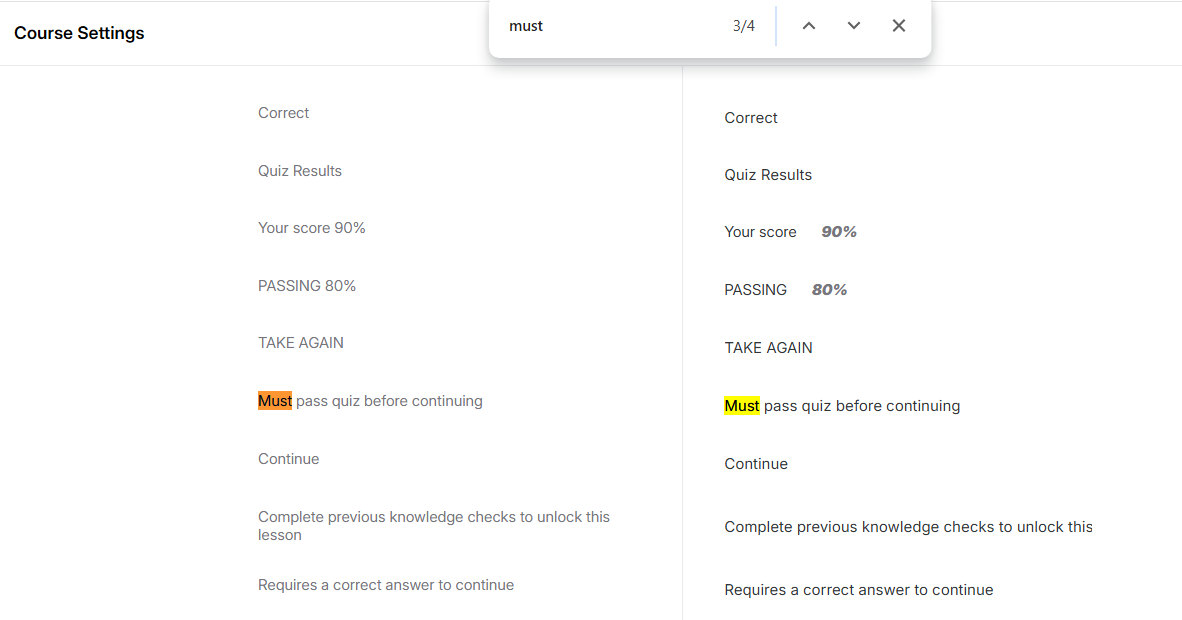
The label you’re looking for is “Must pass quiz before continuing.” To find it quickly, use the Find function:
- On Windows, press CTRL+F
- On Mac, press Command+F
Then type “must” and hit Enter. That will take you straight to the label you want to edit. Please see the screenshot below:
Hope this helps you get everything customized just the way you want! Let me know if you run into any trouble along the way.
Related Content
- 9 months ago
- 7 months ago
- 2 months ago
- 9 months ago