Forum Discussion

Branching Scenario in Storyline 360: (You can only select one option, but options partially correct)
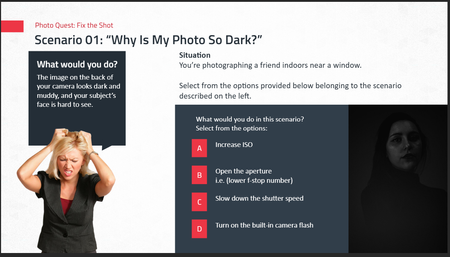

I did a lot of tweaking and testing. I thought I got it working by deleting the extra feedback layer, and also deleting the "attempts" condition on the Continue button for the ISO layer.
Unfortunately, when I closed the file and then re-opened it and previewed, it was no longer showing the feedback for the correct layer. It's possible I deleted the wrong version of the extra layer, but there's a limit to how much work I'll do on such a slide.
I also tried removing the Freeform, and then reapplying it, but with using single objects for the choices* (instead of groups). However, Storyline didn't add the appropriate layers for Feedback By Choice, which it should do automatically
Based on all that, I think the slide (or, perhaps, that template) is corrupted.
I suggest you start completely from scratch.
- Storyline has gotten better at handling Groups, but they can still cause problems. That's why I avoid using Groups for interactions. TIP: Making icons easier to program and easier to click | Articulate - Community
- KeithByrne-95de4 months agoCommunity Member
Thanks for your response but I think there has to be a simple explanation or solution to this issue this file is only new so not sure why it would be such an issue to do what I'm trying to do.
Related Content
- 10 months ago
- 7 months ago