Forum Discussion

Built-in next-lesson option not appearing in one Rise lesson
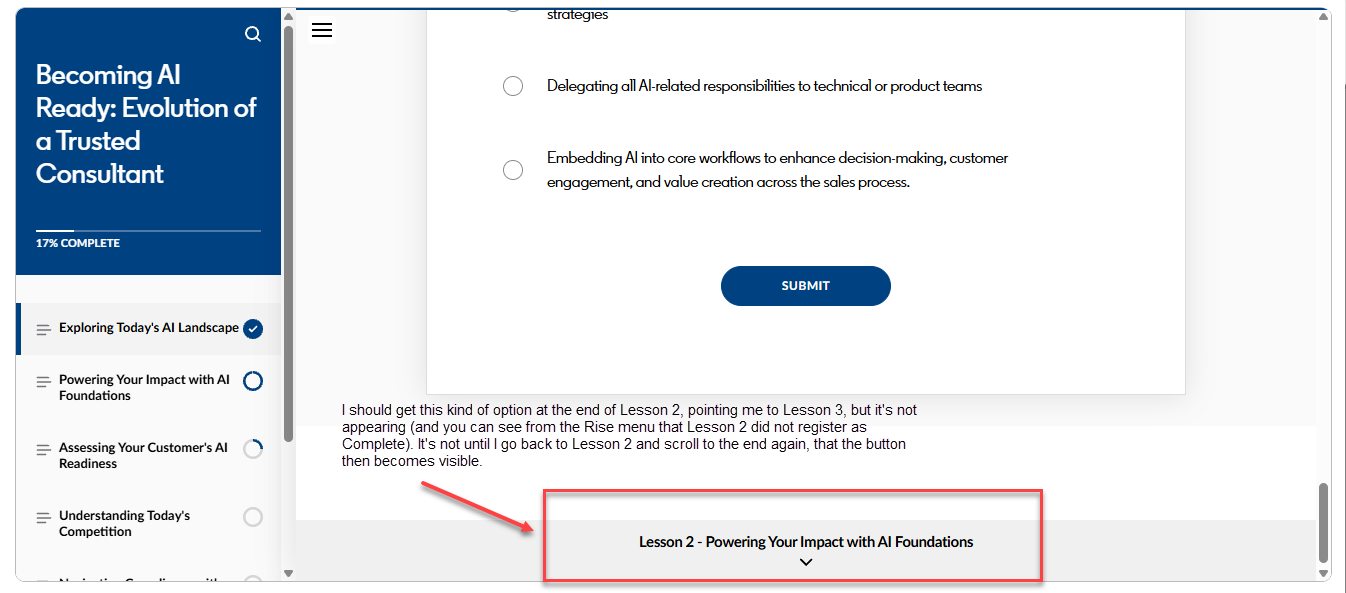
I’m seeing a recurring issue in one lesson of one Rise course that is part of a full curriculum of Rise courses: see attached screenshot. This has happened both in our LMS test environment and production environment (we use Cornerstone CSOD as our LMS) and it even happened in Review360--one reviewer noted it and I tested it and got the same in Review360 (so it's not an LMS issue). It has happened to multiple users, not just me. It's only happening in one course, in this one lesson. The issue is that the built-in next-lesson button at the end of that lesson is delayed in appearing so the lesson doesn’t show as complete until I return to it and scroll back down to the end of the lesson. Only then does the next-lesson option appear. It doesn't seem to have to do with any of the interactives since I don't have to go back and complete an interactive to get it to appear. I just have to reopen the lesson and scroll to the end again. This happens even though nothing is locked to require completing interactives before the lesson can be marked complete. The last two items in the lesson before where the next button should appear are: 1) 4 flip cards (being used as a multiple choice knowledge check, so not all 4 cards will be flipped by users, but there is no lockdown to require all 4 cards to be completed before the lesson shows completed) and 2) a multiple choice question using the Knowledge Check block. Any ideas on why this is happening in this one lesson and how we can fix it?
2 Replies
Hi KatieWood-763d1!
Sorry to hear that content from your Rise 360 course is disappearing!
I noticed you've also opened a support case, being handled by my teammate Lianne. It looks like she just sent you an e-mail requesting a copy of the Rise 360 course that's giving you trouble.
Also, the behavior you reported sounds similar to a Rise 360 bug we are currently tracking for Microlearnings. Sharing your standard Rise 360 course will help us determine if this bug is also affecting courses outside of Microlearnings.
We can continue the conversation through your case to keep all information in one spot!
- KatieWood-763d1Community Member
Thank you, Steven. I responded to Lianne with additional troubleshooting attempts I tried and we'll continue the conversation there. Thanks!