Forum Discussion

Can you deactivate the new rounding shapes function? It causes more problems than it solves.
Hi,
Does anyone know if it's possible to deactivate the new rounding corners function in Storyline?
I find it rounding squares all the time when I don't want it to. If I wanted a shape with rounded corners, then I would have drawn one to begin with. This is just screwing with my workflow.
This new rounding function needs to be disabled. When resizing, the pointer often grabs the radius adjustment. Very frustrating!

11 Replies
- KimLorek-e97b22Community Member
I've been using Storyline since it's inception and I was on the beta team. This new feature is bad, and I mean BAD! Please make a way to turn it off. When resizing, it grabs the curved corner first, ugh! Takes away from the natural way of creating a shape and resizing. Let it be a feature to turn on, not standard, please.
- BenjiLukasCommunity Member
Agreed! Or they need to be redesigned so you can turn them off completely. They are more of a hassle than they are of use.
- MichaelFeducciaCommunity Member
This new rounding function needs to be disabled. When resizing, the pointer often grabs the radius adjustment. Very frustrating!
- OptiDevCommunity Member
I am having a similar yet inverse issue where on reopening a project it is resetting all rounded radius to the default rather than what I have set them as. Meaning I have to go through and manually click all of them to alter.
Hi OptiDev!
Sorry to hear Corner Radius Formatting is not being retained when reopening a Storyline project!
That shouldn't be happening, and I'm happy to help troubleshoot this with you. I tested the behavior on my end, using a sample .story file with three different shapes. Each shape was set to a different Corner Radius value. These values remained in place after closing, and reopening the file multiple times. I've also attached a copy of the file I used in my testing. Do you mind opening it on your end to confirm it's working as expected?
Erratic behavior such as this may be caused by saving .story files to a network, or shared drive. We suggest authoring, and saving your .story files directly from your local hard drive instead. However, if you're already working locally but still seeing this issue, please try a repair of your Storyline installation.
Let me know how it goes!
- OptiDevCommunity Member
Thanks Steven
However we work exclusively on a shared drive system and our clients may have edited the file in between our accessing them so it is happening between uses of the file particularly if another user has edited the file between accesses. It would be ideal if we could turn the default radius functionality off.
Hi BenjiLukas,
Thanks for reaching out! I can understand how unexpected shape rounding can be frustrating.
In Storyline 360, you can fully customize or turn off the Corner radius on shapes, captions, and buttons. To remove the rounding, just select the shape, go to the Format tab on the ribbon, and set the Corner radius values to zero. This will return the shape to sharp corners and stop it from rounding by default.
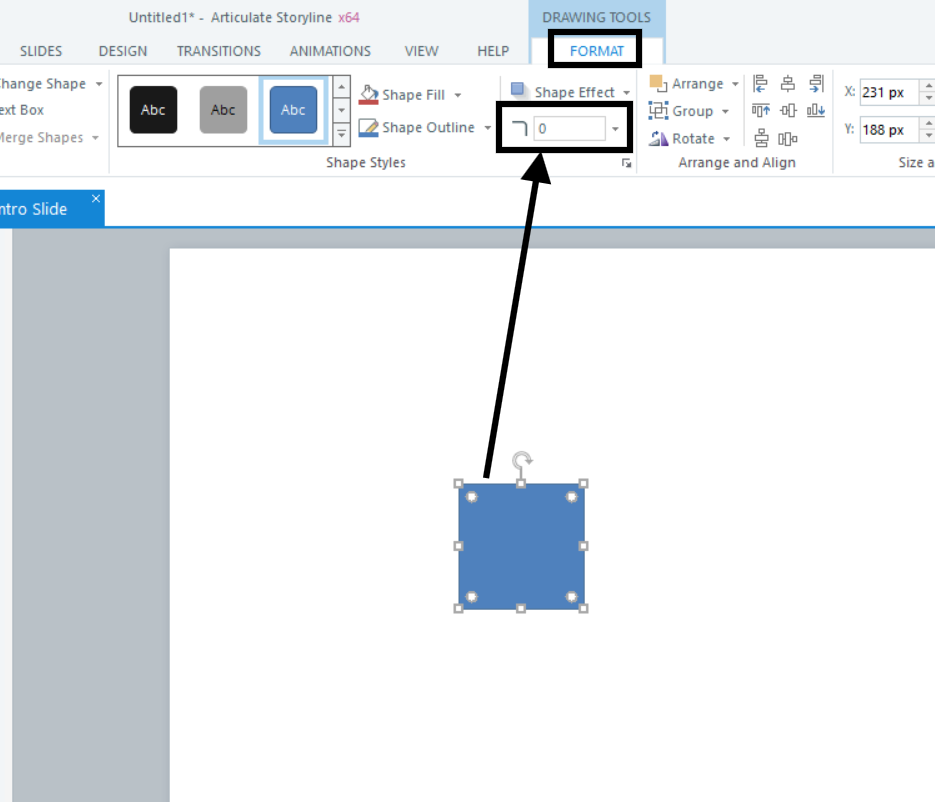
I tried adding a square in Storyline, and it defaulted to a zero corner radius on my end. Do you see the same thing on your end, especially after setting it to 0 at one time?
Check out the Storyline 360: Corner Radius Formatting article for more details.
Please don't hesitate to reach out if you have additional questions.
- BenjiLukasCommunity Member
Thanks, but this doesn't allow me to turn off this function. I can also just Ctrl + Z after it happens to undo it, which is quicker. I guess I just have to live with it. C'est la vie.




Related Content
- 7 months ago
- 10 days ago
- 4 months ago
- 11 months ago