Forum Discussion

Can you deactivate the new rounding shapes function? It causes more problems than it solves.
- 7 months ago
This new rounding function needs to be disabled. When resizing, the pointer often grabs the radius adjustment. Very frustrating!


Hi BenjiLukas,
Thanks for reaching out! I can understand how unexpected shape rounding can be frustrating.
In Storyline 360, you can fully customize or turn off the Corner radius on shapes, captions, and buttons. To remove the rounding, just select the shape, go to the Format tab on the ribbon, and set the Corner radius values to zero. This will return the shape to sharp corners and stop it from rounding by default.
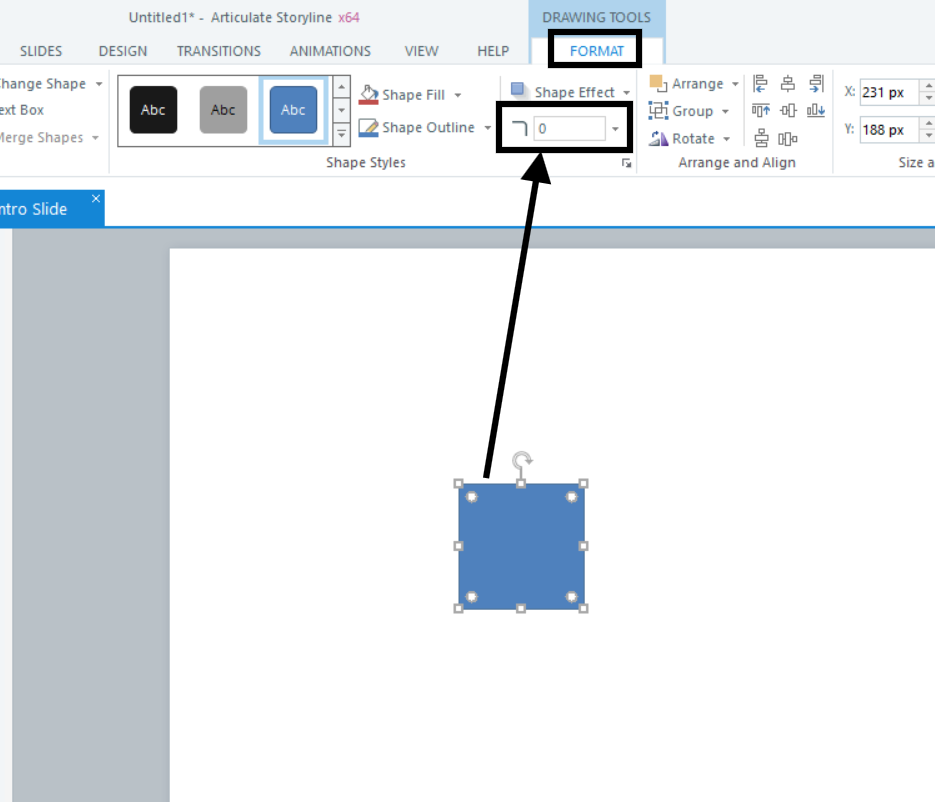
I tried adding a square in Storyline, and it defaulted to a zero corner radius on my end. Do you see the same thing on your end, especially after setting it to 0 at one time?
Check out the Storyline 360: Corner Radius Formatting article for more details.
Please don't hesitate to reach out if you have additional questions.
Thanks, but this doesn't allow me to turn off this function. I can also just Ctrl + Z after it happens to undo it, which is quicker. I guess I just have to live with it. C'est la vie.
Related Content
- 8 months ago
- 5 months ago
- 1 month ago
- 1 year ago
- 6 years ago