Forum Discussion

ChrisPetrizzo
9 years agoCommunity Member
feedback master button states not being inherited by feedback layers
Hello All,
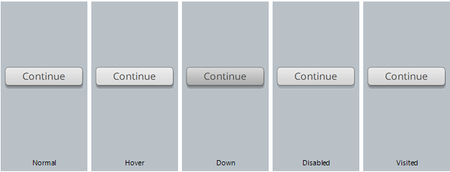
If I create a brand new project, and add a multiple choice question, and then look at the states for the Continue button on the Correct feedback layer, here’s what I see (notice the Do...
ChrisPetrizzo
9 years agoCommunity Member
Hi Christie,
Thanks for your response. The issue has arisen on two different PCs, so I have not felt it warranted to reinstall Storyline. On both machines, the issue arises with brand new files - not just with existing projects. I was hoping that you could confirm that you experience the same behavior. Could you try the steps I outlined in my original message?
- create a new project
- add a multiple choice question
- observe the button states on the correct feedback layer
- switch to the feedback master correct layout, and observe the button states - are they exactly the same?
- if by some chance they are the same, try changing the color of one of the button states on the master, and see if the multiple choice feedback inherits the change
Thanks,
Chris

WendyFarmer
9 years agoSuper Hero
Hi Chris
I get the same behaviour as you - the 'Down' state is different on the feedback master correct layer to the quiz slide correct layer and making a change to the feedback master on the Down state makes no difference when applying the new layout to an existing slide or when creating a new slide.
I only tested 'Down' state no others.
Related Content
- 1 month ago
- 2 years ago
- 8 months ago
- 8 months ago