Forum Discussion

Ghost borders / bounding boxes
Hmmm... that is disappointing. No, the issue doesn't seem to appear when I create a new project.
The file was created by a third party, I believe, and was handed to me by the client to tidy up. I have already installed, rebooted, and reinstalled a completely fresh copy of Storyline on my Windows 10 and 11 environments but the issue persists.
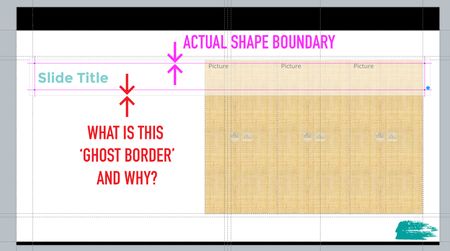
Here's what it looks like, with Grid & Guides OFF, and I select an edge of the shape in order to move it...
You can see the shape is indicated by the blue points, and the new, unwanted, boundary box is approximately 10 pixels beyond the shape.
Here is a similar attempt, with Grid & Guides ON, but just showing how the extra boundary area is defined by the transparent white shape, but the actual shape is defined by the perimeter highlighted by the 'smart' guides.
I know smart guides help, but this is exactly the issue. There is now an extra cognitive requirement to discern whether the shape is aligned correctly or are the smart guides active.
It's genuinely frustrating.
I have uploaded the project file and hopefully, your boffins can help out.
Related Content
- 10 months ago