Forum Discussion

How come some of my storyline blocks in rise have a play button and a black box but others don't
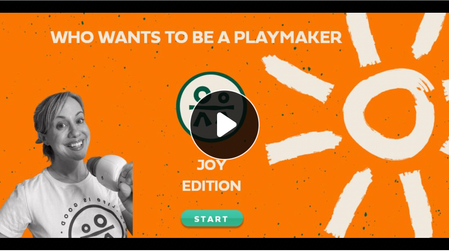

The play button appears on the Storyline Block if your first slide contains an audio or video. You can avoid this by removing the audio or video from the first slide of your Storyline course.
I hope this helps!

So, what if you add a new slide at the front without any audio or video and it still shows a play button :( Any ideas?
- StevenBenassi2 years agoStaff
Hi Julie!
Happy to help with this!
The appearance of a play button indicates that some media is present in the Storyline Block. Is there a chance any audio or video files are hiding on a Layer? A helpful way to check is by referencing the Media Library.
This tool keeps track of images, characters, audio clips, and videos in your course. It also shows which slides they are being used on.
If you're still running into trouble, please connect with our support engineers through a support case. They'd be happy to continue troubleshooting with you!

Related Content
- 9 months ago
- 7 months ago
- 2 months ago