Forum Discussion

How to customize feedback slides
- 1 year ago
There are a couple ways to customize Feedback layers for question slides.
To ensure consistency and have the customized layout used for new question slides, edit the existing Feedback Master Layouts for the question-slide feedback layers. You access the Feedback Master from the VIEW ribbon.
Here's more info:
Storyline 360: Using Feedback Masters | Articulate - Community
TIP: Customizable Feedback Layers | Articulate - Community (Note: this is an old post from the days of the Classic Player. But the basic info is the same for the Modern Player.)
Another option is to redo the existing layers. To start from scratch, apply the blank Feedback Master Layout. That's done using the Apply Layout button on the HOME ribbon.
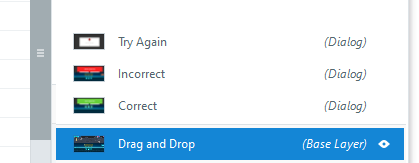
FYI: Question slides come with built-in functionality. If the question is set to provide feedback, the slide will have Correct and Incorrect layers (which is the default). If you adjust a question to allow >1 attempt, the program adds a Try Again layer. If you enter info in the Post-quiz review field in Form View, the program adds a Review layer. The program automatically shows those layers when appropriate.
If you do want to redirect the user to a custom layer, I think the easiest way to do that is with triggers on the Incorrect and Correct layers. Just give those layers a blank layout, remove all objects from them, and then add a trigger to show the custom layer when the timeline of that layer (Incorrect or Correct) starts.

There are a couple ways to customize Feedback layers for question slides.
To ensure consistency and have the customized layout used for new question slides, edit the existing Feedback Master Layouts for the question-slide feedback layers. You access the Feedback Master from the VIEW ribbon.
Here's more info:
Storyline 360: Using Feedback Masters | Articulate - Community
TIP: Customizable Feedback Layers | Articulate - Community (Note: this is an old post from the days of the Classic Player. But the basic info is the same for the Modern Player.)
Another option is to redo the existing layers. To start from scratch, apply the blank Feedback Master Layout. That's done using the Apply Layout button on the HOME ribbon.
FYI: Question slides come with built-in functionality. If the question is set to provide feedback, the slide will have Correct and Incorrect layers (which is the default). If you adjust a question to allow >1 attempt, the program adds a Try Again layer. If you enter info in the Post-quiz review field in Form View, the program adds a Review layer. The program automatically shows those layers when appropriate.
If you do want to redirect the user to a custom layer, I think the easiest way to do that is with triggers on the Incorrect and Correct layers. Just give those layers a blank layout, remove all objects from them, and then add a trigger to show the custom layer when the timeline of that layer (Incorrect or Correct) starts.
- parca1 year agoCommunity Member
Thank you Judy!! That was very helpful - that's exactly what I needed.
- JudyNollet1 year agoSuper Hero
You're welcome! Pay it forward when you can. 🙂

Related Content
- 11 months ago