Forum Discussion

Hyperlink hover effect on text that breaks over lines
When I create a hyperlink that breaks over more than one line using the Hyperlink feature it only activates the hover effect over one line per time rather than over the whole string of text. Can someone help me with this problem?
Hello Everyone!
I wanted to share some good news! We are no longer seeing the bug where a hyperlink line extends past the characters if the linked text reaches a line break (Storyline version 3.72.29699.0).
To confirm or update your version of Storyline:
- Launch the Articulate 360 desktop app on your Windows machine.
- Click the drop-down arrow next to Storyline 360 and select Other Versions.
- Here you will see the current version being used, or have the option to update.
Please let us know if you're still encountering the issue and we'd be happy to continue troubleshooting with you in a support case.

39 Replies
- IntegralEdCommunity Member
This issue appears to be back. I'm experiencing it on two slides. Installing the most recent update didn't fix the issue. Any idea why this went backwards?
- LaurelRohlfCommunity Member
Thanks for the update, and for working on this bug.
- LaurelRohlfCommunity Member
Excellent, thank you!
Hi Laurel!
Glad to hear my teammate Luciana was helping you out!
I see that you connected with my colleague Carlo, through your support case. It looks like Carlo shared that the behavior you encountered is related to a bug our development team is actively tracking. When hovering a cursor over a hyperlink, text excluded from the hyperlink becomes highlighted as well.
Your feedback has been included in the bug report, and we will update this discussion as soon as a fix is in place. Thank you for your patience. Sorry if this has been slowing you down!
Hi Laurel,
I went ahead and opened a support case on your behalf so we can have our support engineers take a closer look at this! I've already shared details of your case with them, and one of our talented Support Engineers will be reaching out shortly via email. Thank you for your patience.
Have a great start to your day!
- LaurelRohlfCommunity Member
Hello Everyone!
I wanted to share some good news! We are no longer seeing the bug where a hyperlink line extends past the characters if the linked text reaches a line break (Storyline version 3.72.29699.0).
To confirm or update your version of Storyline:
- Launch the Articulate 360 desktop app on your Windows machine.
- Click the drop-down arrow next to Storyline 360 and select Other Versions.
- Here you will see the current version being used, or have the option to update.
Please let us know if you're still encountering the issue and we'd be happy to continue troubleshooting with you in a support case.
- TanmayGhosh-5feCommunity Member
Hi,
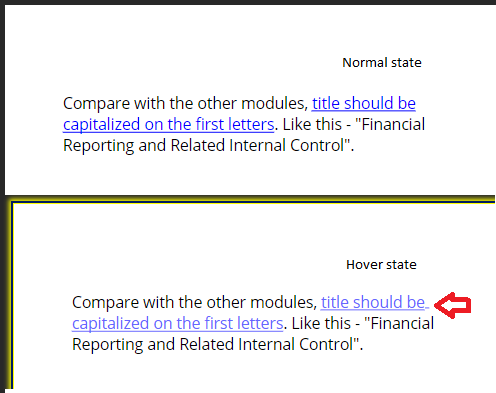
I have a similar issue, though I am using Storyline 360 v3.54, where there is an extra underline in a hyperlink exactly where the line breaks. I have removed the extra underline by deselecting the U button. It works for normal state, but on hover the extra underline is still appearing.
Even if I remove the underline from Hyperlink > Modify option in the Text style section, then also the extra underline appears on mouse rollout.
Please advise.
Hello Tanmay!
Thanks for including a .story file and a screenshot! I also noticed the same on my end, where the space after "be" is underlined after the word is hovered over. As a workaround, you might consider having the entire linked text on one line.
I'll share this with my team for awareness as well!
Hi everyone!
We just released Hyperlink States in Storyline 360 (Build 3.46.23620.0) today. This feature includes the bug fix where the line would break when hovering over a hyperlink!
You can head over to our release notes to see the other features and fixes in this update.
Now all you need to do is update Storyline 360 in your Articulate 360 desktop app!
- RenGomezStaff
Hi Melanie,
I'm sorry to hear you're experiencing this issue as well! We're currently working through this one, so we'll be sure to update you in this discussion when we have news to share on a fix!
Hi Stacy,
So sorry that you ran into this bug. You're in the right place, and we'll notify you of any new developments.
In the meantime, we'd love to explore your setup for any tailored options. If you can share the .story file, please use this secure upload link.
We'd be remiss not to extend a hand!








Related Content
- 8 months ago