Forum Discussion

IngridCarrer168
1 year agoCommunity Member
Key press triggers help
Hello,
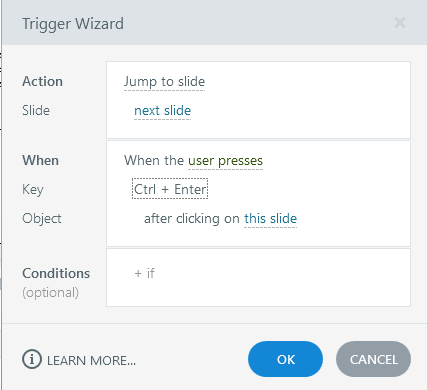
I have been trying to use the Control key as my trigger because I am creating a simulation of our system. But Storyline 360 won't take it unless it is paired with another key. Which is not w...

SamHill
1 year agoSuper Hero
Hi IngridCarrer168 I think they might avoid that due to potential conflict with other system and accessibility tool shortcuts. There could be another reason, just a theory.
Here's the JavaScript to do what you want. Just add this to the timeline start trigger.
document.addEventListener("keydown", function(event) {
    if (event.ctrlKey) {
        const player = GetPlayer();
        const current = player.GetVar("ctrlkey") !== true;
        // forcing the "ctrlkey" value to change everytime the CTRL key is selected
        player.SetVar("ctrlkey",current);
    }
});
Attached is an example of implementation that just triggers an animation every time the CTRL key is selected.

AlanaBousquet
1 year agoCommunity Member
Is there any way to make this functionality work when doing the simulation in a browser? I tried it in SL and it works just fine, but now that I'm trying the published version in my browser, nothing happens :(
Related Content
- 3 months ago
- 10 years ago
- 1 day ago
- 4 months ago