Forum Discussion

Rise - Adding a lesson title to content already created
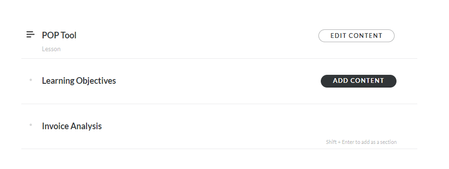

If you created an item using Shift+Enter that now appears on the course structure, those are referred to as Rise Sections.
Sections are essentially just an optional, all caps text label, that you can use to visually organize or group the Lessons in your course.
You can create Sections at any time, and move them to where you want them to appear in the course structure.
If you want to move block from one lesson to another, there is a procedure you can use.

I do need to move blocks from one lesson to another so the procedure would be helpful.
Thank you!
- JudyNollet1 year agoSuper Hero
You can copy Rise content and paste it into another lesson or course by putting it into a Block Template. Block Templates can also help ensure consistent formatting, without having to edit formatting on each block.
Here’s more info about Block Templates: https://access.articulate.com/support/article/Rise-Creating-Sharing-and-Reusing-BlockTemplates
Here’s more info about copying/duping content or lessons: https://access.articulate.com/support/article/Rise-360-7-Ways-to-Reuse-Your-Content- MargaretSequeir1 year agoCommunity Member
Thank you!! This was perfect! I was able to create a Block Template and move all the content fully formatted to the correct lesson!

Related Content
- 10 months ago