Forum Discussion

Rise 360 – Results setting not showing in the quiz editor
Can anyone help please as I have tried everywhere.
My course has a quiz which is a separate lesson and is set to 2 attempts (3 in total). I need to give the learner a message for when they pass and when they fail so they know what action to take especially if they don't pass.
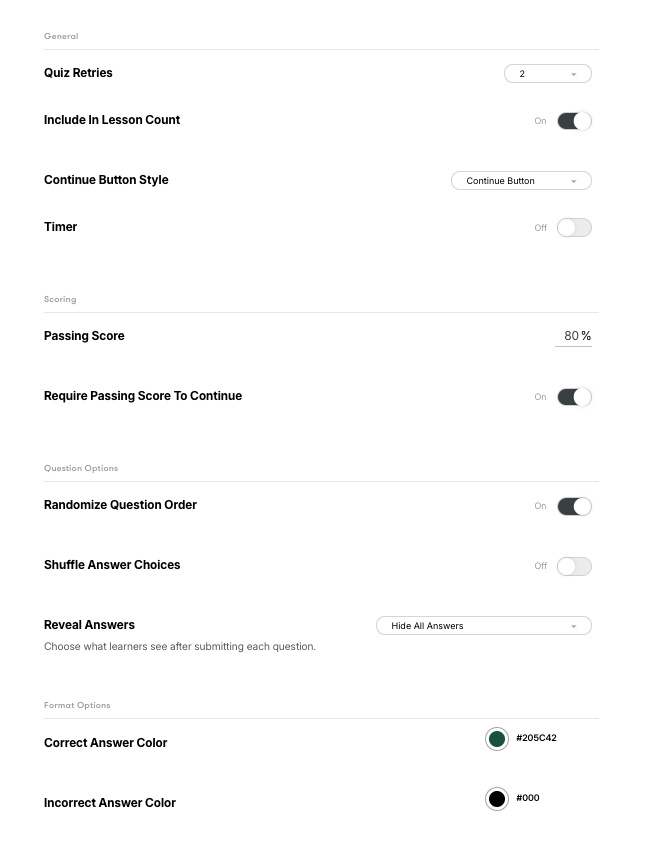
My problem is that in the Quiz editor, the Results setting is not showing up at all as per numerous results say it should from searching for the answer to this problem.
I have searched everywhere to find out how to rectify this. I am sure my quiz is set up correctly and is graded. I have attached screen shots showing the quiz in the overall lesson structure and a screen shot of the settings I can see in the quiz editor.
Thank you.
3 Replies
- KarlMullerCommunity Member
There is no Quiz Results setting for a Rise Quiz.
The Quiz Results page is automatically created when you Publish or Preview the quiz, and the page is therefore not editable.
- StephHarrison-SCommunity Member
Hi Karl, thanks for the reply. I assume that the only way to control this feature I want to add will be to build it in Storyline?
Hi StephHarrison-S,
Thanks for reaching out!
I shared your feedback with our product team, so we'll let you know if we have an update to share. In case you were interested in using Storyline, here's how to add a results slide. Please let me know if you have any questions!



Related Content
- 1 month ago
- 2 years ago