Forum Discussion

Rise 360: Tabs block, image and audio

Hello Vasile_Tihon,
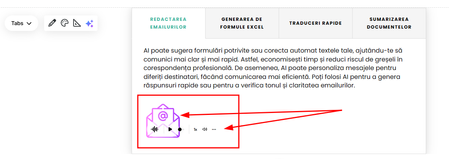
Thanks for reaching out! I want to confirm that the behavior you are experiencing in the Tabs Interactive Block is expected. There will be some overlap with the audio player when an image is included in your tabbed item.
As a workaround, you can adjust the audio player's formatting to display the audio at the top of the item. In your block, click the Format Icon in the top left corner and change the Audio position to Top. Here's a quick visual.
If you have any questions, just let us know!
Hi LucianaPiazza ,
Thanks a lot! After watching your video, I finally get the logic behind player placement, and it makes perfect sense that using a larger image makes it more intuitive. Than you for the tip. Somehow I completely overlooked the setting that lets me place the player on top. Really grateful for your time and help.
- LucianaPiazza6 months agoStaff
Hello Vasile_Tihon,
You're very welcome! I'm so glad that my video was helpful. No worries, it's great that you've discovered a new setting in Rise!
Feel free to share future questions and discoveries in the community. We're happy to help!
Related Content
- 10 months ago
- 8 months ago
- 3 months ago