Forum Discussion

Rise Review and Preview not showing latest content
Hi, I'm trying to send out a Rise Review file but when I was previewing it, I realized that one of the lessons had old information and didn't reflect the changes I had made last week. The changes I made today are accurate, though. I tried duplicating the file but same issue occurs. I also tried viewing the Review and Preview links in a different browser but they're still reflecting the old content. Is anyone else experiencing this?
4 Replies
- AngelaNicholasCommunity Member
Adding on...I just realized that in my duplicate course, the content is not the latest either in Rise. I have been using Snapsots...I wonder if those are overriding new updated content? I'm a bit hesitant to continue using Rise until this issue is fixed.
Hello AngelaNicholas,
Sorry to hear that you ran into this issue.
Are you still seeing this behavior in Rise 360? And can you consistently replicate it regardless of which browser you use?
We're not seeing reports from other users about similar behavior, and Rise 360 has not had a recent outage, so the incident may be isolated. If you published your course to a different one, you'll also want to check other courses in Review 360. If you're still experiencing the behavior, please make a quick Peek 360 recording of what's happening so we can check it out!
- KECanterburyCommunity Member
Just ran into this same issue, also using snapshots. Found that it seemed to come right after republishing to review several times. i.e. turn it off and on again until it works.
Hi KECanterbury,
Sorry to hear you’re also running into this issue with Rise 360 snapshots.
I wasn’t able to replicate the problem in my tests. I tried removing and adding blocks and published them as versions of my Rise course to Review 360. In each case, the changes appeared correctly.
You can check out the screenshots below to see how the snapshots are working as expected. I also got the same results during Rise preview:
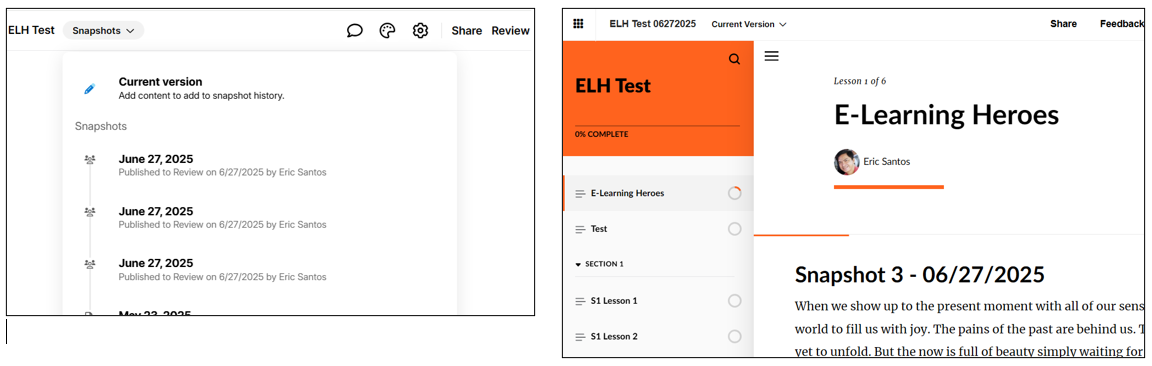
To help us understand what might be going on, could you please let me know:
- Does clearing your browser cache and cookies help?
- Have you checked if you’re using the latest version of your browser, and if JavaScript is enabled?
- I’m glad that you have found a workaround. But please help me understand what you mean by “turning it off and on again?” The snapshots feature cannot be completely turned off.
I’m looking forward to your reply. If you prefer more targeted help, feel free to connect with us privately through a support case. We’re happy to assist!



Related Content
- 8 years ago