Forum Discussion

Set slide properties for the entire project
Hi, I wonder if it is possible to change the slide properties for all the slides in a project at the same time? I want all slides have the same settings as at the screenshot attached.
26 Replies
- WendyFarmerSuper Hero
Sure Marjon
Open the file in Story View. Select the first slide of a scene, Ctrl A then in the bottom right corner you can change the slide properties.
- MarjonVlugCommunity Member
Hi Wendy,
Thanks for your answer! I've tried the option you described a few times, but somehow it doesn't work. Some individual slides still have other properties. Do you know how to tackle that?
- WendyFarmerSuper Hero
Are they in a different scene - if so you would need to follow same process for each scene and sometimes you have to toggle the option on/off to get it selected?
- EllenSlavitz-1fCommunity Member
Thank you Wendy!
- WaltHamiltonSuper Hero
If properties have been set on individual slides, I think those override changes made in bulk.
- PhilMayorSuper Hero
If you do have different properties for different slides click on one of those slides when you do Ctrl+A and then make the changes, it can be a bit hit and miss in SL3 and 360 to apply bulk changes
- MarjonVlugCommunity Member
Thank for thinking along all of you! Unfortunately the problem is still there. I work with SL360, so maybe it's like as Phil mentioned; a bit hit to apply bulk changes :-(
Hi Marjon,
If you're running into trouble, could you share your .story file so that we can take a look? There may be something else we can help you spot!
- EricaBerghout-1Community Member
Thanks for the answers, works fine... but... Now i also need to change the propperties of the layers in the slides...
Is there a fast way to change al of does in a fast way? Hi Erica,
The slide layer properties are specific to each layer, so you'll need to adjust those individually.
Let us know if you need anything else!
- LauriHaganCommunity Member
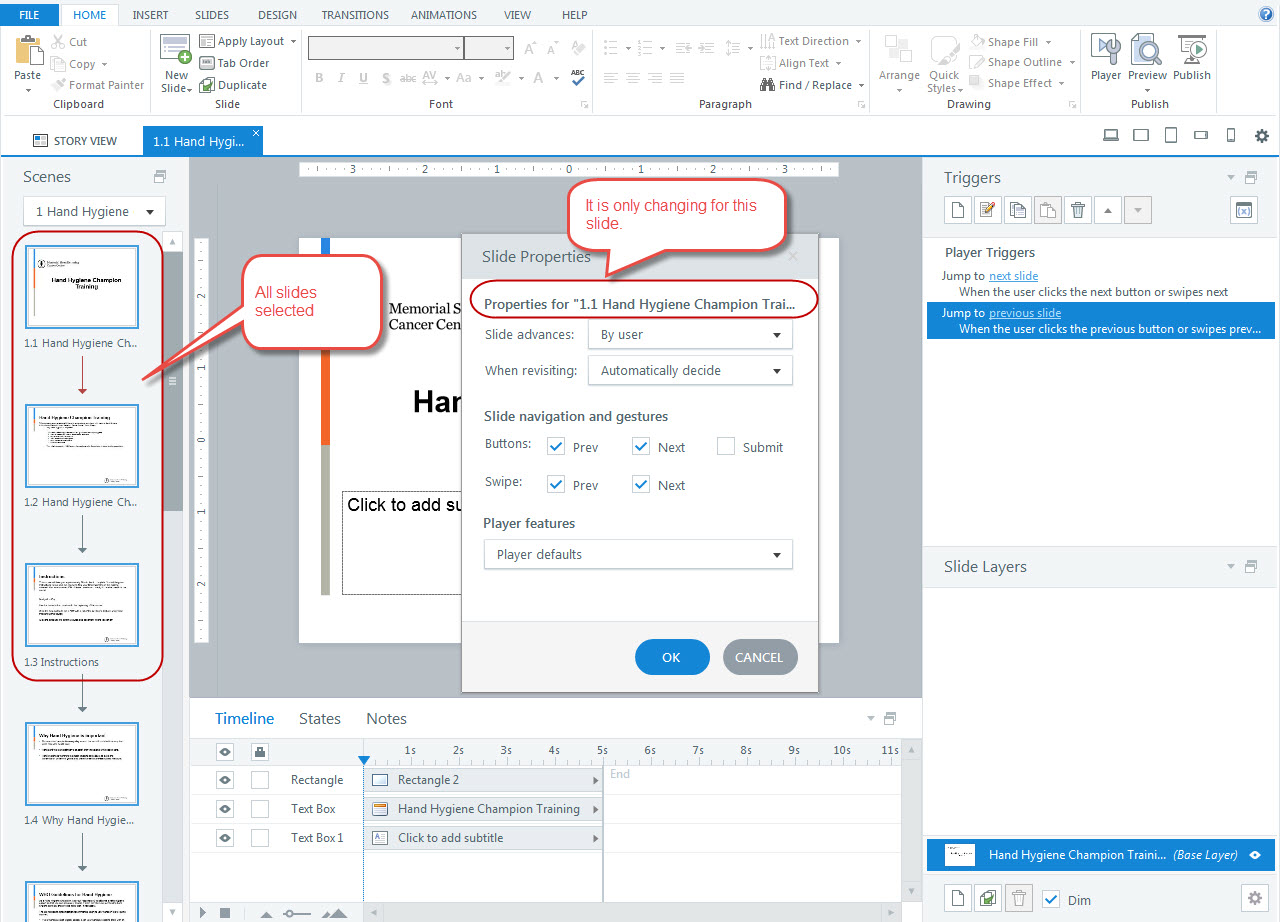
I am having same issue as Erica. Whenever I import from PPT the default is Slide Advances Automatically but I cannot change all slides at once to Slide Advances By user. I have tried manually clicking on each slide to select them all and I also used Ctrl-A to select the entire scene but when I get into the menu it lists only the first slide (even though all slides are selected). The properties are changing only for that slide. This happens on every project. Screen capture below.
Hi Lauri,
Can you try selecting them all in Story view, vs. that Scenes panel? Here's a quick look at what I mean:
- LauriHaganCommunity Member
Thanks Ashley. Yes, I tried that yesterday and it works most of the time. For times (projects) it did not work, I did double check that there were not overrides set, etc. It seems to work best if it is done right after importing all the slides from PPT as opposed to when the project has been worked on already.
I will keep monitoring. Thank you for responding.
- KimHuestisCommunity Member
Thanks this worked for me!
Thanks, Lauri and please keep us posted!
- LauriHaganCommunity Member
I tried with two band-new courses yesterday both imported from PPT and I made the change as the first things I did after import and it worked fine. :)