Forum Discussion

Show Object on second visit/revisit
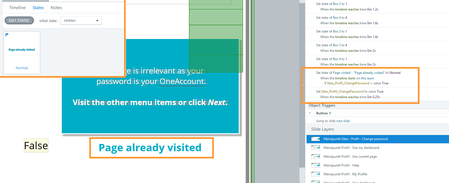

TH-bf52b1b3-f6f: Here's a screenshot of your file, with a few highlights added:
The special text on layer 1 has an Initial state of Hidden. The Slide Layer Properties are set to "Reset to initial state." Thus, that text is Hidden every time the layer reopens. However, the trigger to change that text to Normal runs when the layer reopens. In other words, those settings are good.
The reason you don't see the special text if you jump to layer 2 and then jump back to layer 1 is that the "Hide other slide layers" option in not selected in either of the Slide Layer Properties.
So in the "open layer 1, jump to layer 2, jump back to layer 1" situation, layer 1 never closes, which means it never reopens/resets. Thus, the trigger to show the special text when the timeline starts never runs. The text only shows if you hide the layer and then show it again.
The simple solution: check the "Hide other slide layers" option.
By the way, the solid background on your layers does prevent the user from seeing the base. However, that doesn't prevent the user from tabbing to the buttons on the base. So I suggest you also check "Prevent the user from clicking on the other layers" in the Slide Layer Properties.
Related Content
- 10 years ago
- 6 months ago
- 1 year ago