Forum Discussion

Storyline: Built-in xAPI statements when publishing for LRS
Dear Storyline community,
I was wondering if anyone is familiar with modifying the built-in xAPI statements Storyline sends when LRS is selected as publishing option.
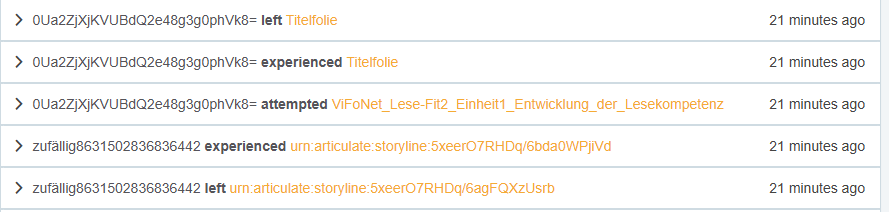
In earlier exports, the automatically generated xAPI statements displayed the slide title, whereas xAPI statements from my current exports contain the slide ID (screenshot below shows both in comparison). Does anyone know how to change this back to slide title?
Hello SamuelBellingha,
Happy to share that we've just released a new update for Storyline 360!
In Update 130, we've included essential fixes and new features. We've released a fix for:
- xAPI statements showed the slide ID instead of the slide title in courses published to an LMS.
Launch the Articulate 360 desktop app on your computer to take advantage of this update, and click the Update button next to Storyline 360. You’ll find our step-by-step instructions here.
Please let me know if you need additional help.

2 Replies
Hello SamuelBellingha,
I see that you've opened a support case with us. You're in excellent hands! Our talented Support Engineers will be in touch shortly via email to take a closer look at your setup.
We'll continue the conversation over in your case.
Hello SamuelBellingha,
Happy to share that we've just released a new update for Storyline 360!
In Update 130, we've included essential fixes and new features. We've released a fix for:
- xAPI statements showed the slide ID instead of the slide title in courses published to an LMS.
Launch the Articulate 360 desktop app on your computer to take advantage of this update, and click the Update button next to Storyline 360. You’ll find our step-by-step instructions here.
Please let me know if you need additional help.