Forum Discussion

Ronnie_Pilman
3 months agoStaff
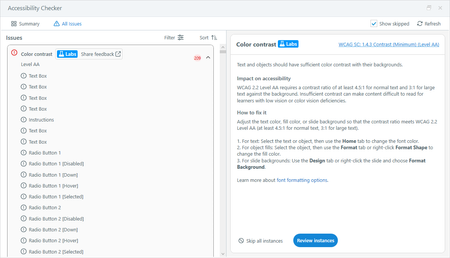
New in Labs: Color Contrast Check in the Accessibility Checker
This post was updated on June 23, 2026 to note the updates mentioned in this comment.
The color contrast check is still in development and will receive updates as part of Labs. Functionality will c...
- 3 months ago
Hey, everyone! We’ve made a few updates based on your feedback:
- A survey link is now available in the checker to make it easier to share your thoughts.
- There’s a new Highlight object option to help identify the affected object when multiple objects appear in the slide preview.
- You can now zoom in and out of the preview area for a closer look at contrast issues.
Let us know if you have any questions, and please keep the feedback coming!
ContentDev-a046
3 months agoCommunity Member
I am not seeing this feature in labs
- Ronnie_Pilman3 months agoStaff
Please make sure you're on the latest version of Storyline 360 (Ver. 3.119.37185.0), then follow the directions below.
- Go to the File or View tab and click Labs. Available experiments are listed alphabetically on this page.
- Select the toggle for an experiment, or use the toggle at the top to enable all experiments.
- Review the conditions in the Labs window, then click Save and Restart to enable the experiment.