Forum Discussion

New in Labs: Color Contrast Check in the Accessibility Checker
- 3 months ago
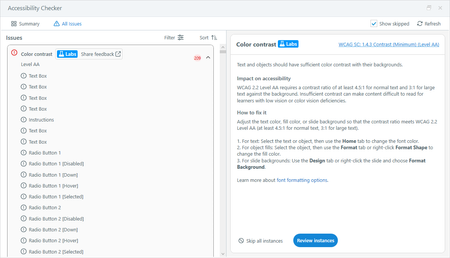
Hey, everyone! We’ve made a few updates based on your feedback:
- A survey link is now available in the checker to make it easier to share your thoughts.
- There’s a new Highlight object option to help identify the affected object when multiple objects appear in the slide preview.
- You can now zoom in and out of the preview area for a closer look at contrast issues.
Let us know if you have any questions, and please keep the feedback coming!

I don't see the survey link in the Accessibility Checker, could someone share a screenshot please? (I know I can also use the link above). I do have feedback that Colour contrast Level AA is being flagged for 'Bullet top'. This is where a text box appears to overlay a button, but they are in fact appearing at different points on the timeline and don't overlap at any point. There is a colour contrast issue, but should it be flagged where the two colours appear separately? Thanks.
Hi StefanPark - Please make sure you're on the latest version of Storyline 360, then you should be able to see the "Share feedback". Below is a screenshot I just took for you