Forum Discussion

New in Labs: Connected Packages
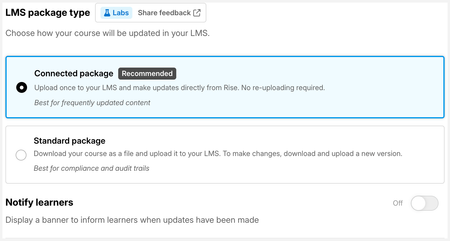

This feature is really exciting and everything runs smoothly. The only bug we’ve hit is that the Exit LMS button in the top‑right corner shows “object not found”. Wondering if there’s a way to resolve it.
- JenLynnRusso3 months agoCommunity Member
Hi ChristineT-gwx! We had a similar issue with the Exit button and I've reported the issue to Articulate. We're using Docebo and it'll show a 404 Not Found graphic for a split second and then return the user to the LMS. What LMS are you using?
- ChristineT-gwx3 months agoCommunity Member
@JenLynnRusso We’re on LearnWorlds. When we click to exit the course player, we get a black screen with “object not found” and no redirect.
- catganim3 months agoStaff
Hey ChristineT-gwx Thanks so much for sharing this! This is a known issue and we plan to fix this before we bring this feature to all users (and out of Labs).
- catganim1 month agoStaff
Following up on the "object not found" screen you were seeing when exiting in LearnWorlds: we've shipped a fix for the exit button. To pick it up, you'll need a fresh package:
- Make a small change to your course
- Click Update on the existing connected package
- Then Download Package again and re-upload it to your LMS
Could you give it a try and let us know whether the exit button works for you now?

Related Content
- 8 months ago
- 2 months ago