Forum Discussion

New in Labs: Connected Packages
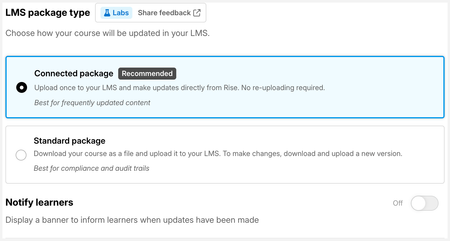
We're loving this feature so far and are really excited about the possibility to streamline workflows and make it less disruptive to learners when we update something. Updates have previously meant we have to wipe a learner's progress entirely to stop them getting stuck between SCORM files so this is a gamechanger for us.
The only bug we've found is that the fullscreen button in the native video player controls of a 'Video' block no longer works when a module is published as a connected package. It works perfectly when in preview in Rise but no longer does anything once published as a connected package.
- LucianaPiazza3 months agoStaff
Hello HollyC!
Thank you so much for sharing this! It's wonderful to hear that Connected Packages are already helping streamline your workflow and avoid disrupting learners when you need to make updates. That's exactly the kind of experience we're hoping to enable.
Regarding the fullscreen issue, thanks for pointing that out. One known limitation to be aware of is that the fullscreen button within Storyline blocks doesn't currently work in Connected Packages. We have this tracked internally and have a plan to repair it.
Everything else should function as expected, but since Connected Packages are still in Labs, if you notice anything else that doesn't seem right, please continue to share it here or reach out to our Support team. Feedback like yours is incredibly valuable as we continue to improve the experience!
- catganim1 month agoStaff
Sorry for the slow follow-up on the Video block fullscreen question. That one is fixed now. Packages downloaded before August 18 need a refresh to pick it up:
- Make a small change to your course
- Click Update on the existing connected package
- Then Download Package again and re-upload it to your LMS
(Fullscreen for Storyline blocks is a separate issue we're still working on, very close to a fix there too.) Could you give it a try and let us know if the Video block goes fullscreen now?
- catganim1 month agoStaff
One more update for you HollyC storyline blocks now also work in full screen mode in case that was also an area of concern for you.
Steps are the same:
- Make a small change to the course (adding a space is enough)
- Click Update on the existing connected package
- Click Download Package and re-upload the new file to the LMS


Related Content
- 8 months ago
- 2 months ago