Forum Discussion

New in Labs: Connected Packages
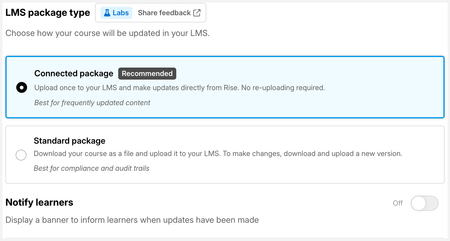
We're loving this feature so far and are really excited about the possibility to streamline workflows and make it less disruptive to learners when we update something. Updates have previously meant we have to wipe a learner's progress entirely to stop them getting stuck between SCORM files so this is a gamechanger for us.
The only bug we've found is that the fullscreen button in the native video player controls of a 'Video' block no longer works when a module is published as a connected package. It works perfectly when in preview in Rise but no longer does anything once published as a connected package.

One more update for you HollyC storyline blocks now also work in full screen mode in case that was also an area of concern for you.
Steps are the same:
- Make a small change to the course (adding a space is enough)
- Click Update on the existing connected package
- Click Download Package and re-upload the new file to the LMS
Related Content
- 7 months ago