Forum Discussion

New in Labs: Connected Packages
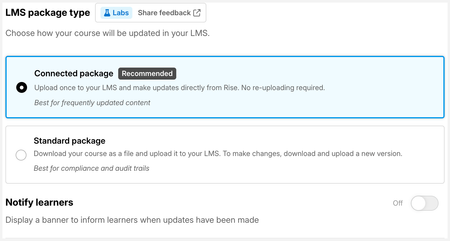
How can you see when updates are published so you can trace back which version the employee completed in case of auditing purposes?
- 42HAL9k14 days agoCommunity Member
Updates have snapshot timestamped versions and you can lock in a snapshot by renaming, delete other automated snapshots that aren't required, restore an old one if roll-back required to publish that to connected packages.
Under Publish > Share > Connected Packags, green circle caption "Up to date" indicates if the current version viewed matches the published item. In this screenshot example, there are some minor updates in the "Current Version" that have been published, different to the renamed version visible, so I need to create a snapshot and give the current version a published version number as this is what we've just communicated to stakeholder trial in the LMS.The "Published to LMS" snapshots are taking the complete course for version conrol in the document control management system, complete training course bill of materials disconnected from Rise.
Since the Connected Package is a launcher to the current version in Rise, the snapshots and LMS download are the means for independent version control process in our file repository workflow and the DCMS.
Another approach when major versions occur, is to make a copy of the course for the new major version. Connected package updates as long as minor revisions occur to the current major version.
Another small reason for taking a course copy for any published version is it removes all prior snapshots if that is preferred to archive the interim versions. It also clears the cache of "own sources" uploaded for AI generated media (beta).

Related Content
- 8 months ago
- 2 months ago