Forum Discussion

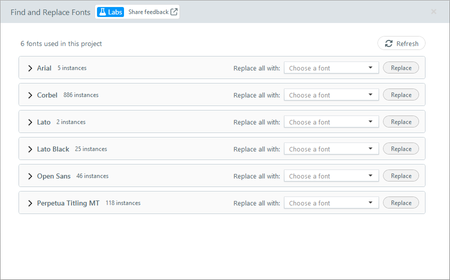
New in Labs in Storyline 360: Find and Replace Fonts
- 1 month ago
Hi, everyone. We made an update based on your feedback. You can now link existing fonts to your project’s Headings and Body theme font. When you update your theme fonts later, the linked text updates automatically. Let us know what you think!


Hi TreyMcNabb-f8db,
Thanks for reaching out!
The Find and Replace Fonts Labs feature is enabled from within Storyline. Go to the File or View tab, click Labs, and you'll see the available experiments listed alphabetically. From there, toggle Find and Replace Fonts on, then click Save and Restart to enable it.
If you don't see the experiment listed there, could you let us know which version of Storyline 360 you're using? That will help us determine what might be preventing it from appearing.

Thanks Eric - I'm on v3.119.37185.0. As a side note I just realized there's no way to copy that number. I had to do a screen grab to see it. 🤣
As you can see from my screenshot above, it's not listed.
- AnnieKim181 month agoStaff
Hi TreyMcNabb-f8db could you update and try again? You need to be on version v3.121 or later to see this feature listed in Storyline Labs.
- TreyMcNabb-f8db1 month agoCommunity Member
Thanks Annie. We've had some problems when it updates the Articulate 360 app, which mine is saying it needs before it can update Storyline. I'm going to have to hold off until the project I'm working on is loaded into our LMS, hopefully sometime next week. Then I know I'll have my tech team available if something goes sideways and I'll try it then. Either way, I'll update in here so you all know I got it. If it doesn't update correctly or doesn't show, I'll open a support ticket with Articulate. Thanks!

Related Content
- 9 years ago
- 9 years ago
- 4 months ago