Example

Gem Quest: teaching a 6-year-old to count in 2s, 5s and 10s
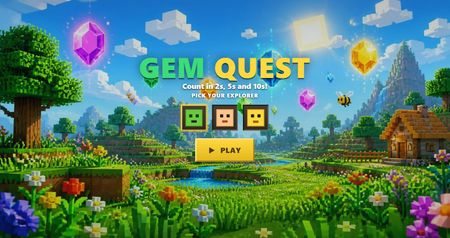

That's a good question... the 'using code blocks in Rise' part is the easy part, you only have 2 options, paste raw code or upload a project as a zip file if you want to bundle other dependencies (Images, audio, video)... The harder part is the coding. If you've never written code then using an LLM can help; but that often has it's own challenges and can be very frustrating when you get into a prompt marathon! Rise iframes also have some restrictions that can further frustrate. Not impossible to overcome but often very frustrating even when using the most proficient LLM's. Then baking in accessibility, mobile responsiveness etc etc... can be too much for some.
For this course and others I've shared I use my Rise Canvas app to build the framework of the slides (sections), then I use my own custom course builder to make the navigation & transitions work. I bundle everything in a zip file and upload as mentioned above.
Rise Canvas is not affiliated with Articulate® or Rise 360®.
Thanks so much for sharing! This week I added my first rise code block to a course I am working on but it was a VERY simple interaction- Just a question to reflect on and then a click and reveal answer. I would love to learn more about coding- and use more coding in eLearning.

Getting Started with the E-Learning Challenges
Find practical answers to common questions about the E-Learning Challenges, a weekly event that helps you build skills, create your portfolio, and grow as an e-learning professional.