ai
64 TopicsWhich Training Hero are you? Earn your badge!
Every Training Hero has a villain. Too many requests and too few hours? Training that vanishes into the void? Language barriers? A tangle of tools and file versions? Whatever’s standing between you and great training, there’s a hero for that, and a Nova superpower to match. 👉 Take the quiz to get tailored guidance and learn how to defeat your villain. 🦸 Then tell us in the comments: what’s your training hero archetype, and what’s one takeaway from your results? After you share, you’ll get a matching badge on your community profile. 🌟 📅 Want to see your villain defeated live? Join Alyssa Gomez on November 18 at 11 a.m. ET for a live build of real Nova-powered training content. You’ll see: Nova at work Real examples of how each archetype can defeat its villain A customized plan and small mission to try 👉 Register for the webinar Can't wait to hear about your results!515Views5likes55CommentsWhat Did You Try? Nova Tips for Every Training Hero Archetype
You met your hero. Now, what will you try? 🦸 Thanks for joining the live Nova build (or catching the replay). It's time to put your hero to work! ⭐ Reply below by the end of the day on December 7th to earn 20 bonus ELH Rewards points. ⭐ Not sure where to start? Review your hero's mission: 🧑💼 The Resourceful One: Turn rough notes into a course draft, then add an AI Avatar for the video you've been putting off. 🔍 The Detective: Pick a skill where completions look great but behavior doesn't. Add a 40-word model response as an avatar clip. 🌉 The Bridge Builder: Translate your highest-reach, English-only resource first. Compliance, safety, and onboarding are great starting points. 🎛️ The Orchestrator: Consolidate one multi-version course into a single package so you fix it once. 🧭 The Trailblazer: Run one small experiment with a clear learning goal, like showing both sides of a tough conversation. Show us what you tried Reply with: Your archetype What you tried (a screenshot, link, or short description is welcome) What happened, or one tip for others Haven't tried anything yet? Tell us what you're planning, or what's getting in your way. We'll help troubleshoot. New here? Take the quiz → to find your archetype. Want your matching profile badge? Share your hero in the Which Training Hero Are You? thread, too. We can't wait to see what you try! 🌟58Views1like0CommentsDoes AI work for you or do you work for AI?
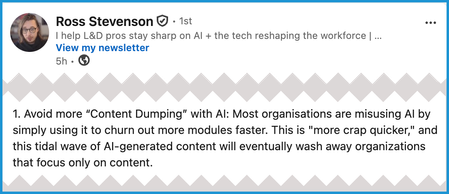
Are you a centaur or a reverse centaur? What does that mean? Here's how Cory Doctorow presents those terms in his book, "The Reverse Centaur's Guide to Life After AI": "[A] centaur is a person who is assisted by a machine... A reverse centaur is a human who is conscripted into acting as an assistant to a machine." As an example, think about Lucy & Ethel working at the chocolate factory. (Search for the video if you don't know what I'm referring to.) They're supposed to wrap each chocolate as it travels on a conveyer belt. But they can't control the speed and can't keep up. The result is hilarious in a situation comedy. It wouldn't be so funny in an actual work situation, though. Product quality would suffer, and so would the workers. Or consider this note by Ross Stevenson: (I recommend going to that LinkedIn post for his full list of takeaways from a conversation about how people learn.) So the real question is this: How can L&D pros use the new AI features in Articulate to create, review, and maintain meaningful and accurate "content" that helps improve job performance throughout their company? Of course, so many other questions have to be answered first. How big is the company? What tasks do people need to do? How often do processes/procedures change? What has to be done to ensure that materials are error free? What are the risks from errors and/or noncompliance? What's the budget? How much input does L&D have in the decision making anyway? And on and on... In other words, this discussion won't be marked as "solved." It's just here because I think there's a lot worth pondering—and this community is great at that. 😊 To paraphrase Hamlet: "No software is either good or bad, but the use case makes it so." P.S. For those who might be interested in Doctorow's book, here are more excerpts:253Views2likes4CommentsIntroducing SlideMind
Bonjour ! I wrote this text in French and used Deepl to help me translate it. I’m David, an instructional designer and multimedia specialist from Montreal. Although my profile looks new, I’ve been a member of the E-Learning Heroes community for over ten years. Until last spring, my account was tied to the institute where I worked all those years (in the health and legal fields). Since I’m still in e-learning, it only made sense to create a new profile of my own! Which brings me to a side project I’ve been building for over a year and a half now, one that I think might interest some of you. Most AI tools for e-learning focus on building the course for you. That’s not what interests me: I’d rather build my courses myself. Where I see untapped potential is in bringing AI into the learner experience. For that to work, several things are needed: Course context. What is the course about, which module is the learner in, and which slide are they on? Knowledge of the learner. Who are they, and what is their background? A defined type of response. Text feedback? A score? A multi-turn role-play conversation? Values written back into Storyline variables? A secure place for the API key. I learned this one the hard way! My initial need was simple: give learners personalized feedback on an open-ended answer, instead of the same generic feedback for everyone. I started with a long JavaScript snippet that called an LLM directly from Storyline, with the API key and the course context embedded in the slide. I quickly hit two walls. I quickly hit two walls. The first was security: the API key is exposed in the browser, and bots found mine within a few months, burning worth of 50$ before I realized my mistake. The second was maintenance: changing anything in the context meant republishing the whole course. So I moved everything server-side, into a plugin on the WordPress site that hosted our LMS. My API keys were now safe, and I could adjust the context of each course at a granular level without reopening Storyline. As a bonus, I could use learner info from the LMS and save learners’ answers and Storyline variables, then reuse them later as context. For example, what a learner writes on slide 3 can shape the feedback they get on slide 12. A video explains it better than I can: I then turned this into a public product, which I named SlideMind. In short, SlideMind sits between your course and the AI model: you set up the context and the type of response in a dashboard, and your course simply calls it. Since WordPress was too specific an environment, I rebuilt it as a standalone service that works with both SCORM and xAPI. I’ve tested it on different setups, and I have yet to find an LMS where it doesn’t work. After more than a year and a half of research and development, I use it daily in my own work: for feedback on open-ended answers, for role-play conversations, and for activities that remember what the learner said earlier in the course. I’m now confident enough in its features and its integration workflow to present it to you and invite you to try it. The quickest way to see what it does is the interactive demo: SlideMind Demo I’ve also started a series of tutorials for Storyline 360 (6 episodes so far, with more on the way). Each episode is 5 to 8 minutes long and shows one feature, with the steps to add it to your own courses. Everything shown in these tutorials is done with a free account. Curious to try it yourself? You can do so here. SlideMind isn’t limited to Storyline, either: it also works in Rise! A tutorial series on that is planned for December. Feel free to ask me any questions or share your comments! ---- A little more about me: I learned the basics of programming at a summer boot camp when I was 13, in the late 1990s, and I’ve kept honing those skills ever since without making it my profession. I earned a bachelor’s and a master’s degree in visual and media arts, with a specialization in education. I then worked for over a decade as an educational technologist at a health-related institute. There, I developed my Storyline skills and built the training portal from scratch, a portal that still reaches thousands of specialists every year. I now work primarily as a program manager for an AI research and training center. 85Views1like1Comment
Rise 360 AI Audio changing volume block to block
Two fixes that seem to work for me: Quickest: Edit AI Audio, advanced sound settings, change to V3, change stability to max, regenerate. Longest: Copy the script to another block with working loud volume, generate the audio there, insert it, duplicate block, convert content into correct block format, copy in content. Remove audio from block used and replace with correct text.29Views1like1CommentManaging sensitive data in Storyline simulations, including AI-assisted workflows
Our source systems may contain confidential information that can't appear in simulations. How are others handling this? Synthetic/test data before recording? Redaction or replacement after capture? Edited screenshots instead of recordings? AI-assisted redaction, data replacement, or generation of realistic synthetic data? We're looking for a workflow that balances security, realism, efficiency, and maintainability.64Views0likes1CommentI turned my course QA checklist into a free Claude skill. What would you add?
I started this checklist in my master's program, and most of it was accessibility. Over the years I kept adding the things I actually catch when I review a course: activities that don't match the stated outcomes, quiz feedback that only says "incorrect, try again," screenshots of a UI that changed two releases ago. The checklist worked great, but was manual. Recently I turned it into a Claude skill that checks 53 UX & LX criteria. You give it an exported course or a PowerPoint deck and it gives you back a checklist to validate, not a verdict. It answers what it can from the files and drafts an answer when it isn't sure. Anything it can't check, like keyboard navigation or how a screen reader sounds, it leaves open for you. Each finding gets a severity level based on how it affects the learner (blocked, inaccurate, adds effort, and so on), so you know what has to be fixed before launch and what can wait for the next revision. It runs in the Claude desktop app or claude.ai with code execution turned on, so you don't need to install anything technical. It's been tested on a Mindsmith.ai course export on a Windows machine. If it doesn't recognize your export, it'll tell you and ask before trying, and I'd ✨love ✨ to hear how it handles Rise, Storyline or anything else. It's free, and there's a sample report you can click through before trying it: https://chickadee368.github.io/learner-first-qa/ I'd really like to hear from people who QA courses for a living. What do you check that isn't on the list? And if you run it on one of your own exports, I'd love to know where it got things wrong! 🔗 to the overview: https://chickadee368.github.io/learner-first-qa/ 🔗 to the repo: https://github.com/chickadee368/learner-first-qa128Views1like5CommentsBest practices for maintaining a large library of Storyline system simulations
We’re exploring Storyline for building a library of software simulations, including processes that move between multiple systems that share data. For teams doing this at scale: How do you structure simulations for easier maintenance when applications change? Do you use screen recordings, screenshots, custom-built interactions, or a hybrid? What reusable templates/components have worked well? Are you using AI to identify UI changes, update simulations, or reduce maintenance effort? We’re particularly interested in approaches that remain manageable as the simulation library grows.31Views0likes0CommentsAI Tool for creating conversations
Hi everyone, I'm exploring the possibility of using text between 2 (or more) people to create an AI-generated audio conversation, in most cases between a CSR and customer. From my web search I see there's a utility called Musely that might work but my company's internet policies block me from seeing the page. So, I figured I'd poll this wonderful group of creators to see what they may know or could recommend. Thanks!74Views0likes1Comment