assets
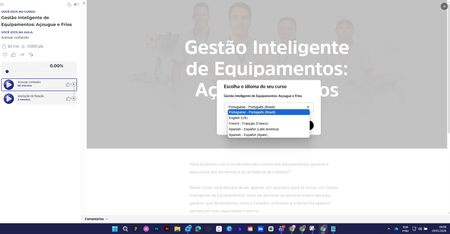
2 TopicsSwitching between languages in the LMS
Hi everyone, how are you? I used the "Localization" feature in a course. After making the content available, when selecting a language I can't revert to the original language. What am I doing wrong? Choice of language After this, it is no longer possible to change the language. Thank you in advance.794Views0likes7CommentsLocalization - Videos, Assets, Audio+
To set the stage, I created a Storyline course in English and localized it into Spanish. In this course, I have 4 external video files and an external podcast audio. The first video file I remade in Vyond in Spanish and when I uploaded it the Spanish version of the SL course, it replaced it in the original source (EN) file. How can I prevent this from happening? I imagine I will have the same issues with the other 3 video files as well. Additionally, I added an icon and a text box to the Spanish only version of the course and it carried back to the original source (EN) file. How can I prevent this from happening? I have a podcast audio file (external .wav) with 2 voices as part of this same course. Are there any tools you can recommend to have this localized into Spanish? Last, and a little bit of a different topic... The options for Mexican and Spain (formal/informal) Spanish are not appropriate for most US cities across the country. Can we add a request for Latin American Spanish to be added to the roadmap, as a priority?382Views0likes1Comment