build-a-thon
31 TopicsPaint by Num-Birds: Songbird Identification Tool
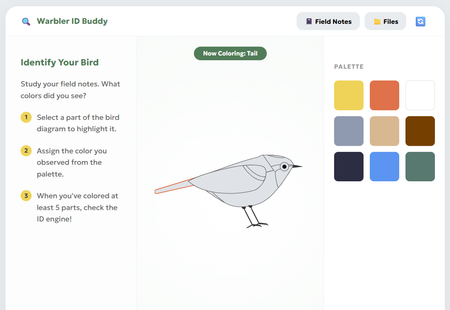
This interaction pushes learners to get curious and creative while identifying some of the most notoriously difficult bird species to spot - warblers! The paint-by-numbers interface paired learning materials (like snapshots, anatomy diagrams, and their own field notes) introduces learners to the fundamentals of bird identification, and allows them to explore this process of visually ID'ing a bird for themselves. Review Here: https://360.articulate.com/review/content/54d099bd-477a As a team with avid birdwatchers, trying to "onboard" people to the hobby always poses a classic blocker: "How do you tell the birds apart?" Though sound, habitat, and other factors play a role, visuals are the first pillar of identification that beginners start to familiarize themselves with. Using Rise's code block, we wanted to create a tool that went beyond flip cards, checklists, and other default interactions. Leveraging HTML/CSS, we created a workshop space that: Breaks down key features to note for ID'ing through an interactive diagram Offers as much or as little support they may need in the form of the snapshots, diagrams, and facts in the "Files" Provides a challenge to apply what they've learned by identifying the "Field Notes" recordings To build this block, we used a mix of vibe-coding and human code expertise! Once we had refined our idea on our own, Gemini was enlisted to help create the basic UI and functions. The functionality was refined and adjusted many times for user ease and clarity. Finally, we looped human experts back in to polish the code, refine the diagram, and squash any stubborn bugs. It was a whirlwind learning experience! Some takeaways: Having the AI refine snippets of the code ensured overall block integrity. We made the mistake at the start of having Gemini spit out a whole new HTML file to adjust minor pieces; we found it changed things that we hadn't asked it to, and actually got "lazy", condensing body text and dressing down UI elements increasingly with each iteration Knowing when to use AI, and when to call in a human expert was our superpower. Gemini deeply, SERIOUSLY struggled trying to create an SVG of a bird. So, we took the monstrosity it outputted and edited the code ourselves to create an image we were happy with! We also enlisted our senior developer to jump in and fix some serious coding errors that had made the block totally un-playable. Not all AI's are made equal: Canva's AI was very promising for vibe-coding at first, but Gemini ultimately became our tool of choice as it provided the most accurate and useful responses. We chose this activity because as bird lovers, we know that warblers in particular have such subtle differences - a black eye ring on one bird might make it a totally different species from the next! The ability to paint and visually describe these tiny differences seemed like the perfect learning opportunity for this challenge (and get our other coworkers on board with birding)! Let us know what you think! Were you able to paint a perfect match? Created by Aamir Aman, Tal Castillo, and Ryan Young.4.3KViews37likes15CommentsMeet Your Learner Persona
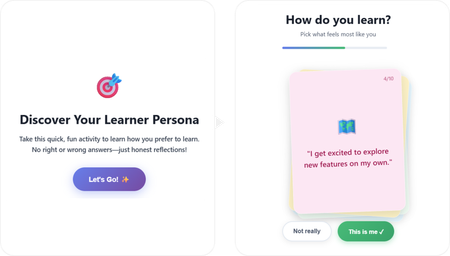
Hello there! 👋 Here's my project: A short, playful interaction that learners could experience at the beginning of a course, but not limited to that. I used both Lovable and ChatGPT as my buddies throughout this learning journey. The interactive code is embedded directly inside the course project. Check out the project here: Meet Your Learner Persona ✨The story behind As a newcomer to vibe coding, the experience was rewarding in the best possible way. I genuinely enjoyed every part of the process and learned a lot, especially about writing effective prompts, navigating code, and making small changes. I found a lot of inspiration by exploring visual and interaction design references on platforms like Dribbble, Figma, and Godly, which helped shape the experience's look and feel. Throughout the project, I experimented with both simple and more complex interactions. In the end, I found myself drawn to the simpler ones, those that quietly support the learning journey without adding unnecessary friction or contributing to cognitive overload. Try taking it to discover your type. 💻Here's also the prompt I used: Create a self-contained, embeddable HTML/CSS/JavaScript interactive learning game designed to be placed inside a Rise course code block. Concept: “Discover Your Learner Persona” – a playful, low-pressure personality-style interaction that helps learners reflect on how they prefer to learn. Experience goals: Fun, fast, and intuitive (2 minutes max) No right or wrong answers Feels like a game, not a test Encourages self-awareness and engagement at the beginning of a course Interaction design: Display one card at a time in the center of the screen Each card contains a short first-person statement describing a learning behavior Two buttons below each card: “This is me” “Not really” When the learner clicks “This is me”, assign 1 hidden point to a specific learner persona When “Not really” is clicked, move on without scoring After all cards are answered, calculate the dominant learner persona and display the result Learner personas (4 total): The Explorer – learns by experimenting, trying things out, discovering through action The Builder – learns best with structure, steps, and logical progression The Observer – prefers watching, reading, and understanding before acting The Connector – learns through discussion, stories, and social interaction Cards (8–10 total): Write short, relatable, first-person statements such as: “I like to jump in and try things out, even if I don’t fully understand yet.” “I feel more confident when learning follows clear steps.” “I prefer seeing examples before I start.” “Talking things through with others helps me learn.” Each card should clearly map to one persona behind the scenes, but never reveal scoring or categories to the learner. Result screen: Display the learner’s persona as a friendly title (e.g. “You are: The Explorer”) Include a short, encouraging description of what this persona means Add 2–3 practical tips on how this learner can approach the course effectively Include reassuring language that most people are a mix and there is no best persona Visual & UX style: Clean, modern, friendly Card-based layout with soft rounded corners Smooth transitions between cards Large, readable text Accessible contrast Neutral, welcoming color palette (colorful, but in light colors) Card layout and behavior: Display the cards as a stacked, slightly fanned card pile, inspired by a physical deck of cards. Cards should overlap each other diagonally, forming a small pile rather than a grid Only the top card is fully readable and interactive at any time The cards underneath should be partially visible, offset slightly in position and rotation Use subtle differences in rotation (e.g. -3°, +2°, -1°) to create a natural, tactile feel Each card should have rounded corners, a soft shadow, and a solid background color Interaction behavior: When a learner answers a card, animate it smoothly off the pile (slide or fade) The next card should move into the top position of the stack The pile should visually shrink as cards are completed Technical constraints: No external libraries or frameworks All HTML, CSS, and JavaScript in a single file Fully responsive (works well on desktop and mobile) Safe for embedding in Rise as a code block or zip package5KViews50likes14CommentsWizard Maze Game
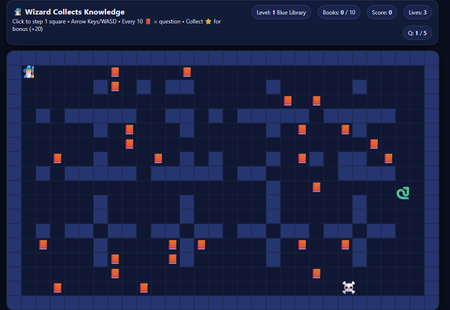
I've seen some people have been successful making 8 bit games while vibe coding so I wanted to give it a go! This was a fun one to build and adjust! I really wanted a character to go through a maze and try to collect the books. After 10 books, you answer a question and it continues through 3 levels of maze over 5 questions (if you get them right). Code Build-a-thon: Maze Game Knowledge Check | Review 360 I was inspired by the Hoppy Adventures Coin Capture Hoppy Adventures: Coin Capture | Articulate - Community. Kudos to desterly1kenobi! This build was a roller coaster. First, ChatGPT said I couldn't do it. Fought me. Once I found the Hoppy Adventures, I saw that it CAN be done! So, I started a new chat with ChatGPT and within one prompt, I got a game. I kept adjusting til I got everything I wanted in place. There's some minor tweaks I want to make but, I'm pretty happy with it and it's fun! I'll have to find a project to incorporate it in.715Views5likes2CommentsRisk Quest: Investigator Training
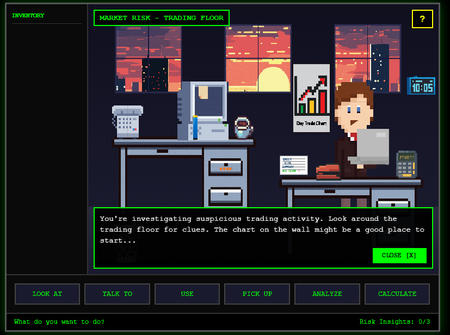
Code Block Experience Inspired by the old point-and-click adventure games, I wanted to build a simulation-style experience that lets learners have fun while actually practicing investigation skills. In this scenario, you step into the role of a newly assigned Risk Investigator trying to figure out why financial projections don’t match real-world returns. Projects like this usually don’t happen. Not because they aren’t valuable, but because they take time, money, and resources that most teams just don’t have. Fast builds are expected. Games are not. So instead of waiting for the perfect conditions, I used Rise Code Blocks, ChatGPT, stock images, and a lot of trial and error to build a playable proof of concept the team could realistically evaluate. The Risk Quest demo puts you directly in the investigation. You explore the environment, pick up and use objects, connect the dots, and report back what you’ve uncovered. If you’re not paying attention, you’ll miss things. That’s intentional. The project is broken into three parts: Risk Quest Demo Play the experience. Be the investigator. Figure out what’s going on. Risk Quest Evolution Walk through how the project evolved from v1 to the current POC. You can see what changed, what stuck, and what ideas didn’t survive contact with reality. Hidden Assets All of the graphics used in the experience and how they were stored and referenced directly in the Code Block as the look and feel evolved. And yes, this whole thing is heavily influenced by nostalgia. Did anyone else play these growing up? Zak McKracken and the Alien Mindbenders, Maniac Mansion, Sam and Max, Indiana Jones and the Fate of Atlantis, and my personal favorite, Monkey Island as Guybrush Threepwood. 😁 Take a look, share feedback, swap a memory or two, and enjoy.591Views11likes3CommentsUsing Time with Intention
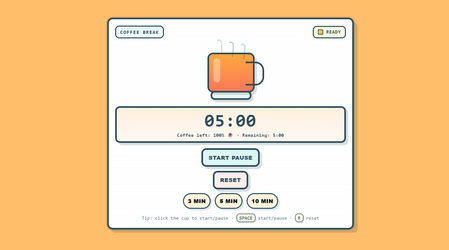
I built a small interactive sequence in Rise to explore time awareness and time management, combining several HTML embeds into a single, cohesive experience. The flow is simple but intentional: First, a timer to build awareness of time passing. Then, a 40-hour work week pie chart, where learners reflect on how their time is currently distributed. Finally, a playful 8-bit coffee break, where the cup slowly empties and ends with a small “Break well taken” badge. All interactions are built with lightweight HTML/CSS/JS, with support from ChatGPT. Prompt The first prompt I used was: I want to create a graphic where users can select how they spend their work time. For now, I have these options, but I’d like to adapt them for someone working in a corporate environment, such as an instructional designer or project manager (e.g. meetings, emails, networking, developing workshop materials, workshop facilitation). I’d like to introduce some kind of HTML-based interaction that allows users to select how they spend their time and then visualise it in a pie chart. From there, the interaction evolved iteratively — refining the structure, adjusting fonts and colours, and improving the overall experience. Idea The original idea for the course was inspired by a real Rise course template: Time Management Essentials. I took the introductory concept and the idea behind the “How I Spend My Time” graphic as a starting point. We often rush through many different tasks during the week, and having tools that allow us to pause and analyse how we use our time can help trigger meaningful reflection. 🚀Course link Hope you all like it — happy to hear your thoughts! 😊473Views10likes1CommentAustralian Sign Language
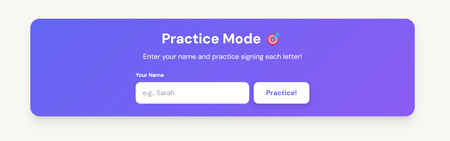
Here is my submission for Code Block Build a Thon: https://share.articulate.com/WVWze6SsoA46ThiJICpPM Learning Australian Sign Language, the fun way with Articulate Rise. Some challenges I faced were: Attaching image to each letter in the code: I found a URL for each sign on a website and shared it against each alphabet in my prompt. Adding movements: Had a few versions in getting the movements right and fun. I also added a prompt to avoid duplicating a sign if a name has double letters. Example - Anna will only see images A and N to sign.635Views6likes5CommentsHandy Templates! – Three Reusable Rise Code Blocks for Everyday Problems
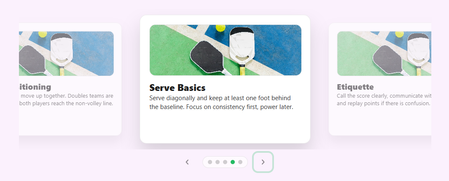
For this Build-a-Thon, I decided to submit a small collection of reusable Rise Code Block templates rather than a single standalone interaction. The idea behind Handy Templates! is simple: When working in Rise, there are a few patterns we reach for again and again, but they are either not available natively or require workarounds that compromise usability, accessibility, or visual consistency (I know you know a few...) This submission brings together three practical, “use-them-tomorrow” templates that are designed to feel native to Rise while extending what is possible with Code Blocks: Floating Text Cards Carousel MCQ with No Right or Wrong Answers + Side Image Likert Scale (Click-to-Reveal Reflection) Each block is fully reusable, configurable, and intentionally designed around real instructional use cases rather than novelty. Detailed descriptions and the codes for each block are included directly in this Rise review link: https://360.articulate.com/review/content/d4be7478-bd5a-49bd-a972-642ddc47c43b/review If any of these solve a problem you have worked around before, feel free to copy, adapt, and make them your own. That was the goal!!!1.5KViews13likes7CommentsCheese Party
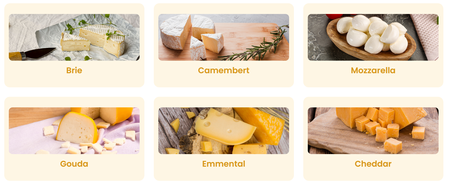
Hi everyone! I tried creating a full mini-course and made the most of different ways to use the code block. The course itself is more entertainment-oriented: I didn’t focus much on the content and instead concentrated on exploring the capabilities of the blocks. As a result, the only standard blocks used in this mini-course are images, text paragraphs, and navigation buttons. I don’t know how to code at all, so I actively used ChatGPT, which helped me bring my ideas to life. I was really inspired by examples from Stephanie’s List and Shannon’s List. Huge thanks for sharing them! Since I’m not familiar with coding, my first question was: what is actually possible? It had never even crossed my mind to create something like this. These examples were incredibly helpful — I tried recreating some of them and adapting them to my course, and also added a few ideas of my own along the way. I took away a few useful insights and ideas for the future: Learn the basics of writing code. I didn’t have much time to dive deep into the topic, but I figured out how to change colors and font styles on my own (pretty proud of that 😂). I found a lot of inspiration in web design examples available online. Many of them can be adapted to fit your own ideas. I truly enjoyed the process. Being able to bring even the craziest ideas to life is pure childlike joy when things finally work. Thank you all!708Views4likes7CommentsValentine's Express: The Romance Master Class
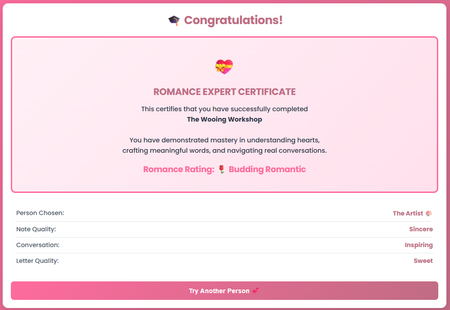
It's February, the month of love. And I bet you're wondering: how do I express my feelings authentically? How do I say what matters most in a way that truly lands? So I built something for that. This is my entry for the Code Block Build-a-thon! Valentine's Express is an interactive experience where users navigate through personality-based scenarios and craft handwritten notes and love letters. They choose a personality type (The Dreamer, The Artist, The Intellect, The Adventurer, or The Kindred Spirit), then receive personalized feedback as they write. This is my first time building with code blocks in Rise, and I'm blown away by what's possible. The interactivity, the personalization, the ability to create something that feels truly custom, all within a code block. What's Inside 5 unique personality profiles with custom feedback Interactive note and letter writing with real-time scoring localStorage integration for seamless progression across 4 code blocks Automated Romance Expert certificate upon completion Why I'm Sharing This I'm uploading the code so you can try it, remix it, and explore what's possible. Whether you build something romantic, playful, or educational, the interaction patterns here can work for any content. Ready to express your heart? Check it out here and let me know what you think! 💕634Views4likes5CommentsAccessibility Reality Checker (3 - minute Simulator)
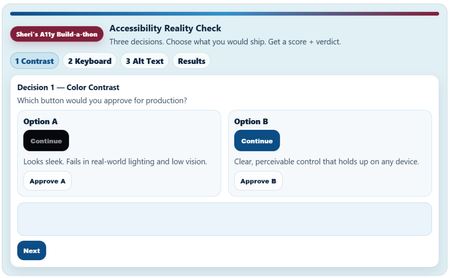
Link to Rise Course (Quick Share) Accessibility Reality Checker Copy /Paste Link: https://share.articulate.com/kdeNT__CFskcknh1QTeIp Project overview I created this project because most accessibility training fails in a predictable way. It explains rules, but it doesn’t change decisions. Teams ship inaccessible experiences because the tradeoffs are invisible in the moment. I worked to build something that puts some of those tradeoffs out into the open. Instead of building a tutorial, I built a short decision simulator: three common, high-impact accessibility choices (contrast, keyboard navigation, and alt text). I framed each choice under the question “Which would you ship?” The simulator allows the review to choose and get immediate consequences, then see an “accessibility” score. I made the simulator small, fast, and opinionated because that is how product decisions and learning content approval happens in the real world. This is not and was not intended to be a comprehensive accessibility course. It’s a pressure test for everyday judgment. Prompts and constraints The Build-a-thon prompt was to explore what the Rise Code Block can really do. My personal guide was: “Can I build something that feels like a real product review decision instead of another accessibility checklist?” My constraint and format drivers were: No long explanations up front No hidden scoring Do not pretend or ignore nuances The review must make a decision and live with the result Tools and implementation Built entirely in Articulate Rise 360’s Code Block Plain HTML, CSS, and JavaScript only Custom UI, state management, scoring logic, step flow, results meter, and share text are all handled in the Code Block Intentionally used: Semantic HTML Keyboard-operable controls Visible focus states High-contrast color choices The experience itself is designed to model the behaviors it’s teaching. The experience had to go beyond just talk about the experiences. What I learned I need to spend a lot more time upskilling on HMTL and JavaScript. Vibe Coding can be fun. Rise’s Code Block is capable of much richer, multi-step interactions than I use it for. Using the Code Block require you to be disciplined about structure, focus management, and state. Small UX decisions (focus order, feedback timing, contrast, visual hierarchy) have a big impact on whether a user experience feels accessible, useable, or sloppy. Accessibility cannot be taught in 5 minutes, but a quick accessibility review can expose bad decisions and highlight options for better user experiences instincts This type of tool/ format is good for awareness, decision calibration, but not for deep technical training. I like to call this a “feature” of the simulator not a bug. I acknowledge simulator has some real limitation for real work use in it’s current state.3.2KViews30likes11Comments