code block
3 TopicsThink About It!! Quiz, with Quiz Builder
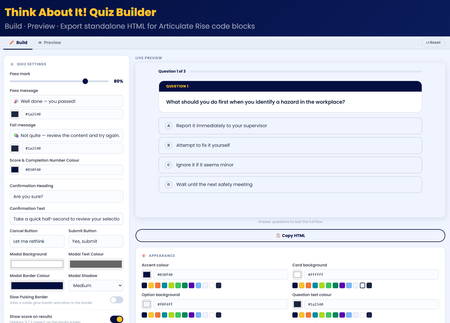
💡My take on the challenge: I looked at this from a slightly different perspective. Building a quiz is easy! so I wanted to create something useful for the entire community. I didn't just create a quiz, I built an app right inside Rise that allows users to craft, preview, and export their own high-impact, standalone quiz right inside Rise for use in their own courses. Everything in the quiz is customisable! Use it along with the native rise style and format block controls to create something amazing! 🖥️ The tech bit! The tool is a dynamic, client-side web application built using HTML, CSS, and Vanilla JavaScript. It allows you to build, configure, and export self-contained, interactive quiz blocks engineered specifically for code block iframe integration within Rise. 🔎LMS/Rise Compatibility & Performance The exported codebase is mathematically pure Vanilla JavaScript (ES5 standard for runtime compatibility). I hope you enjoy it 😊 Think About It!! Quiz With Quiz BuilderAre You Sure? Turning a Confirmation Prompt Into a Checkpoint 🛑
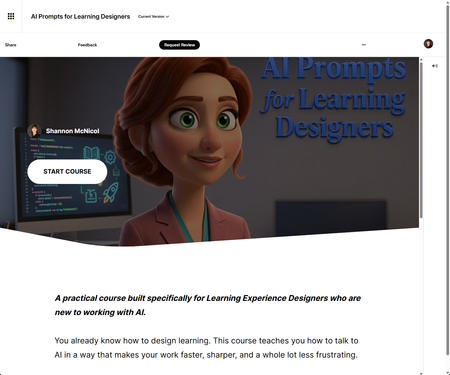
We've all done it. You're halfway through a required course, your inbox is screaming, and you click the first answer that looks right just to keep moving. So when this week's challenge landed on confirmation prompts that little "Are you sure?" pause before you submit I knew exactly the moment I wanted to design for. But I didn't want to bolt a generic pop-up onto a quiz. I wanted the pause to actually do something. The idea id💡 I built this as a Checkpoint inside my course AI Prompts for Learning Experience Designers and here's the part I had a little too much fun with: it's a course about prompting, and the checkpoint itself models the single most important prompting habit there is. Don't fire off the first thing that comes to mind. Pause. Reread. Reconsider. Then commit. The interaction drops the learner into four real-world scenarios, one drawn from each module of the course writing intro copy under a deadline, drafting measurable objectives, iterating on a draft that's almost right, raising the ceiling on generic questions. They pick an answer. And then, before anything locks in, the pause hits. What makes the pause smart ⏸️ This is the bit I'm proudest of. Instead of the same flat "Are you sure?" for every option, the confirmation reacts to the exact answer you picked. Choose the vague prompt and it nudges you: "Three words, zero context — you'll spend the time you saved rewriting the output. Sure?" Choose the strong one and it affirms your thinking instead. It reads like a prompt coach leaning over your shoulder never giving away the answer, just helping you check your own work. Then at the end, a little tally shows what the pause actually did: how many times reconsidering rescued a wrong answer, and how many times it talked you out of a right one. Turns out the value of slowing down is surprisingly easy to measure. 😄 A couple of build notes 🗒️ Placement matters. The Checkpoint sits before the hands-on Practice Lab on purpose recognition first (spot the better prompt), then production (write your own). Nice little scaffolding ramp. All Rise 360 Code Block, and entirely transform-free the gradient hero, the twinkling tokens, the glowing progress bar, the staggered fade-ins, and the count-up score are all pure opacity, shadow, and gradient. Keeps it rock-solid inside Rise's iframe. Matched to my course palette so it feels native, not bolted on. And yes — I built this side by side with Claude as my co-creative partner. The taste and the instructional intent are mine; the AI just helped me get there faster and iterate without losing my mind. Which, fittingly, is exactly what the course is about. 🙂 The real lesson of a good confirmation prompt isn't "gotcha." It's "hey — you've got this, just take half a second to be sure." That's the kind of friction I'm always happy to design in. Would love to hear how you'd use a pause like this in your own work. 👇 AI Prompts for Learning Designers“Are You Sure?” in E-Learning #555
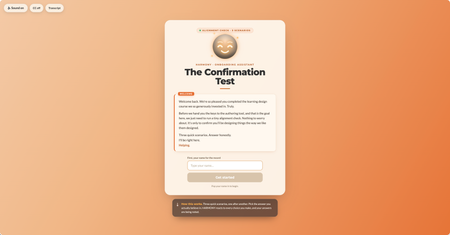
This week I wanted to lean into the spirit of the confirmation prompt, that moment of pause, of reconsideration, and ask: what if that pause wasn't entirely on your side? The scenario: you're an internal team member who's just come back from a learning design course. You have the master learning design authoring tool. Before you're allowed near the authoring tool, the org's AI guide HARMONY needs to run a quick "Confirmation Test." Three scenarios. Shouldn't take long. HARMONY is very helpful. The "Are you sure?" mechanic does something a little different here. I'll leave it at that. 🙂 A few craft notes for anyone interested in the build: The confirmation prompt UX is deliberately asymmetric; the buttons don't behave the same way depending on which answer you're leaning toward HARMONY has two states that shift based on your choices throughout Three different endings based on your answer tally The fake "analysis" stage has a silent jury. You'll see. I have a lot of fun with Claude Design, Code and all things Claude Would love to know which ending you hit, and whether any of the scenarios felt a little too close to home. 👀 Are you a conformist or a rebel? Find out here Confirmation Test Thanks to DavidAnderson and the Articulate 360 Account Management team for the prompt; this one was a lot of fun. #ElearningChallenge