graphics
41 TopicsID Toolbox
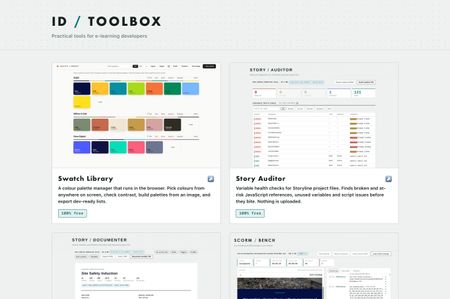
Practical tools for e-learning developers… Over the past several months I've built a set of browser tools for the bits of Storyline and Rise that used to cost me hours. Eleven of them, all completely free, no signup, no accounts, nothing to install. They run entirely in your browser. Nothing is uploaded anywhere, which for me was the whole point, I wasn't keen on posting client content to a website just to check something… ID Toolbox238Views10likes3CommentsDesigning Immersive Phone Conversations in Storyline
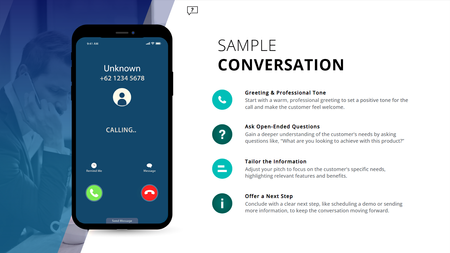
Ever have two characters talk in a training module, but it still feels flat; even with speech bubbles, audio, and triggers? This (FREE) Storyline phone conversation template changes that. Whether you're designing for sales, compliance, healthcare, or support, it creates real, layered convos that feel like you're eavesdropping on a call. Animated phone effects Realistic voiceover dialogue Transparent APNG waveforms (way better than GIFs!) Custom triggers for pick-up/end call Clean, modern layout with animated text Watch how it works: https://www.youtube.com/watch?v=kMpUcYJRNnE Preview the demo: https://www.redesignedminds.com/Discuss/story.html Download it free: https://drive.google.com/file/d/19AvmE7q3PAUbXoNKIViQtPNqCwUoFDQW/view?usp=sharing If your training includes a conversation, this is how you bring it to life.1.4KViews10likes14CommentsGraphic Design Resources
I've been in ID for years now but was never formally trained - just figured it out as I went. Other companies I worked for didn't have the budget for certification and neither did I. I'm confident in my ability to create clear, engaging content. What I'm less confident in is my ability to "make it pretty." I rely heavily on the available formats and templates, which isn't a bad thing, but I want to grow beyond that. How does someone decide on a splash of color here, a swoop there, creative transitions or animations? I'd appreciate any tips, tricks, resources for improving my graphic design skills in course creation, because I feel a bit stuck at the moment.992Views4likes10CommentsAnimating Engaging Quiz Questions in Storyline
A cool way to turn your standard Storyline quizzes into interactive, engaging, and immersive learning experiences. Watch "how to" tutorial here: https://www.youtube.com/watch?v=4wB1_HWTZeU Preview slide here: https://craftuxd.tech/Submit/story.html Preview animations here: https://craftuxd.tech/Submit.gif165Views3likes0CommentsFun Animated Timer for Gamification Projects
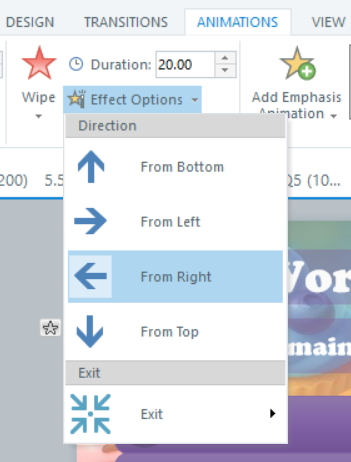
Hi Articulate heroes, I wanted to highlight one very fast but fun-looking way to create timers for interactive projects. I've learned about this way from "Gamification Series; 05: Creating Tension with Timers." You can check out these amazing webinars Gamification series, and there was a few different ways to add timers to projects. I used it in my recent project "Cooking Frienzy" - Jeopardy-style cooking-game. (btw you can check out the full game: Cooking Frienzy So, here are the steps: 1) Create / find a "timer" picture - it could be any image with transparent background what works for your theme (in my case it is "Pomodoro" timer, made with AI help, saved as .png ) 2) Add this image as a picture (insert an image). 3) Go to Animation tab 4) Choose Exit Animation - "Wipe", go to "Effect Options" - "From Right". Set the animation timer for whatever time you need (10 sec., 30 sec., 1 min etc.) 5) Set triggers to what will happen after the timer is done (animation completed): i.e. jump to the next slide, show "result-fail" etc. 6) Preview and adjust if needed 🤞419Views3likes5CommentsCharacter Expression/Pose Series Using Photo Characters?
I have a common problem in many of my e-learning projects. I want to have a photographic character, say a man at a desk on the phone, looking happy. I then want a version of him with an angry expression. I then want a version of him with an exhausted expression. I want to choose the age, race, etc. In addition, I want to be able to easily change the background, etc. Trying to find this kind of a character series has been difficult. I have resorted to finding stock video and then grabbing frames out of the video that represent the expressions. But I cannot adjust the backgrounds very easily. Does anyone know of an AI tool where you can create a photographic character, and then show the character in multiple poses/expressions/etc. Thanks for any advice!414Views3likes8CommentsA Way to Organize Color Swatches
I'm a big fan of organization and efficiency when it comes to production eLearning development. One of the biggest challenges is keeping track of hexadecimal colors that I use on a daily basis. I used to use Adobe Kuler, which was a fantastic way to explore color combinations and a swatch panel that I used to organize all the colors I used for various projects. Well, they've recently changed to Adobe Color and have basically ruined what wasn't broken and now its requires Adobe Express in order to edit and save color palettes, so I started researching other options. Frustratingly, nearly all the options I found required a subscription. What I ended up doing is create an html document that I keep on my desktop and it's been absolutely wonderful and I wanted to share with this community as I have received so much help and assistance from this amazing, creative community of professionals. Open and edit the html document with Text Edit, or Notepad and you'll see the section where you can add your own color swatches, or update what's there. You can name them whatever you want and add in the hexadecimal color code. When you open the document in a web browser, you simply click on the color you want to use and it copies the hexadecimal code to your clipboard. My next push will be to create another one that is all pastel color combinations. This has ended up being one of my favorite new resources and best of all it's free and super easy to customize. Enjoy and continued success!Solved148Views2likes5CommentsPowerPoint Meets AI: Testing 5 Motion Models
When it comes to adding AI motion, many designers bounce from one model to the next, often frustrated by strange results. Some eLearning apps don’t give the motion we want natively, and others take too long to configure, making it hard to know where to start. So, I tested 5 AI models on the same slide with the same prompt to see how each performed. The results were surprising: one nailed the physics, another went off into odd morphs, and a few missed the mark entirely. The lesson? Every model has strengths, but the right fit depends on your design goals and willingness to experiment. Watch the full tutorial: https://youtu.be/Udtg1X81mow Download the AI Models for Motion – Comparisons chart: [AI Models for Motion - Comparisons.pdf - Google Drive]168Views2likes2CommentsReimagining Navigation Intros with 3D Motion
There’s more than one way to begin an eLearning course; and sometimes, sometimes the best way isn’t with text content, but with atmosphere. I’ve always been inspired by how airline safety videos set the tone before a flight begins. They take a routine moment and turn it into something memorable through motion, storytelling, and design. In this short navigation intro, I demo how to bring that same prelaunch energy into your course. With 3D motion and audio cues, you can instantly draw your learners in, before a single concept is even introduced. Navigation Intro: https://craftuxd.tech/Audio/story.html I designed this to spark engagement, proof that learning experience design gets fun when you experiment with 3D, soundscapes, animation, and visual storytelling. Here’s a quick tutorial: https://www.youtube.com/watch?v=62MRlM1iz0M202Views2likes2CommentsHow to Build a Rotating Video Carousel in Articulate Storyline
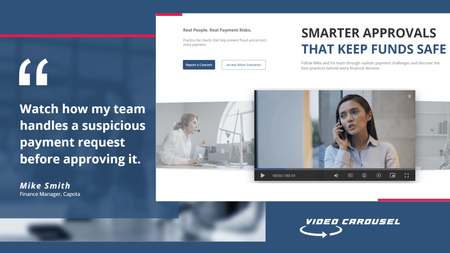
2 min read Three videos. Click a side tile and the whole set glides across, the outer tiles scaling and blurring back into depth. It loops in both directions and never dead-ends. Try the live demo first. Then here is how it goes together. The videos stay in Storyline They sit on three slide layers, Vid01, Vid02 and Vid03, as ordinary Storyline video. That matters. You keep your seekbar, your accessibility settings and your normal publish pipeline. Swapping in your own footage is just right click, Change Media. The carousel is a web object A small folder of HTML, CSS and JavaScript sits on top and draws the three tiles. The front tile lines up exactly behind the real video, so what learners click is Storyline, not a picture of Storyline. The look and motion live in one file Open config.js in Notepad. Tile size, swing distance, tilt, blur, fade, speed, play button colour and background are each one line with a plain-English comment. Change a number, save. There is no code to write. The folder rule nobody expects This is the step that may trip up almost everyone. Storyline copies the web object folder when you insert it, so pointing it back at the same folder shows you the old version no matter how many times you save. Rename the folder, repoint the web object at the new name, then publish. Why it looks blank in Preview Web objects do not render in Storyline Preview. You have to publish to see the carousel run. This is normal Storyline behaviour and nothing is broken. See it running Open the live carousel demo and click the side tiles to feel how the motion reads. Watch the full tutorial on YouTube for the complete build.66Views1like2Comments