graphics
41 TopicsDesigning Immersive Phone Conversations in Storyline
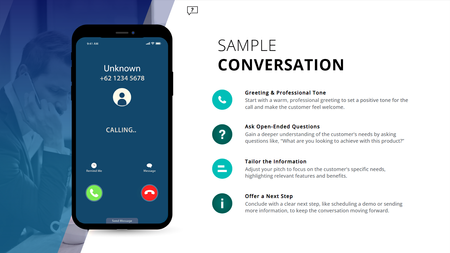
Ever have two characters talk in a training module, but it still feels flat; even with speech bubbles, audio, and triggers? This (FREE) Storyline phone conversation template changes that. Whether you're designing for sales, compliance, healthcare, or support, it creates real, layered convos that feel like you're eavesdropping on a call. Animated phone effects Realistic voiceover dialogue Transparent APNG waveforms (way better than GIFs!) Custom triggers for pick-up/end call Clean, modern layout with animated text Watch how it works: https://www.youtube.com/watch?v=kMpUcYJRNnE Preview the demo: https://www.redesignedminds.com/Discuss/story.html Download it free: https://drive.google.com/file/d/19AvmE7q3PAUbXoNKIViQtPNqCwUoFDQW/view?usp=sharing If your training includes a conversation, this is how you bring it to life.1.4KViews10likes14CommentsGraphic Design Resources
I've been in ID for years now but was never formally trained - just figured it out as I went. Other companies I worked for didn't have the budget for certification and neither did I. I'm confident in my ability to create clear, engaging content. What I'm less confident in is my ability to "make it pretty." I rely heavily on the available formats and templates, which isn't a bad thing, but I want to grow beyond that. How does someone decide on a splash of color here, a swoop there, creative transitions or animations? I'd appreciate any tips, tricks, resources for improving my graphic design skills in course creation, because I feel a bit stuck at the moment.899Views4likes10CommentsCourse Design Best Practices
Hello everyone...a few months ago, our Senior eLearning Instructional Designer retired and I've inherited a catalog of eLearning courses that were authored in Storyline 2. I'm working on updating courses as needed and turning my attention to better processes and best practices for course design. One of the standards I'm examining is course navigation and baseline expectations for any given course with regard to seat time, whether it has audio, etc. Because the courses I'm updating and developing will be authored in the new versions of Storyline and Rise, there is also a learning curve for the organization on using these new player interfaces. I've seen a number of creative ways this has been done, but wanted to ask if there were any recommendations for things that have worked well for you. For things like orienting the learner to the player controls, fullscreen options, etc. do you recommend creating a Lightbox overlay for Storyline courses at the beginning? What about Rise courses? Do you include a block at the beginning, during the introduction that shows learners how to use the player, etc.? I appreciate any creative inspiration and recommendations! Added screenshots as examples. My apologies for not knowing the author of the first example. I grabbed a quick screenshot when I saw this in one of the community downloads as it was very close to what I'm wanting to do. The second is an example (from a recent video course I just finished) of similar information I'd like to include in eLearning courses.Solved799Views0likes3CommentsAI Talking Heads: Uncanny Valley Test
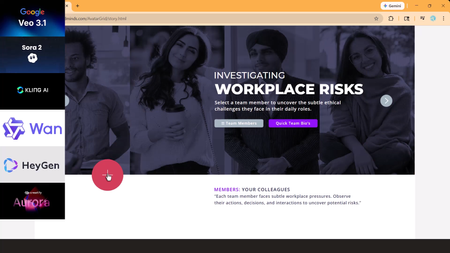
AI talking heads are everywhere, but most still fall straight into the Uncanny Valley. When lip-sync drifts or facial movements glitch, the learner stops focusing on the scenario and starts focusing on the AI mistake. I tested Veo 3.1, Kling 3.0, Creatify Aurora, Seedance 1.5, and HeyGen using the same image, script, and workplace scenario. One model clearly stood out as production-ready for realistic eLearning conversations. Watch the tutorial: https://www.youtube.com/watch?v=zroW6I7CGO0&t=317s Try the Storyline live demo: https://craftuxd.tech/AvatarGrid/story.html506Views0likes2CommentsFun Animated Timer for Gamification Projects
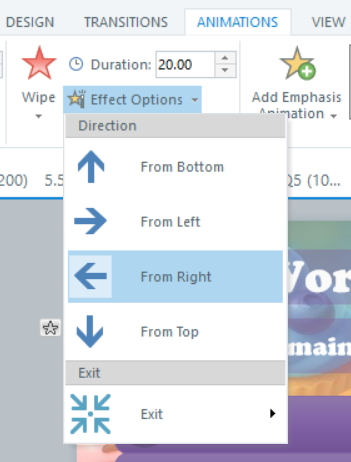
Hi Articulate heroes, I wanted to highlight one very fast but fun-looking way to create timers for interactive projects. I've learned about this way from "Gamification Series; 05: Creating Tension with Timers." You can check out these amazing webinars Gamification series, and there was a few different ways to add timers to projects. I used it in my recent project "Cooking Frienzy" - Jeopardy-style cooking-game. (btw you can check out the full game: Cooking Frienzy So, here are the steps: 1) Create / find a "timer" picture - it could be any image with transparent background what works for your theme (in my case it is "Pomodoro" timer, made with AI help, saved as .png ) 2) Add this image as a picture (insert an image). 3) Go to Animation tab 4) Choose Exit Animation - "Wipe", go to "Effect Options" - "From Right". Set the animation timer for whatever time you need (10 sec., 30 sec., 1 min etc.) 5) Set triggers to what will happen after the timer is done (animation completed): i.e. jump to the next slide, show "result-fail" etc. 6) Preview and adjust if needed 🤞400Views3likes5CommentsCharacter Expression/Pose Series Using Photo Characters?
I have a common problem in many of my e-learning projects. I want to have a photographic character, say a man at a desk on the phone, looking happy. I then want a version of him with an angry expression. I then want a version of him with an exhausted expression. I want to choose the age, race, etc. In addition, I want to be able to easily change the background, etc. Trying to find this kind of a character series has been difficult. I have resorted to finding stock video and then grabbing frames out of the video that represent the expressions. But I cannot adjust the backgrounds very easily. Does anyone know of an AI tool where you can create a photographic character, and then show the character in multiple poses/expressions/etc. Thanks for any advice!400Views3likes8CommentsHelp Needed: Magnifying Glass on 360 Images?
Hello, I am working on a project that requires magnifying a part of the 360 image when students hover over it. Similar to this one: Magnifier1.2, but with a 360 image rather than a flat image. Any ideas/suggestions? Thank you in advance! Tool: Storyline360345Views0likes2CommentsEMFs import differently
Hey y'all, So I like making my own icons/freeforms. I typically use Inkscape for the vector work. Storyline accepts SVGs, but I can't change the colors per project. Typically, I make an emf and ungroup it to turn it into a freeform. Unfortunately, I cannot get that behavior to play nicely from an emf made in Inkscape. Instead, I have to import the svg into PowerPoint, and then save it as an emf; then I can import the emf into Storyline and ungroup it. Can somebody clarify what is so different about the emf from Inkscape as opposed to the emf from PowerPoint? Is the issue with Inkscape's codec? Is the issue with Storyline's import process? I would offer to share my .emfs as an example, but its not a permissible file type. Thanks, Pierre302Views0likes1CommentImages in Shapes - Stretch Options
I'm trying to create a click and reveal interaction using custom shape buttons. I've created circles that I want to hold images representing a topic. However when I try to adjust the image using the Format Shape/Stretch Options instead of stretching the image it offsets it from the Shape Outline. Is this fixable? I know I can just create the image/shapes I want and then bring them into storyline but that becomes challenging when I start adding states.222Views0likes5CommentsID Toolbox
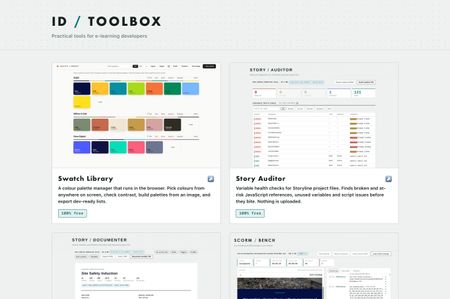
Practical tools for e-learning developers… Over the past several months I've built a set of browser tools for the bits of Storyline and Rise that used to cost me hours. Eleven of them, all completely free, no signup, no accounts, nothing to install. They run entirely in your browser. Nothing is uploaded anywhere, which for me was the whole point, I wasn't keen on posting client content to a website just to check something… ID Toolbox213Views10likes3Comments